En 76
Viewing the current status
■ Switching information on the front display
1
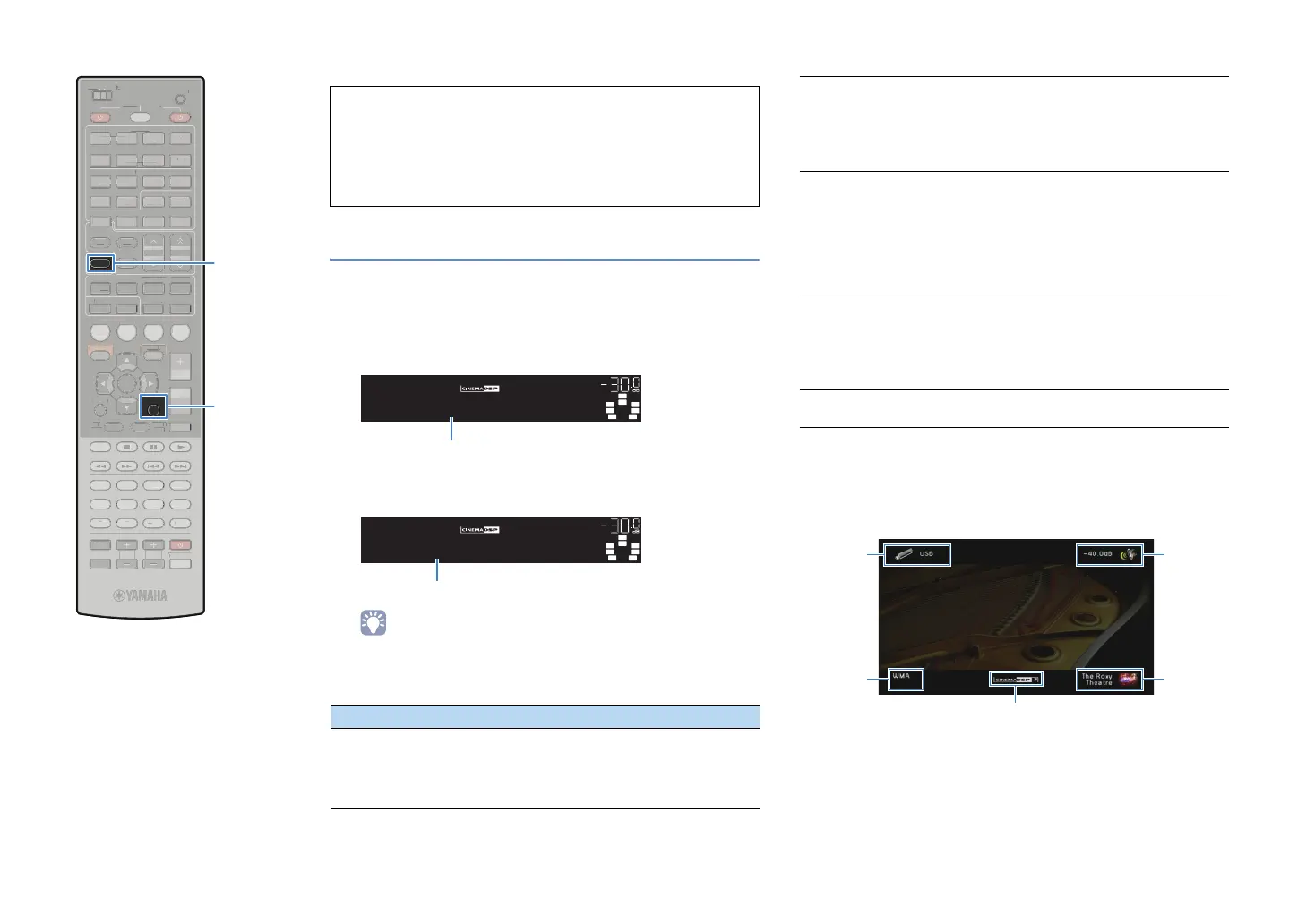
Press INFO.
Each time you press the key, the display item switches.
About 3 seconds later, the corresponding information
appears.
• Available items vary depending on the selected input source. Also, the
display item can be applied separately to each input source group.
■ Viewing the status information on the TV
1
Press DISPLAY.
The following information is displayed on the TV.
2
To close the information display, press DISPLAY.
Note
• Do not operate this unit during the recovery process (restoring the settings).
Otherwise, the settings may not be restored correctly. When the recovery
finishes, click “OK” to set this unit to standby mode.
• The backup does not contain user information (user account, password, etc.)
or unit-specific information (MAC address, IP address, etc).
Input source group Item
HDMI1~7
V-AUX
AV1~6
AUDIO1~2
PHONO
Input (input source name), DSP Program (sound
mode name), Audio Decoder (decoder name)
VOL.
SW
C
LR
SL SR
SBL SBR
DSPProgram
INFO
Item name
VOL.
SW
C
LR
SL SR
SBL SBR
TheRoxytheat
HDMI1
Information
TUNER
Frequency (frequency), DSP Program (sound mode
name), Audio Decoder (decoder name)
* When tuning into a Radio Data System
broadcasting station, Radio Data System data is
also available (p.51).
DOCK
Song (song title), Artist (artist name), Album (album
name) , DSP Program (sound mode name), Audio
Decoder (decoder name)
* When using iPod wireless system, Bluetooth
receiver, or during simple play:
Input (input source name), DSP Program (sound
mode name), Audio Decoder (decoder name)
PC
USB
Song (song title), Artist (artist name), Album (album
name), DSP Program (sound mode name), Audio
Decoder (decoder name)
* When iPod is connected via USB, the display item
switches in the same manner as “DOCK”.
NET RADIO
Station (station name), DSP Program (sound mode
name), Audio Decoder (decoder name)
Input
source
Audio
format/
Decoder
Volume
Sound
mode
CINEMA DSP status
SCENE
RETURN
VOLUME
SUR. DECODE
STRAIGHT
ENHANCER
SLEEP PURE DIRECT
HDMI
AV
123
67
4
V-AUX
5
FM
INFO
MEMORY
AM
PRESET
PA RT Y
MOVIE MUSIC
BD
DV
D
TV
CD
RADIO
MUTE
ENTER
7856
90
10
1234
MODE
ENT
HDMI OUT
TV
TV VOL TV CH
TOP
MENU
POP-UP
MENU
DISPLAY
SOURCE
MAIN
ZONE 2
RECEIVER
CODE SET
INPUT
MUTE
DOCK
AUDIO
OPTION
ON SCREEN
5
1234
6
NET USBPHONO
TUNING
TUNER
EN
R. DE
D
TRAI
H
ENHAN
E
LEEP PURE DIRE
HDM
AV
1
4
-
MEM
R
PRE
ET
VIE M
I
D
D
ENTE
DE
N
HDMI
UT
V
V
P
P-
UR
ZONE
E
EIVE
DE
E
D
AU
PTI
N
REEN
NET
H
N
T
NIN
NE
INFO
DISPLAY


 To Next Page