En 68
• By adding your favorite Internet radio stations to “Bookmarks”, you can access to
them quickly from “Bookmarks”. To remove stations from “Bookmarks”, select the
station in “Bookmarks” and then “Bookmark Off”.
• You can also register your favorite Internet radio stations by accessing the
following website with the web browser on your PC. To use this feature, you need
the vTuner ID of this unit and your e-mail address to create your personal account.
You can check the vTunerID (MAC address of this unit) in the “Network” screen
(p.102) in the “Information” menu.
http://yradio.vtuner.com/
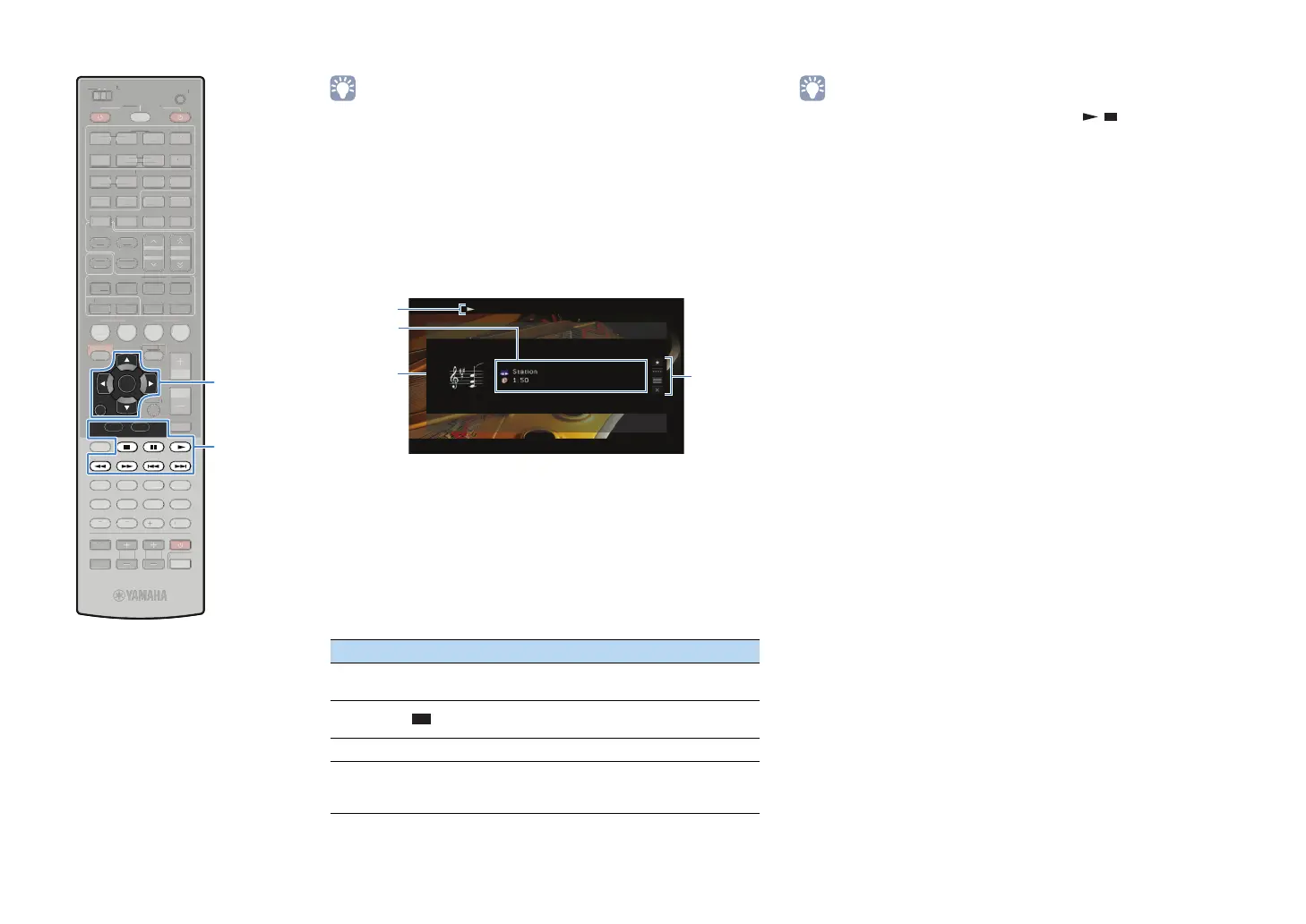
■ Playback screen
1 Playback indicators
2 Playback information
Displays the station name and elapsed time.
3 Station art
4 Operation menu
Use the cursor keys to select an item and press ENTER to confirm the
selection.
To close the submenu, press RETURN.
• You can also use the external device operation keys ( , ) on the remote
control to control playback.
Menu Submenu Function
Bookmark
On
Adds the current station to “Bookmarks”.
Play
Control
Stops playback.
Browse Moves to the browse screen.
Screen Off
Closes the screen display and shows the
background. Press one of the menu operation
keys to redisplay it.
4
3
2
1
SCENE
RETURN
VOLUME
SUR. DECODE
STRAIGHT
ENHANCER
SLEEP PURE DIRECT
HDMI
AV
123
67
4
V-AUX
5
FM
INFO
MEMORY
AM
PRESET
PA RT Y
MOVIE MUSIC
BD
DV
D
TV
CD
RADIO
MUTE
ENTER
7856
90
10
1234
MODE
ENT
HDMI OUT
TV
TV VOL TV CH
TOP
MENU
POP-UP
MENU
DISPLAY
SOURCE
MAIN
ZONE 2
RECEIVER
CODE SET
INPUT
MUTE
DOCK
AUDIO
OPTION
ON SCREEN
5
1234
6
NET USBPHONO
TUNING
TUNER
EN
R. DE
D
TRAI
H
ENHAN
E
LEEP PURE DIRE
HDM
AV
1
4
-
INF
MEM
R
PRE
ET
VIE M
I
D
D
DE
N
HDMI
UT
V
V
UR
ZONE
E
EIVE
DE
E
D
AU
PTI
N
REEN
NET
H
N
T
NIN
NE
ENTER
RETURN
Menu operation keys
Cursor keys
External device
operation keys


 To Next Page