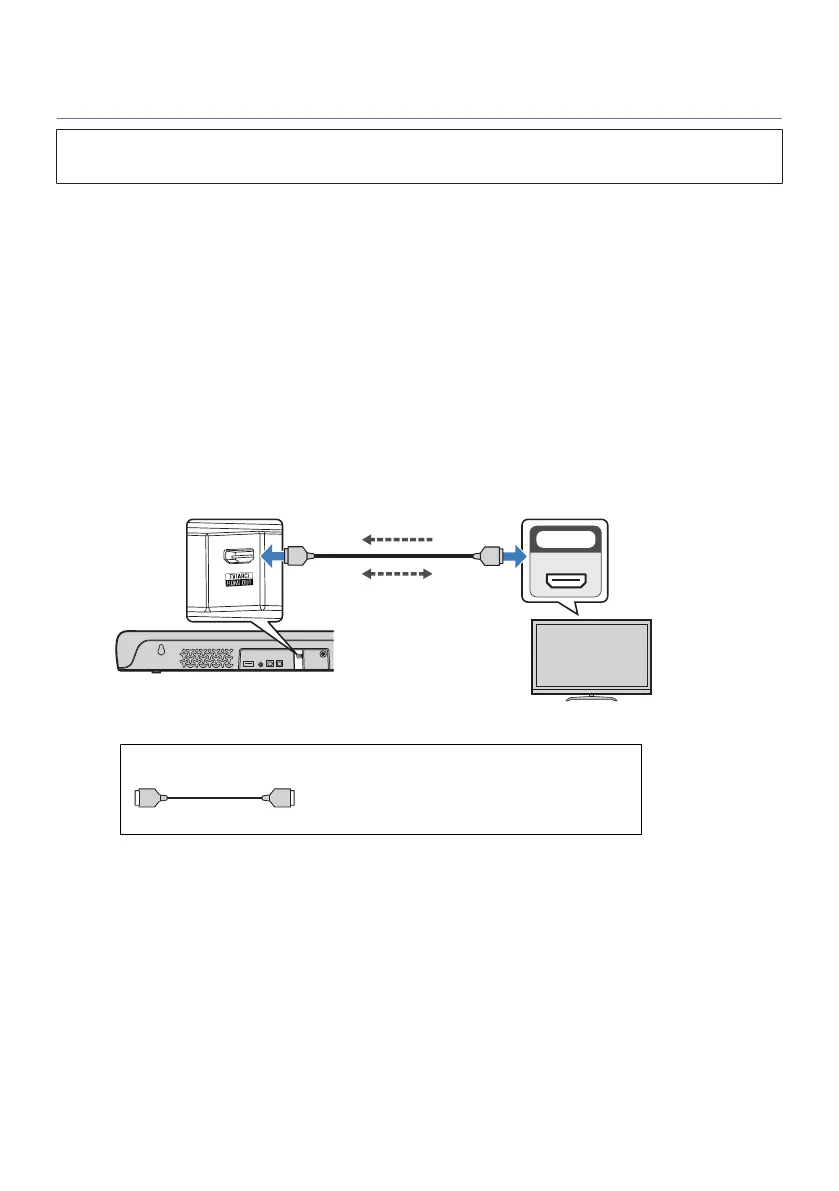
Connecting a TV using an HDMI cable (commercially available)
(
Before connecting devices, be sure to read the following precautions.
(
“Precautions for preparation”(p.18)
If a TV is connected via an HDMI cable, the sound bar can be controlled by the HDMI Control function using
the TV’s remote control.
n
Connecting to an HDMI input jack compatible with Audio Return Channel (ARC)
Connect the TV using an ARC-compatible HDMI cable (commercially available).
The HDMI cable transmits the TV’s audio signal and the control signal for controlling the sound bar using the
TV’s remote control.
1 Connect a TV to the sound bar.
Connect an HDMI cable to the HDMI input jack compatible with Audio Return Channel (labeled
as “ARC”) on the TV.
HDMI OUT/TV (ARC) jack
Sound bar (rear)
TV
HDMI input jack (compatible
with ARC)
TV’s audio signal
Control signal
Cable to use
HDMI cable (commercially available)
26
PREPARATION > Connecting a TV



 To Next Page