3-3
EAU00102
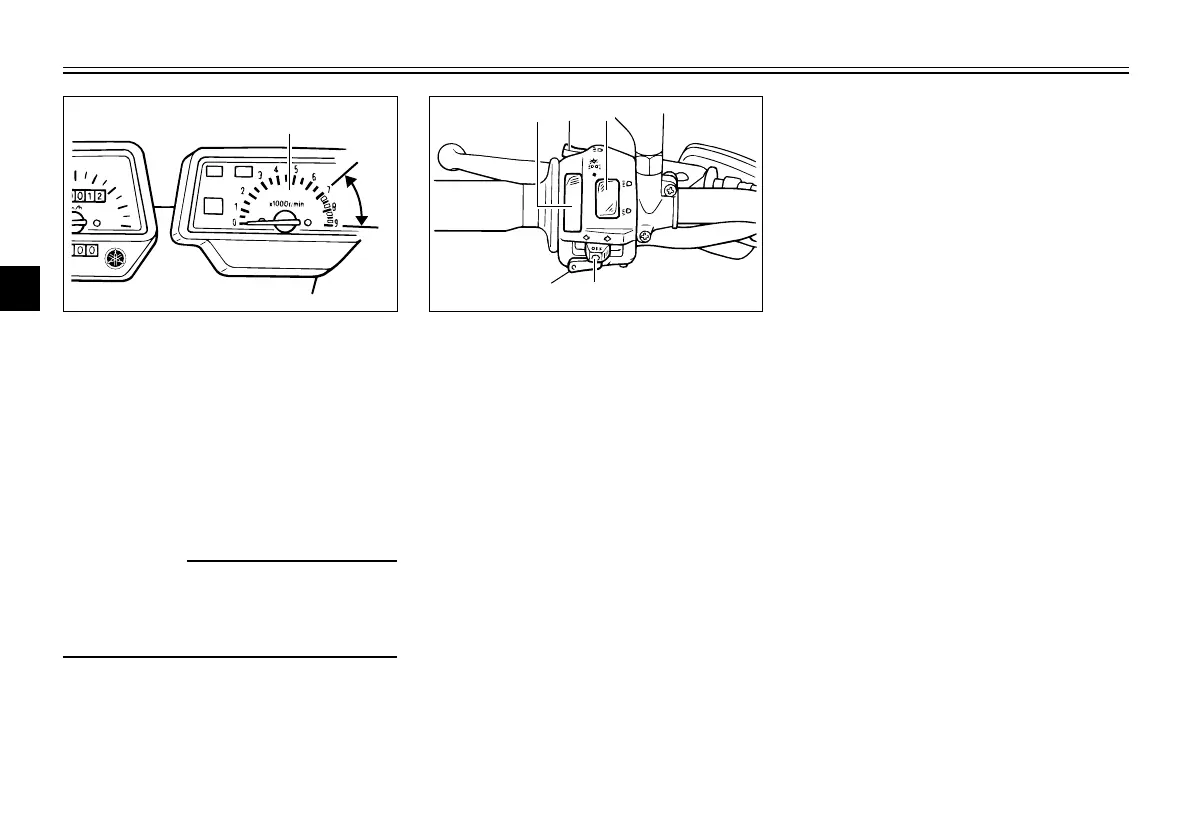
Tachometer
Tachometer
The tachometer allows the rider to
monitor the engine speed and keep it
within the ideal power range.
EC000003
cC
Do not operate the engine in the
tachometer red zone.
Red zone: 7,000 r/min and above
EAU03888
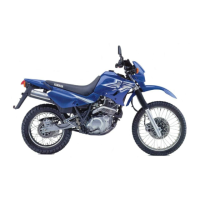
Dimmer switch “%/&”
Dimmer switch
Set this switch to “&” for the high
beam and to “%” for the low beam.
EAU03889
Turn signal switch “4/6”
Turn signal switch
To signal a right-hand turn, push this
switch to “6”. To signal a left-hand
turn, push this switch to “4”. When
released, the switch returns to the
center position. To cancel the turn
signal lights, push the switch in after
it has returned to the center position.
EAU00129
Horn switch “*”
Horn switch
Press this switch to sound the horn.
INSTRUMENT AND CONTROL FUNCTIONS
3
1. Tachometer
a. Red zone
EAU00118
Handlebar switches
Handlebar switches
EAU03898
Light switch “9/'/:”
Light switch
Set this switch to “'” to turn on the
auxiliary light, meter lighting and tail-
light. Set the switch to “:” to turn on
the headlight also. Set the switch to
“9” to turn off all the lights.
EAU00119
Pass switch “&”
Pass switch
Press this switch to flash the head-
light.
1. Light switch “9/'/:”
2. Pass switch “&”
3. Dimmer switch “%/&”
4. Turn signal switch “4/6”
5. Horn switch “*”
4PT-E7 (English) 6/29/01 9:13 AM Page 16




 To Next Page