Bluetooth® Connectivity
Pairing for the First Time
When first connecting this product to a Bluetooth device (such as a smartphone), follow the steps below to
pair (register) this product with that device.
[Search tag] #Q02 Pairing
NOTE
You can use Google Fast Pair (described afterwards) to easily pair this product with your Android smartphone.
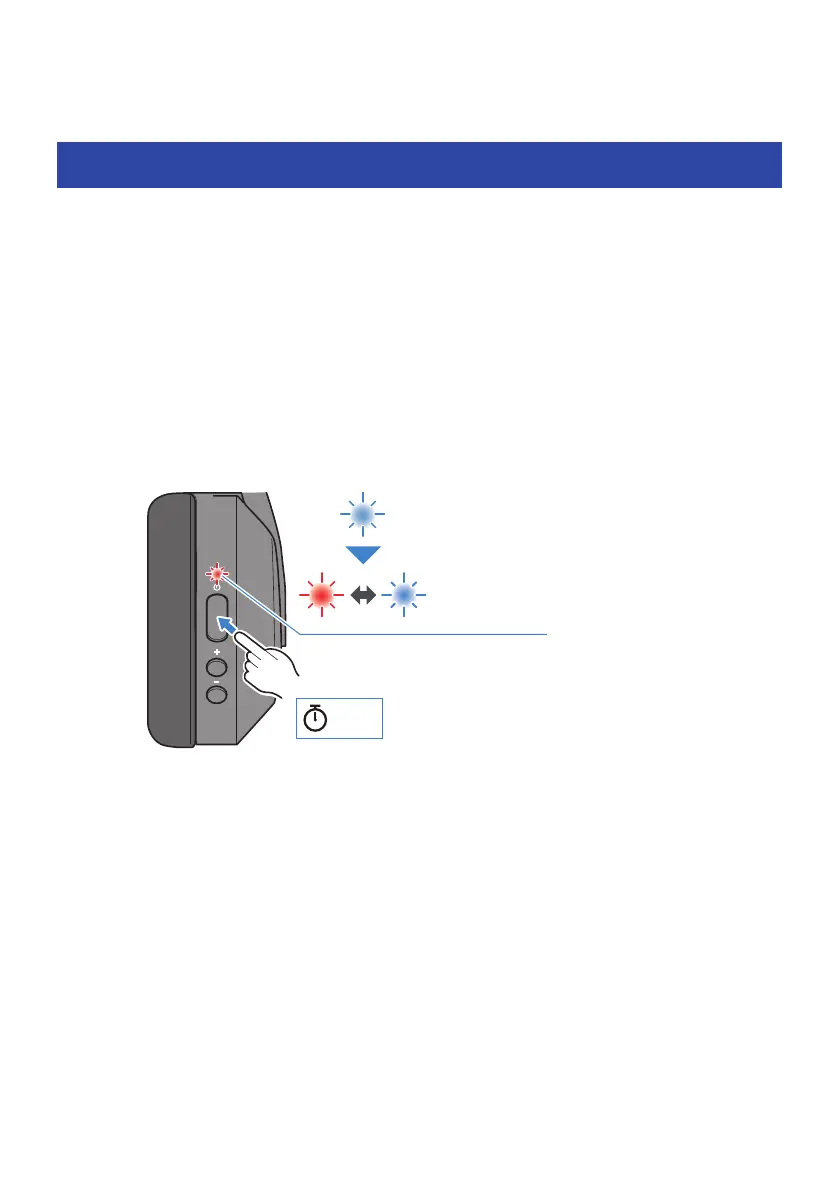
1 Set this product to pairing (registration) standby mode.
With the headphones powered off, hold down the power key until the indicator flashes as
shown in the illustration below. You will hear the “Pairing” audio message in the headphones,
and the product enters pairing (registration) standby mode.
Red and blue
Flashes
alternately
3 sec
Blue
Lights up for 1 sec
2 Activate Bluetooth on your Bluetooth device.
A list of Bluetooth devices that can be connected will be shown.
15
Bluetooth® Connectivity > Pairing for the First Time



 To Next Page