Pairing for the First Time with Google Fast Pair
Follow the steps below to easily pair (register) this product with your Android device
that supports Google Fast Pair.
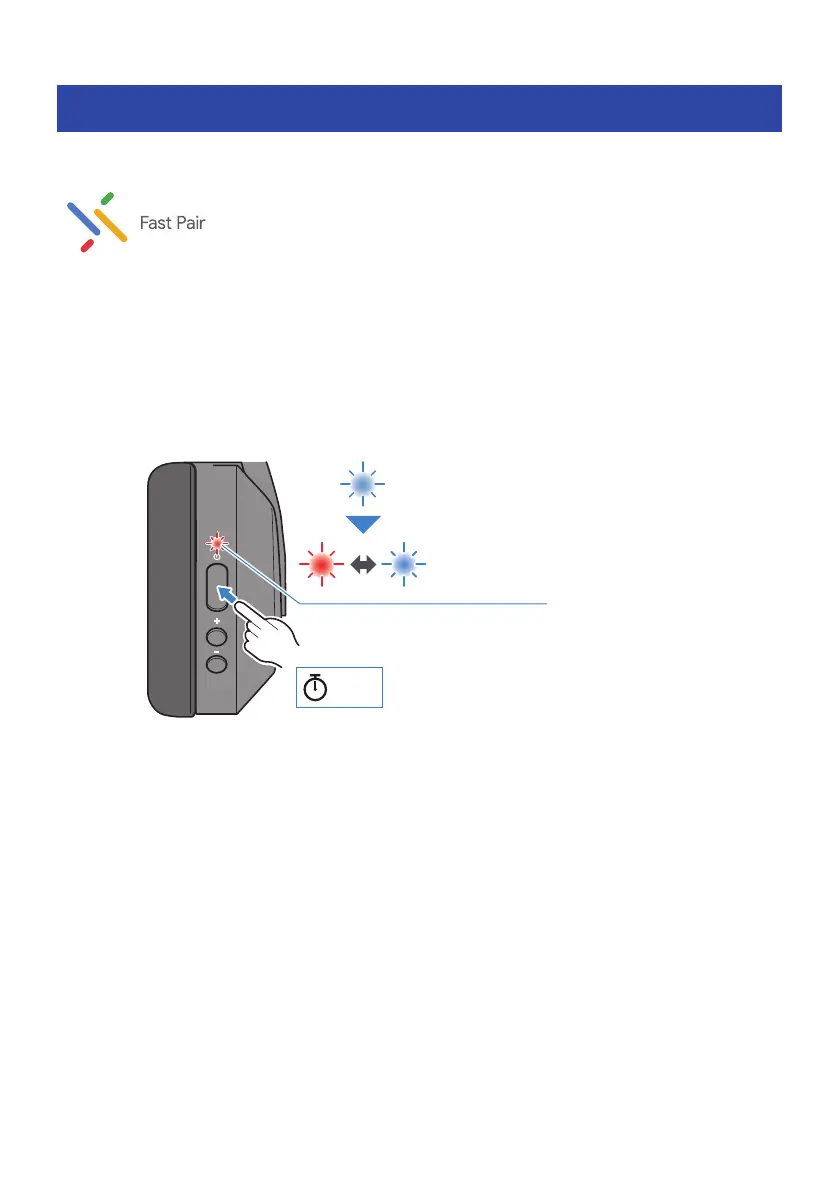
1 Set this product to pairing (registration) standby mode.
With this product powered off, hold down the power key until the indicator flashes as shown in
the illustration below. You will hear the “Pairing” audio message, and the product enters
pairing (registration) standby mode.
Red and blue
Flashes
alternately
3 sec
Blue
Lights up for 1 sec
2 Activate Bluetooth on your Bluetooth device, and move the device close to this
product.
A notification will be shown on your Android device.
3 Tap the notification on your Android device.
The device will then finish pairing with this product.
If successfully connected, the indicator on this product lights blue (for about five seconds),
and you will hear the “Connected” audio message.
Pairing and connection are now complete.
NOTE
(
To use Google Fast Pair, you’ll need to configure your Google account and connect to a network.
(
Pairing is supported with Android devices running Android OS 6.0/Google Play 11.7 or later.
17
Bluetooth® Connectivity > Pairing for the First Time with Google Fast Pair



 To Next Page