■ ADVANCED SETUP
Selectable item/Adjustable rangeDescription
Menu
TURN ON VOLUME Sets the volume level at power-on. OFF* (Not set), 1 to 70
MAX VOLUME Sets the maximum volume level. 1 to 99, MAX* (Maximum)
INPUT LOCK Enables/disables the INPUT key on the front panel. ON (Disabled), OFF* (Enabled)
PANEL LOCK Enables/disables the keys on the front panel. ON (Disabled), OFF* (Enabled)
R.INPUT POWER Enables/disables power-on by remote control input
selector keys when the unit is in the standby mode.
ON (Enables power-on), OFF* (Disables power-on)
AC ON STANDBY Sets whether or not this unit returns to its previous
state when AC power is restored after a temporary
power loss.
ON* (Enters standby mode),
OFF (Restores the state before power was lost)
MEMORY PROTECT Protect system memory 1/2/3 ( p.28).
ON (Protect is performed),
OFF* (Protect is not performed)
YRB FL
4)
Use the YRB-100 reection board for the front left
channel.
YES (The reection board is used),
NO* (The reection board is not used)
YRB FR
4)
Use the YRB-100 reection board for the front right
channel.
YES (The reection board is used),
NO* (The reection board is not used)
YRB SL
4)
Use the YRB-100 reection board for the surround
left channel.
YES (The reection board is used),
NO* (The reection board is not used)
YRB SR
4)
Use the YRB-100 reection board for the surround
right channel.
YES (The reection board is used),
NO* (The reection board is not used)
Conrm rmware version/update rmware.FW UPDATE 02.00.04* (The rmware version is displayed) ,
5)
START OK? (Firmware is updated)
INITIALIZE
6)
Resets all settings to their default values. OK (All settings are restored to their default values),
CANCEL* (Settings are not restored to their default
values)
RETURN
ENTER
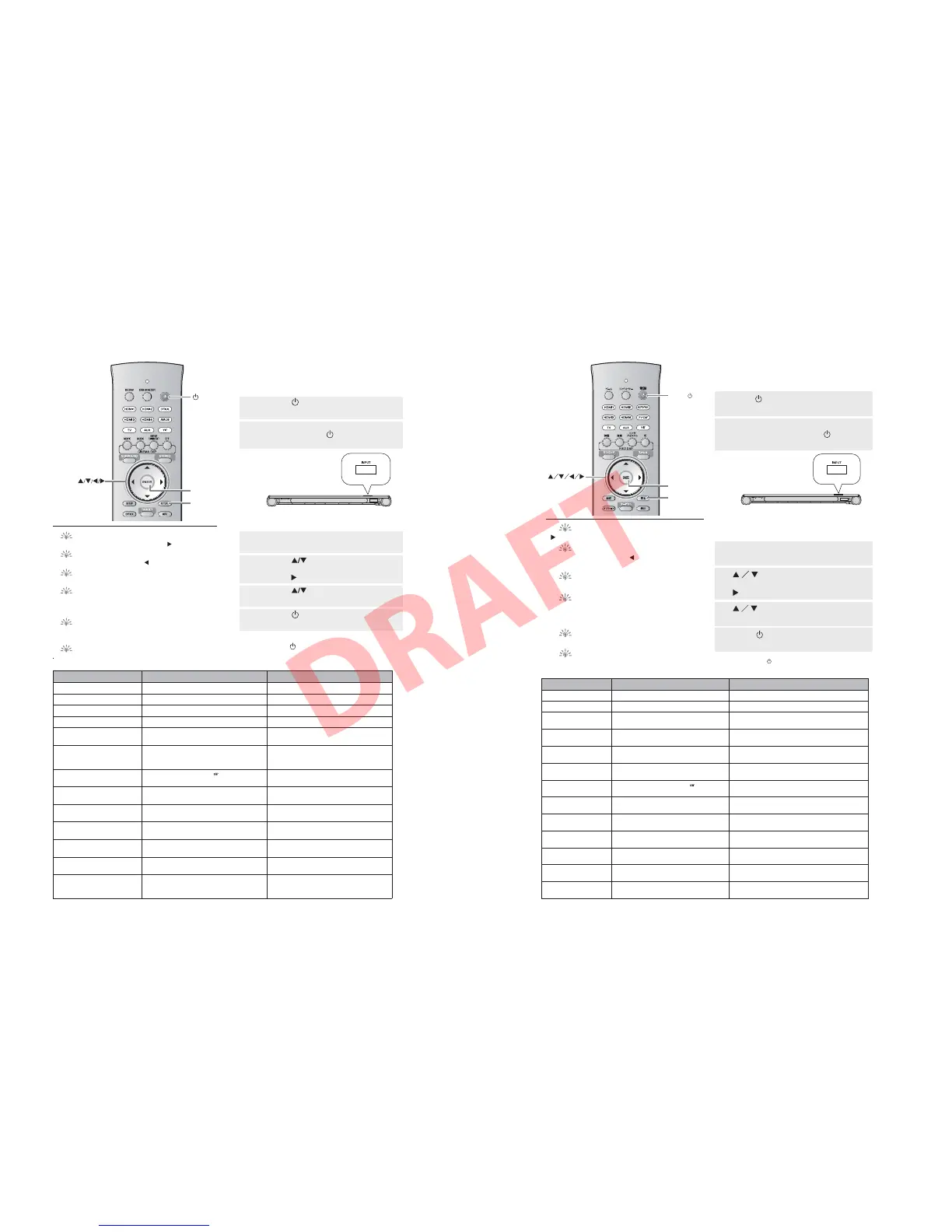
The advanced setup enables more precise conguring of this
unit’s function. For example, maximum volume can be specied
and the INPUT key on the top panel can be disabled. No
adjustment is necessary for normal operation.
1
Press the key to turn this unit to the
standby mode.
2
While holding down the INPUT key on the
top panel, press the key on the remote
control to turn on the power.
“ADVANCED” appears in the front panel display. The
advanced setup menu is not displayed on the TV screen.
3
Release the INPUT key on the top panel.
4
Press the key to display the desired
menu in the front panel display and then
press the key.
1)2)
5
Press the key to change setting.
3)
6
Press the key to set this unit to the
standby mode.
The new setting is reected when you turn on the unit by
pressing the key.
The ENTER key performs the same function as the key.
To return to the previous menu, press the or RETURN key.
The default settings are marked with “*”.
1)
2)
3)
When a menu for the YRB settings is selected, on-screen instructions for
installing the reection board is displayed. See documentation provided
with the YRB-100 for instructions on installing the YRB-100.
4)
“02.00.04” is an example of rmware version display in the advanced
setup menu.
When the unit freezed, the problem may solve by restoring to their
default values.
5)
6)
起動時の音量
OFF*(設定しない)、1 〜 70
音量最大値の制限
1 〜 99、MAX*(最大)
本体
INPUT キーの有効/無効
ON(無効)
OFF*(有効)
本体操作キーの有効/無効
ON(無効)
OFF*(有効)
スタンバイ状態からリモコンの入力選択キー
で起動する
ON(起動する)
OFF*(起動しない)
本機への電源供給が回復したときの状態
ON(スタンバイ状態)
OFF*(電源遮断前の状態)
システムメモリー
1 / 2 / 3(27 ページ)
を保護
ON(保護する)
OFF*(保護しない)
4)
反射板 YRB-100 をフロント左に使用する
YES(反射板を使用する)
NO*(反射板を使用しない)
4)
反射板 YRB-100 をフロント右に使用する
YES(反射板を使用する)
NO*(反射板を使用しない)
4)
反射板 YRB-100 をサラウンド左に使用する
YES(反射板を使用する)
NO*(反射板を使用しない)
4)
反射板 YRB-100 をサラウンド右に使用する
YES(反射板を使用する)
NO*(反射板を使用しない)
本機のファームウェアのバージョン確認と、
ファームウェアのアップデート
02.00.04*(ファームウェアのバージョン表示)
5)
START OK?(ファームウェアのアップデート)
6)
設定の初期化
OK(初期化する)
CANCEL*(初期化しない)
設定項目 内容 選択項目/調整範囲
TURN ON VOLUME
MAX VOLUME
INPUT LOCK
PANEL LOCK
R.INPUT POWER
AC ON STANDBY
MEMORY PROTECT
YRB FL
YRB FR
YRB SL
YRB SR
FW UPDATE
INITIALIZE
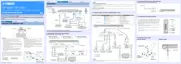
「拡張メニュー」は、最大音量の制限や、センターユ
ニットの
INPUT キーを無効にするなど、本機の機能
をより詳細に設定します。通常は使用しません。
1
2
3
4
5
6
電源()キーを押して、本機の電源を
スタンバイにする。
センターユニットの INPUT キーを押し
ながら、リモコンの電源()キーを押
して電源をオンにする。
フロントパネルディスプレイに「ADVANCED」
と表示されます。拡張メニューはテレビには表示
されません。
センターユニットの INPUT キーをはな
す。
再度電源()キーを押して電源を入れると、
設定されます。
電源()キーを押して、電源をスタン
バイにする。
キーで、設定したいメニューをフ
ロントパネルディスプレイに表示させ、
キー
1)
を押す。
2)
キーを押して、設定を変更する。
3)
戻る
決定
電源()
1)
2)
3)
キーのかわりに決定キーを押すこともできます。
ひとつ前の表示に戻るには、 または戻るキーを押して
ください。
設定値の「
*」は初期設定を表しています。
YRB の設定を選ぶと、テレビに反射板設置補助のための
画面が表示されます。
YRB-100 の取扱説明書をご覧のう
え、
YRB-100 を設置してください。
「
02.00.04」は表示例です。
本機の操作ができなくなったときなどに、初期化すること
で問題が解決する場合があります。
4)
5)
6)
YSP-CU4300/YSP-CU3300/NS-WSW160
170


 To Next Page