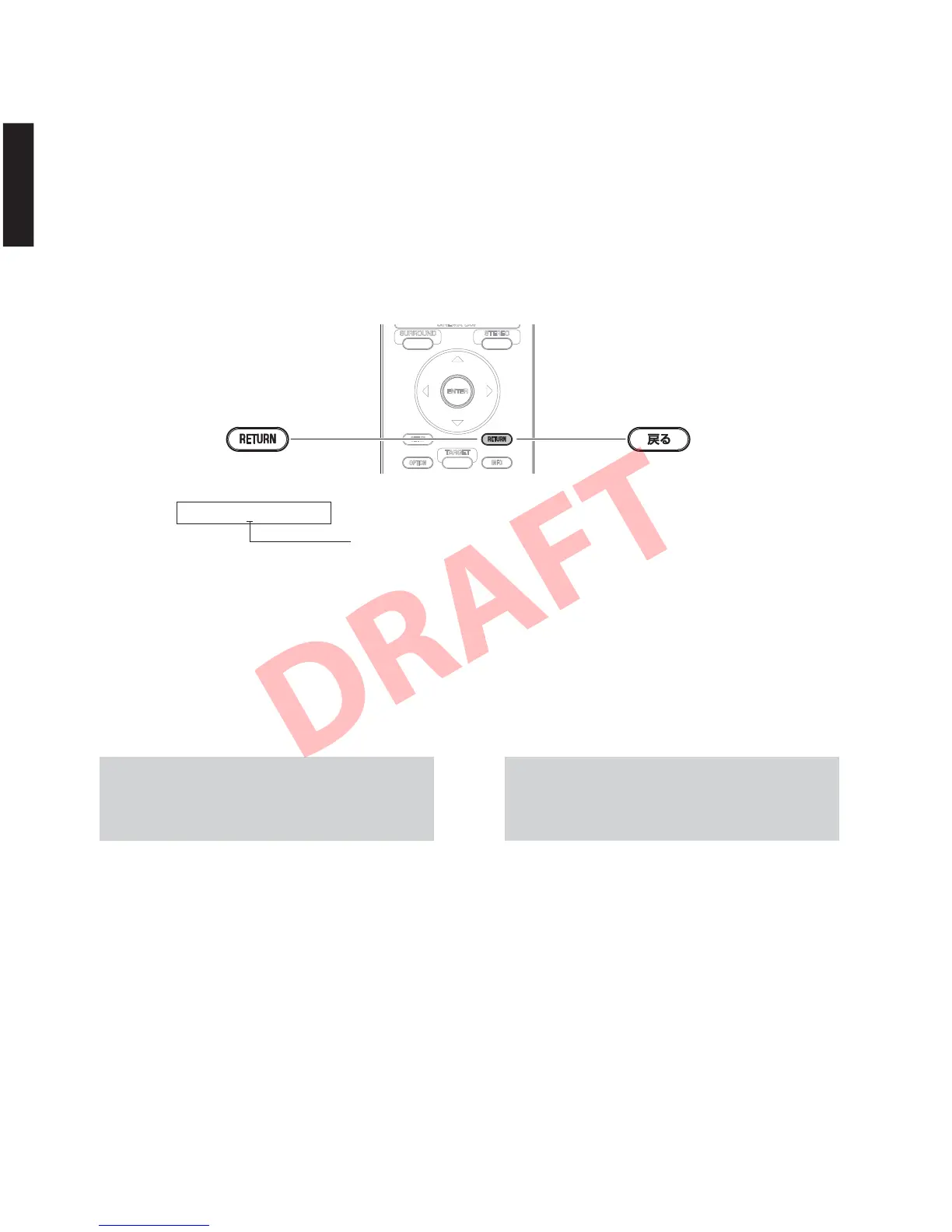
Keys on the remote control /
リモコンキー
7. ショートしたピンを元の状態に戻します。
8. 再び電源を入れ、バックアップ IC(EEPROM:
DIGITALP.C.B. の IC703)の初期化を行います。
6. リモコンの “戻る” キーを押すと、表示されてい
る仕向けが書き込まれ、自動的に電源が切れます。
(Fig.4)
※ このとき、バックアップ IC(EEPROM:DIGITAL
P.C.B. の IC703)の初期化は予約状態になってい
ます。
7. Be sure to return the shorted pins to their original
condition.
8. Turn on the power again and initialize the backup
IC (IC703 of EEPROM: DIGITL P.C.B.).
6. If the “RETURN” key of the remote control is
pressed, the displayed destination will be written
and the power will be turned off automatically.
(Fig. 4)
* At this time, initialization of the backup IC
(FEPROM: IC703 of DIGITAL P.C.B.) is in the
reserved state.
9. ダイアグを起動し、“q.CPUINFORMATION” メ
ニューを選択します。(詳細は “ダイアグ” を参照
してください。)
サブメニューでシステムモデル名と仕向け先を表
示し、正しく書き込まれていることを確認します。
9. Start up the self-diagnostic function and select “q.
CPU INFORMATION” menu. (For details, refer to
“SELF-DIAGNOSTIC FUNCTION”)
Using the sub-menu, have the system model name
and destination displayed, and check that they are
written properly.
注意: バックアップ IC(EEPROM:DIGITALP.C.B. の
IC703)の初期化を行っても、システムモデ
ル名と仕向け先は保持されます。
NOTE: The system model name and destination
are preserved even when the back-up IC
(EEPROM IC703 of the DIGITAL P.C.B.) is
initialized.
p1.4300U
Fig. 4
The displayed destination is written.
表示されている仕向けが書き込まれます。
56
YSP-CU4300/YSP-CU3300/NS-WSW160
YSP-CU4300/YSP-CU3300/
NS-WSW160


 To Next Page