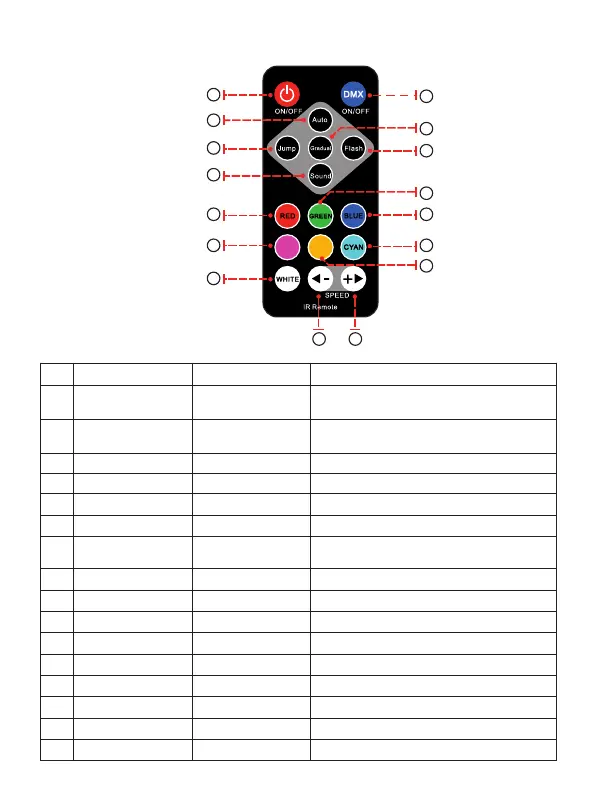
Remote Control
ROSEO
1
3
4
7
8
6
5
Auto mode
Hopping mode
Sound-active mode
Red color
Green color
Fade 1, Fade 2
Strobe mode
11
14
13
12
Cyan color
Amber color
Power ON/OFF
Speed - Speed +
Roseo color
White color
Blue color
DMX mode
10
9
15
16
2
Icon Button Function Display on Panel
1 ON/OFF
2 DMX Mode
A001/D001/
SLAV
3 Auto Mode DENO
4 Hopping Mode CJ**
5 Fade 1, Fade 2 CF**/CP**
6 Strobe Mode CT**
7 Sound-Active
Mode
SOUD
8 Red Color r255
9 Green Color g255
10 Blue Color b255
11 Roseo Color
12 Amber Color
13 Cyan Color
14 White Color
P32
15 Speed-
16 Speed+
Function Description
Press this button to turn on or
turn off the light
Repeat e d l y p r e s s t h i s b u t t o n to
switch betwe e n A0 0 1 / D 001/SLAV
Press this button to run auto mode
Press +/- to adjust hopping speed
Press +/- to adjust fade speed
Press +/- to adjust strobe rate
Press this button to run
sound-active mode
Press this button for Red color
Press this button for Green color
Press this button for Blue color
Press this button for Rose color
Press this button for Amber color
Press this button for Cyan color
Press this button for White color
Decrease the speed of a program
Increase the speed of a program
-13-
AMBER
A32
C32
U32


 To Next Page