16
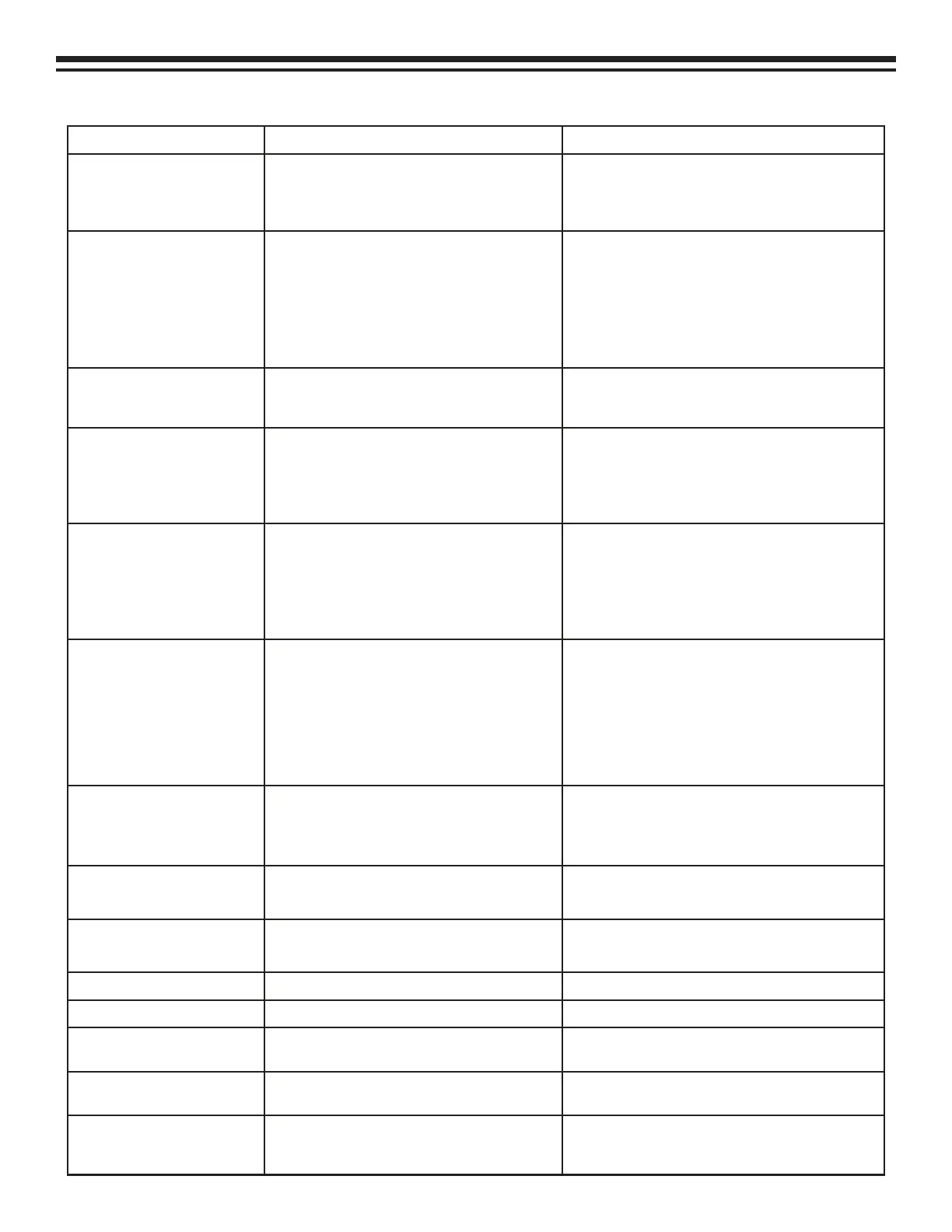
LCD Error Messages and Potential Solution
Error Possible Causes Possible Solutions
Hi Pressure Limit
• Service valves on hoses closed. • Open valves
• Schrader core on A/C system not
depressing
• Replace schrader core
Tank Empty
• No refrigerant in storage tank • Refill storage tank using Mode 6, Tank Refill
• Tank not properly on scale • Reposition scale
• Scale cord not properly connected • Check scale cord connection
• Scale is out of calibration • Re-calibrate scale using Utility Mode
Supply Tank Empty
• Tank of new refrigerant is empty
• Close supply tank valve and disconnect
hoses. If tank is not empty, see “Refrigerant
not being transferred during Tank Refill.”
Tank Full
• Tank is 80% full
• Charge some refrigerant or transfer to an-
other tank.
• Scale is out of calibration • Re-calibrate scale using Utility Mode
• Tank not properly on scale • Reposition tank
Time Limit (during charging
cycles)
• Tank on unit is closed
• Default time limit is too short
• Open tank valve
• Use default time of 10 minutes unless A/C
system
• Compressor not running • Call Technical Services
• Tank or scale misaligned • Reposition tank and scale
Time Limit (during recovery
cycle)
• A/C system has a leak • Locate and repair leak
• Valves on service hoses shut • Open valves
• Service hose is constricted • Straighten hose
• Unit storage tank valve is closed • Open tank valves
• Compressor not operating • Call Technical Services
No Scale
• Scale cord not connected • Properly connect cord
• Scale cord damaged • Call Technical Services
• Microprocessor malfunction • Call Technical Services
No Tank
• Tank is not on scale • Place tank on scale
• Scale out of calibration • Calibrate scale using Utility Mode
Possible Overcharge
• Tank was disturbed during charging cycle • Re-start Full Cycle
• Internal failure of unit • Call Technical Services
Accum Time Limit
• Internal failure of unit • Call Technical Services
Accum Hi Pressure
• Internal failure of unit • Call Technical Services
Purge “Y”
• Non-condensable gases are present in
storage tank
• Turn unit off and on to start purge cycle
Purge “N”
• Non-condensable gases are NOT present
in storage tank
• Normal condition
Purge “E”
• Time limit was reached before purge cy-
cle was complete.
• Turn unit off and on to start purge cycle. If
“E” remains after three on-off cycles, contact
Technical Services.


 To Next Page