12
8. CORRECT DISPLAY HEIGHT TO OFFICE TABLE HEIGHT
STEP 1:
Set the table at any height, the bottom
position is recommended.
Measure the table’s actual height and write
down the number in inches or centimeters.
STEP 2:
Hold the S key hold
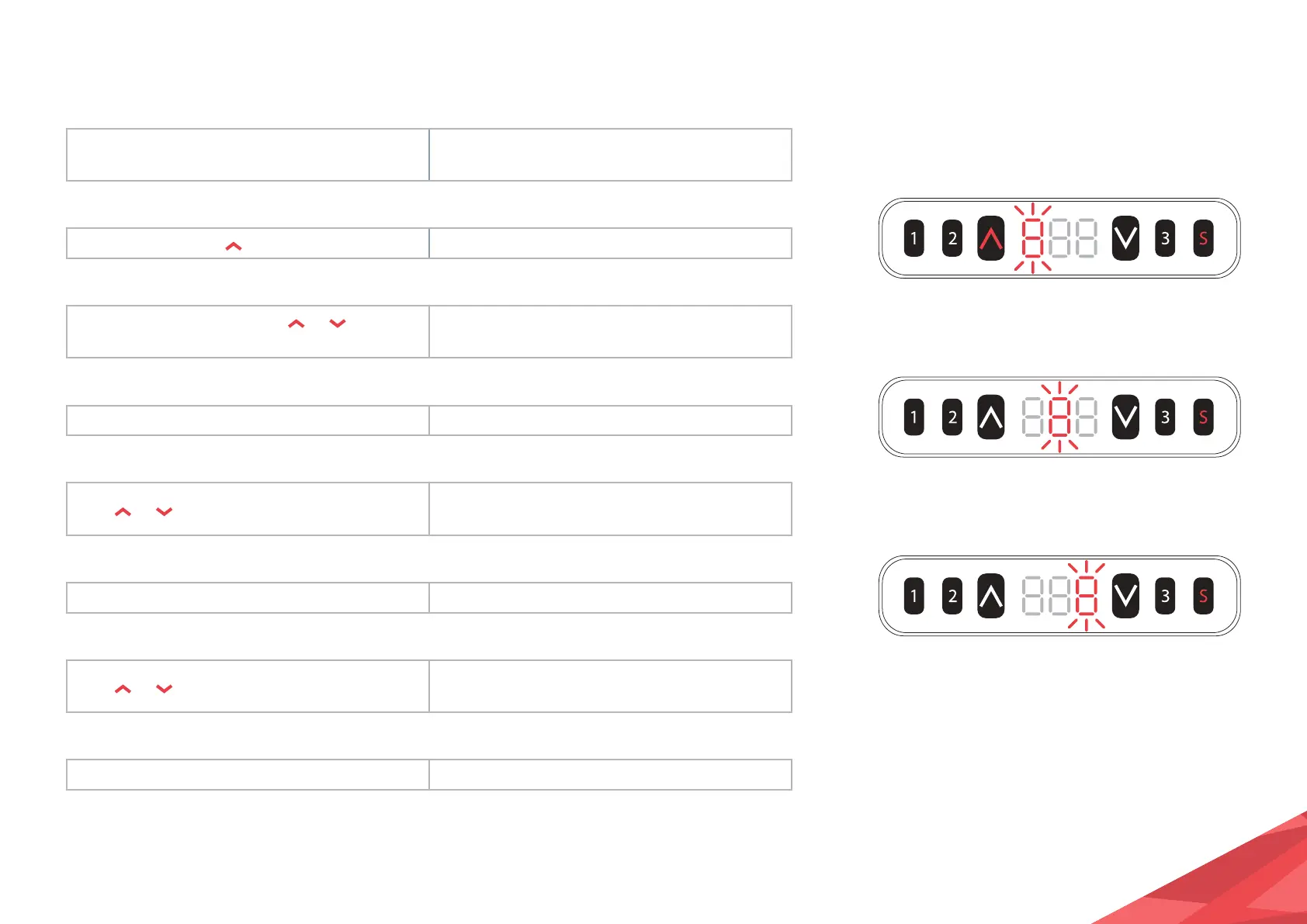
key for over 3 seconds. The first digit will be flashing on the screen.
STEP 3:
Release the keys, then click
or to adjust
the first digit.
Increase or decrease the first digit on the
screen to match your measured number.
STEP 4:
Click the S key. The second digit will be flashing on the screen.
STEP 5:
Click
or to adjust the second digit.
Increase or decrease the second digit on the
screen to match your measured number.
STEP 6:
Click the S key. The third digit will be flashing on the screen.
STEP 7:
Click
or to adjust the third digit.
Increase or decrease the third digit on the
screen to match your measured number.
STEP 8:
Click the S key. The setting is complete.
1. Check whether the handset display format matches with the measured data, either in
centimeters or inches. In imperial display format the minimum height adjustable unit is
0.5 inch, and in metric display format, the minimum height adjustable unit is 1 cm.


 To Next Page