
 Need help?
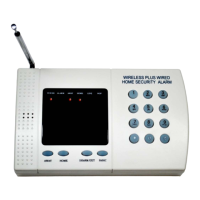
Do you have a question about the YY-Electron Wireless Home Security Alarm System and is the answer not in the manual?
Instructions for connecting the main control unit to power and activating it.
Guides for connecting a wired siren and telephone line to the alarm system.
Steps to activate various wireless siren models, including those with strobes.
How to access the system's programming mode using the keypad and default password.
Changing the system password and activating key fob remotes.
Process for activating a second keypad and a portable keypad.
Steps to activate a wireless panic button for emergency use.
Activating motion detectors and environmental sensors like smoke, gas, and glass break detectors.
Activating door/window sensors and wireless range motion detectors.
Procedures for deactivating specific sensors or disabling them by removing power.
Set exit and entrance delay times for arming and disarming the system.
Adjust siren sounding time and enable phone line anti-cut monitoring.
Set up remote access for arming/disarming and record/play back messages.
Enter stored phone numbers for auto-dialer and reset system functions to defaults.
How to use the main keypad and key chain remote for system functions.
Remote phone operation and responding to auto-dialer calls.
Operation and management of wireless portable and second entry keypads.
Guide for setting up the SIM card and connecting the GSM module to the keypad.
Understanding GSM terminal status, signal strength, and remote operation commands.
 General
| Brand | YY-Electron |
|---|---|
| Model | Wireless Home Security Alarm System |
| Category | Security System |
| Language | English |

 To Next Page