-9-
Main Menu
Tap anywhere on the Home Screen to
reveal the Shortcuts. Tap on the Menu
icon (D) to view the Main Menu. Select
one of the following options:
No. Item Description
A Mode
Switch between Drive, HDR, Scenic and Park modes
(see 3.2 for more details).
D Main Menu
B Video Protect
Protect the currently recorded video file from being
overwritten (see 3.5 for more details).
Instantly take a snapshot whilst recording or in
standby mode.
C Microphone On/Off Switch audio recording on/off.
Go to Main Menu.
F Display Off Turn display screen off.
G Play/Pause
Play or pause video recording.
E Snapshot
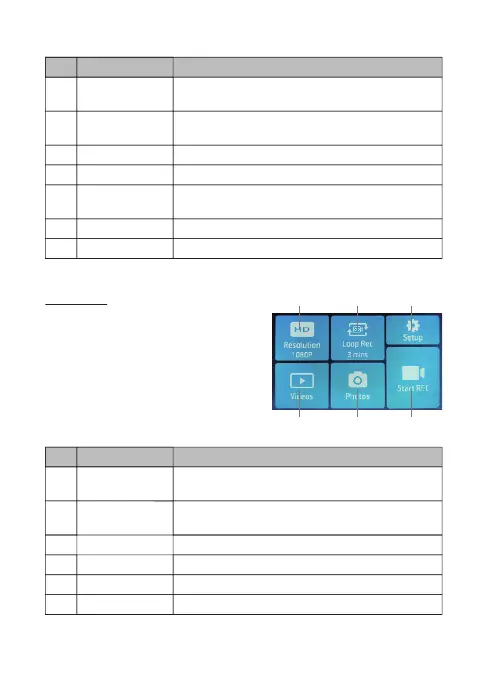
No. Item Description
H Resolution
Switch between 1080p 30fps, 720p 60fps, and 720p
30fps video recording resolutions.
K Videos
I Loop Rec
Switch between 1, 3 or 5-mins recording intervals
(see 3.4 for more details).
J Setup View the full list of settings that can be customized.
Playback 'Normal' and 'Protected' video recordings.
L Photos Preview saved photos.
M Start REC
Exit Main Menu to Home Screen (starts recording).
K L M
H I J



 To Next Page