Need help?
Do you have a question about the Zanussi ZIBN646K and is the answer not in the manual?
Safety guidelines for children and vulnerable individuals using the appliance.
General safety precautions for appliance operation, usage, and environment.
Instructions and warnings related to the safe installation of the appliance.
Critical information regarding safe electrical connections and potential hazards.
Key safety precautions to follow during the normal operation and use of the appliance.
Preparatory steps and information required before commencing the installation process.
Specific guidance for installing hob units into built-in furniture and work surfaces.
Details on the connection cable, its installation, and replacement by a qualified electrician.
Visual representation of the electrical connections and wiring for the appliance.
Instructions for physically assembling and positioning the hob, including clearances.
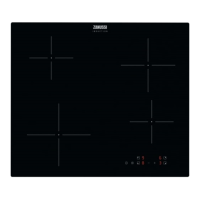
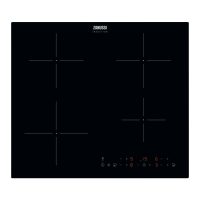
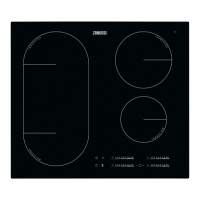
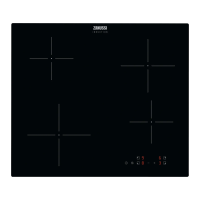
Diagram illustrating the arrangement of cooking zones on the hob surface.
Overview of the control panel, its buttons, displays, and indicators.
Explanation of the various symbols and codes displayed during heat setting operation.
Step-by-step guide on how to turn the hob on and off.
Details on the automatic deactivation features and conditions for the hob.
How to choose a cooking zone and adjust its heat level for cooking.
Instructions for increasing or decreasing the heat setting for a cooking zone.
Explanation of the residual heat warning symbol and its meaning.
Information on activating the power-boosting function for faster heating.
How to activate the control panel lock to prevent accidental changes.
How to activate the child safety device to prevent unintended operation.
Instructions for activating or deactivating audible signals and sounds from the hob.
Explanation of how power is managed and distributed among cooking zones.
Recommendations on suitable cookware materials, dimensions, and care for induction hobs.
Description of normal operating noises and what they indicate.
A guide to using different heat settings for various cooking tasks and times.
General advice and precautions for cleaning the hob surface and components.
Specific steps for removing spills and stains, including timing and methods.
A guide to identifying and resolving common issues encountered with the hob.
Steps to take if problems persist and how to contact support for assistance.
Details found on the appliance's rating plate, including model and electrical specifications.
Technical specifications for each cooking zone, including power and cookware diameter.
Product information compliant with EU and UK Ecodesign regulations for energy efficiency.
Practical advice on how to save energy while using the hob for cooking.
This document is a user manual for a Zanussi hob, model ZIBN646K. It provides comprehensive instructions for the safe installation, operation, maintenance, and troubleshooting of the appliance.
The Zanussi hob is designed for cooking purposes in a domestic indoor environment. It is an induction hob, meaning it uses an electromagnetic field to generate heat directly in the cookware, offering quick and efficient cooking. The appliance features multiple cooking zones and a control panel for setting heat levels and activating various functions.
The hob is activated and deactivated by touching a dedicated sensor field for one second. Once activated, individual cooking zones can be selected by touching their corresponding sensor fields. Heat settings are adjusted using plus and minus sensor fields, allowing for precise control over cooking temperatures.
A key feature is the Booster function, which provides extra power to induction cooking zones for a limited time, useful for rapidly boiling water or searing food. After the booster period, the zone automatically reverts to its highest regular heat setting.
The hob incorporates an Automatic Switch Off function for safety and energy efficiency. It deactivates automatically if all cooking zones are off, no heat setting is selected after activation, an object is left on the control panel for too long (triggering an acoustic signal), the hob overheats (e.g., if a saucepan boils dry), incorrect cookware is used (indicated by an 'E' symbol), or a cooking zone is left active without changes to its heat setting for an extended period (indicated by a '-' symbol).
Residual heat indicators (H) alert users when a cooking zone is still hot after use, minimizing the risk of burns. This indicator may also appear for neighboring zones, when hot cookware is placed on a cold zone, or when the hob is deactivated but the zone is still hot.
For safety, the hob includes a Lock function to prevent accidental changes to heat settings while cooking. This is activated by touching a sensor field for four seconds, indicated by an 'L' symbol. Similarly, a Child Safety Device prevents accidental operation of the hob altogether. It is activated by touching a specific sensor field for four seconds when the hob is on but no heat setting is selected, indicated by a symbol. This function can be temporarily overridden for a single cooking session.
The OffSound Control function allows users to deactivate or activate the hob's operational sounds. This is done by pressing a sensor field for three seconds, with a display indicating whether sounds are off or on. Even with sounds off, audible alerts will still occur for activation/deactivation and in case of an error.
A Power Management function is integrated to distribute available power efficiently when multiple cooking zones are active, especially if the total consumed power exceeds the household's supply limit. This prevents overloading the electrical installation by automatically reducing power to some zones. The display of reduced zones will flash between the initially selected and the reduced heat setting.
Regarding cookware, the manual emphasizes using suitable induction-compatible materials like cast iron, steel, enamelled steel, stainless steel, or multi-layer bottoms. Cookware should have a thick, flat, and clean base. Users are advised to lift rather than slide pots to prevent scratches on the ceramic glass. The hob automatically adapts to cookware dimensions, but efficiency is related to the diameter of the cookware.
The manual also describes various noises during operation (crack, whistle, humming, clicking, hissing/buzzing) as normal for induction hobs, arising from different cookware materials, high power levels, electric switching, or fan operation. These noises do not indicate a malfunction.
Examples of cooking applications are provided with recommended heat settings and cooking times for various dishes, from keeping food warm to boiling large quantities of water using the Booster function.
Regular cleaning is essential to prevent deterioration of the hob's surface material. The hob should be cleaned after each use, ensuring it has cooled down first. A moist soft cloth and neutral detergents are recommended. A special hob scraper is advised for removing stubborn residues like melted plastic, sugar, or food with sugar, which should be removed immediately to prevent damage.
For limescale rings, water rings, fat stains, or shiny metallic discoloration, these should be removed once the hob is sufficiently cool, using a moist cloth and a non-abrasive detergent. Shiny metallic discoloration can also be addressed with a solution of water and vinegar.
The manual explicitly warns against using steam cleaners, abrasive products, abrasive cleaning pads, solvents, or metal objects for cleaning. It also advises against using cookware with damaged bottoms, as they can scratch the glass ceramic surface.
 General
| Hob type | Zone induction hob |
|---|---|
| Frame type | Frameless |
| Product color | Black |
| Hob width size | 60 cm |
| Top surface type | Glass |
| Appliance placement | Built-in |
| Cooking zone 1 type | Simmer |
| Cooking zone 2 type | Regular |
| Cooking zone 3 type | Large |
| Cooking zone 1 power | 1400 W |
| Cooking zone 2 power | 1700 W |
| Cooking zone 3 power | 2200 W |
| Cooking zone 1 diameter | 145 mm |
| Cooking zone 1 position | Left rear |
| Cooking zone 2 diameter | 190 mm |
| Cooking zone 2 position | Right rear |
| Cooking zone 3 diameter | 210 mm |
| Cooking zone 3 position | Left front |
| Cooking zone 4 position | Right front |
| Number of cooking zones | 4 zone(s) |
| Cooking zone 1 power source | Electric |
| Stop & Go function | No |
| Control type | Touch |
| Display type | LED |
| Built-in display | Yes |
| Control position | Front |
| Country of origin | Romania |
| UK Trade Tariff code | 85166050 |
| Expanded Polystyrene (EPS) packaging weight | 275 g |
| Package depth | 600 mm |
| Package width | 678 mm |
| Package height | 125 mm |
| Package weight | 9500 g |
| Current | 13 A |
| AC input voltage | 220-240 V |
| AC input frequency | 50-60 Hz |
| Connected load (gas) | 0 W |
| Connected load (electric) | 3000 W |
 Weight and Dimensions
| Depth | 520 mm |
|---|---|
| Width | 590 mm |
| Height | 57 mm |
| Weight | 8600 g |
| Installation compartment depth | 490 mm |
| Installation compartment width | 560 mm |

 To Next Page