ZEISS
3 Product and Functional Description | 3.5 On Screen Display (OSD) menu of the Primostar 3 HD IP
Camera
3.5 On Screen Display (OSD) menu of the Primostar 3 HD IP Camera
When the Primostar 3 HD IP camera is powered and connected to a display device via HDMI, the
OSD menu will be shown automatically on the connected display device.
3.5.1 Home Menu
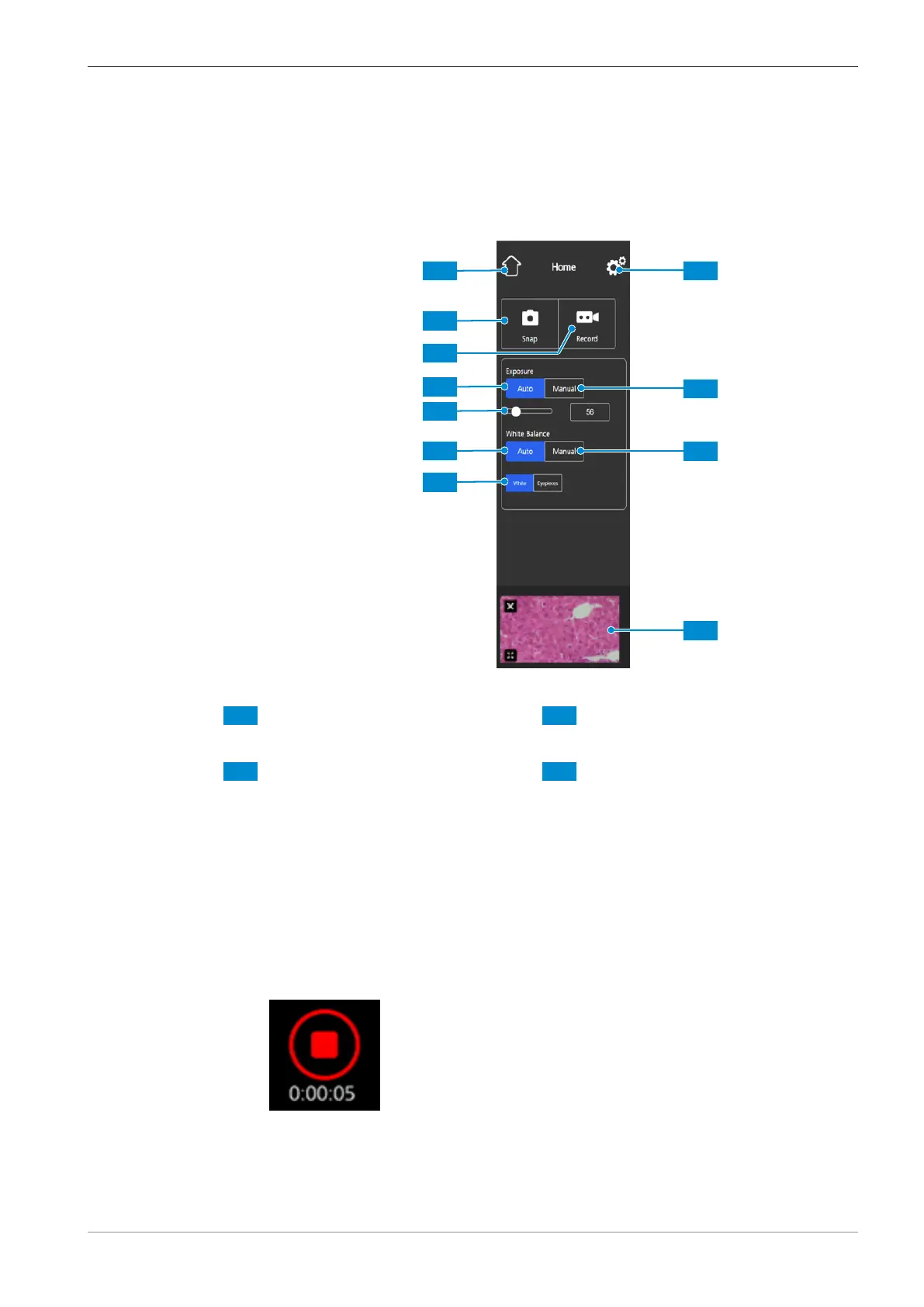
Fig.24: Home menu, control elements
1 Home button
Opens the Home menu.
2 Snap button
Snaps a single image.
3 Record button
Starts a video recording. A time counter
is displayed.
When pushing the button the following
controls expand:
Enables you to manually re-adjust the
exposure time, e.g. when the Auto Ex-
posure mode does not deliver appro-
priate results.
When pushing the button the following
controls expand:
The recording can be stopped by click-
ing the red square symbol above the
time display.
4 Auto Exposure button
Ensures consistent brightness of the im-
age by continuously calculating the cor-
rect exposure time based on the current
light intensity.
Instruction Manual ZEISS Primostar 3 | en-US | Rev. 1 | 415501-7011-111_en 35





 To Next Page