6 Rev.C 7 Rev.C
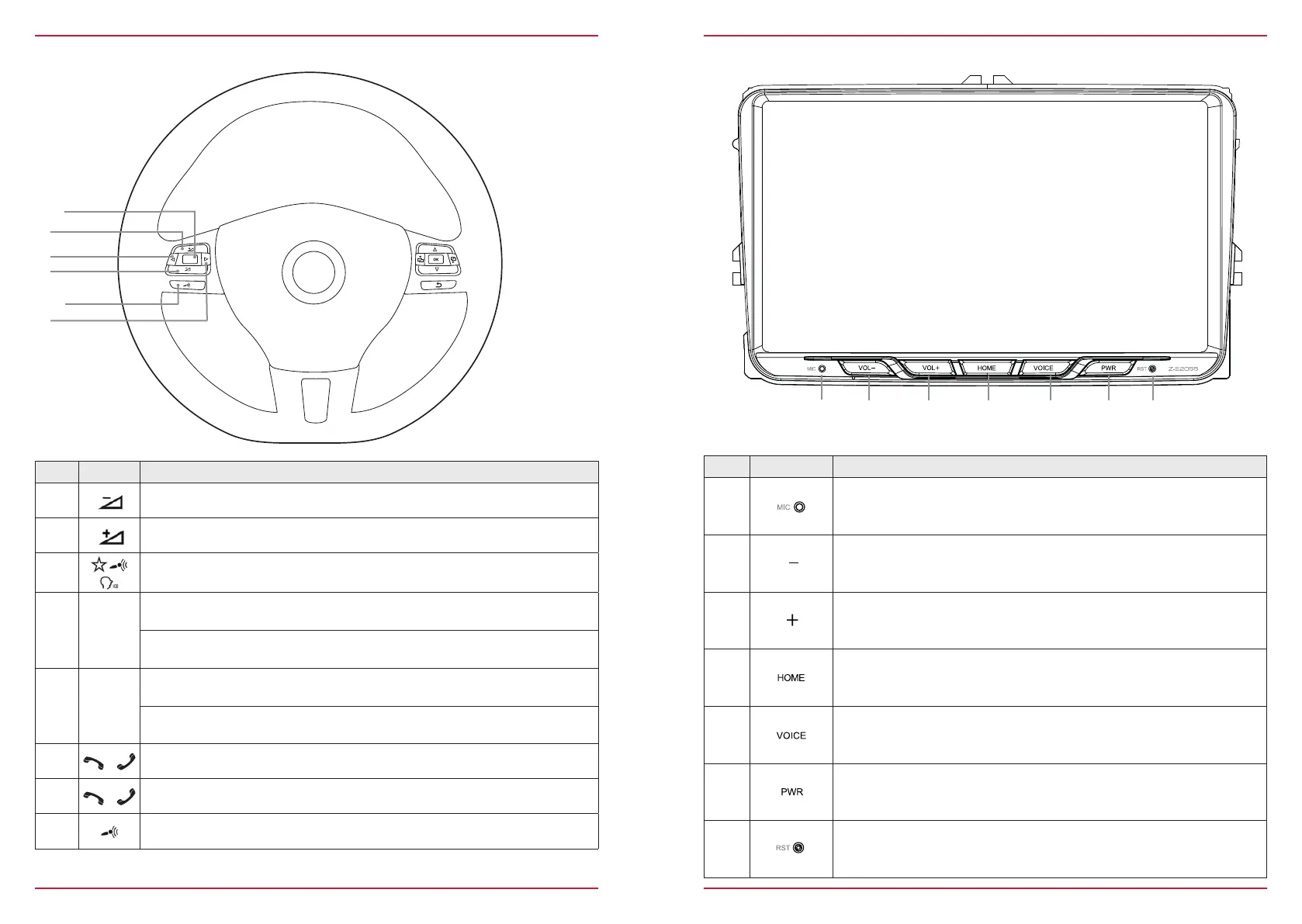
Z-E2055 (FRONT PANEL)
Device Front Panel Control Options
Item Icon Function
1
Internal Bluetooth microphone
2
Press, or press and hold to decrease the playback volume
3
Press, or press and hold to increase the playback volume
4
Tap to jump back to main menu
Press and hold jump to audio settings
5
Tap to start the Android and CarPlay voice control. Tap once more to
cancel the voice control.Tap and hold to restart the voice input.
6
Press to mute device, press and hold to turn device ON or OFF
7
Reset pin to perform hardware reset
MULTIFUNCTION STEERING WHEEL
Item Icon Function
1
Reduce volume
2
Increase volume
3
Mute
4
|
Radio source Press to choose the next radio station.
Media
source
Press to choose the next track/title.
Press and hold to fast forward.
5
|
Radio source Press to choose the previous radio station.
Media
source
Press to choose the previous next track/title.
Press and hold to fast rewind.
6
Accept call
7
Reject / End call
8
Voice (not supported)



 To Next Page