ZE-MC294
13
DISC OPERATION (COnTinUED)
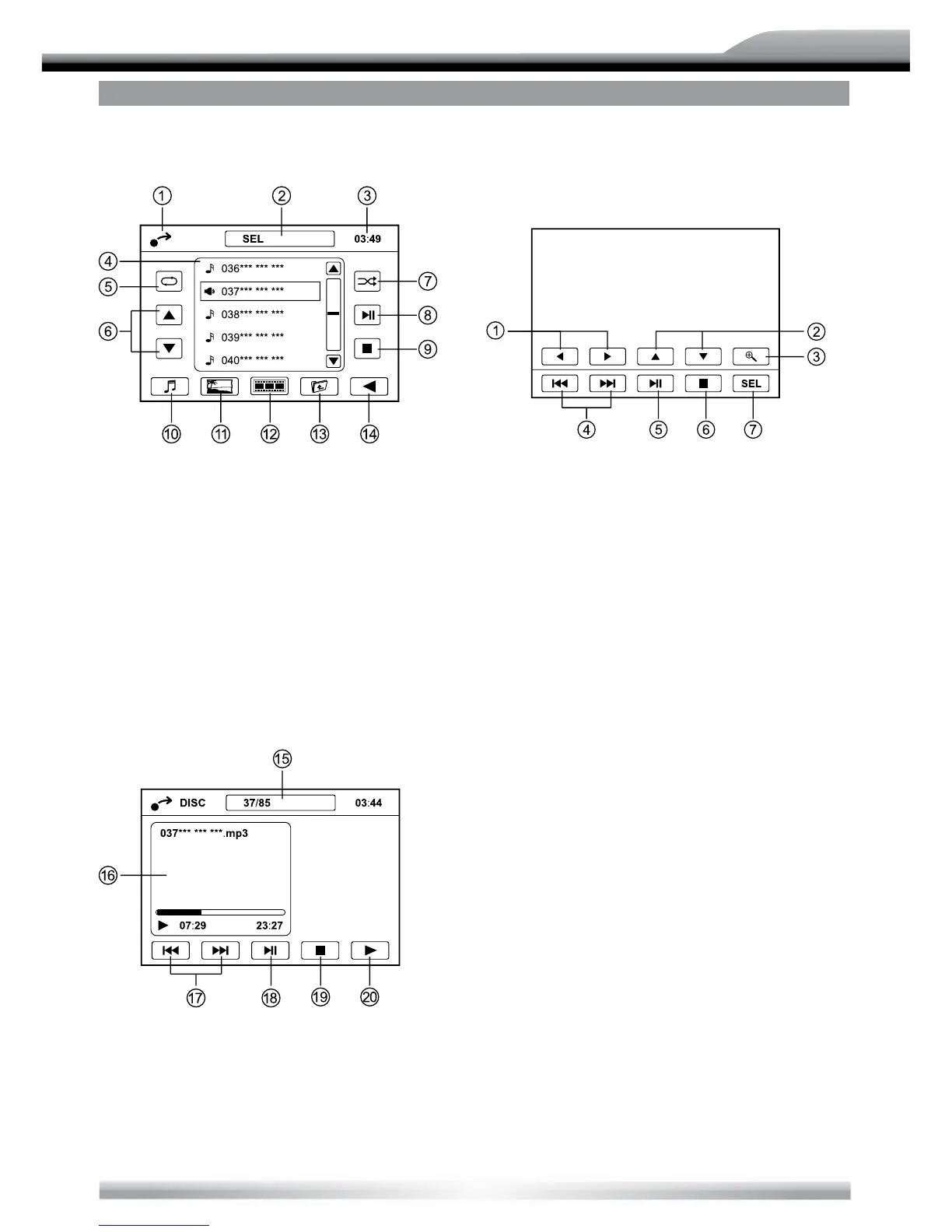
CD/MP3/MOVIE/PHOTO MENU
Touch the icon to access desired function.
1. Display main menu
2. Display audio/video setting menu
3. Current time
4. Folder/ le list
5. Repeat playback
6. Previous/next page
7. Random play
8. Play/Pause
9. Stop
10. Show audio le
11. Show photo le
12. Show video le
13. Back to up folder
14. Show next menu
15. Current track number/total track number
16. Playback Information
17. Track skip/seek
18. Play/Pause
19. Stop
20. Show previous menu
PHOTO INTRO MENU
While intro photos, touch the center of the
screen:
Touch to access desired function.
1. Rotate the picture anticiockwise/clock-
wise.
2. Mirror the picture vertically/horizontally
3. Zoom
4. Previous/next picture
5. Play/Pause
6. Stop
7. Display audio/video setting menu



 To Next Page