ZE-MC294
7
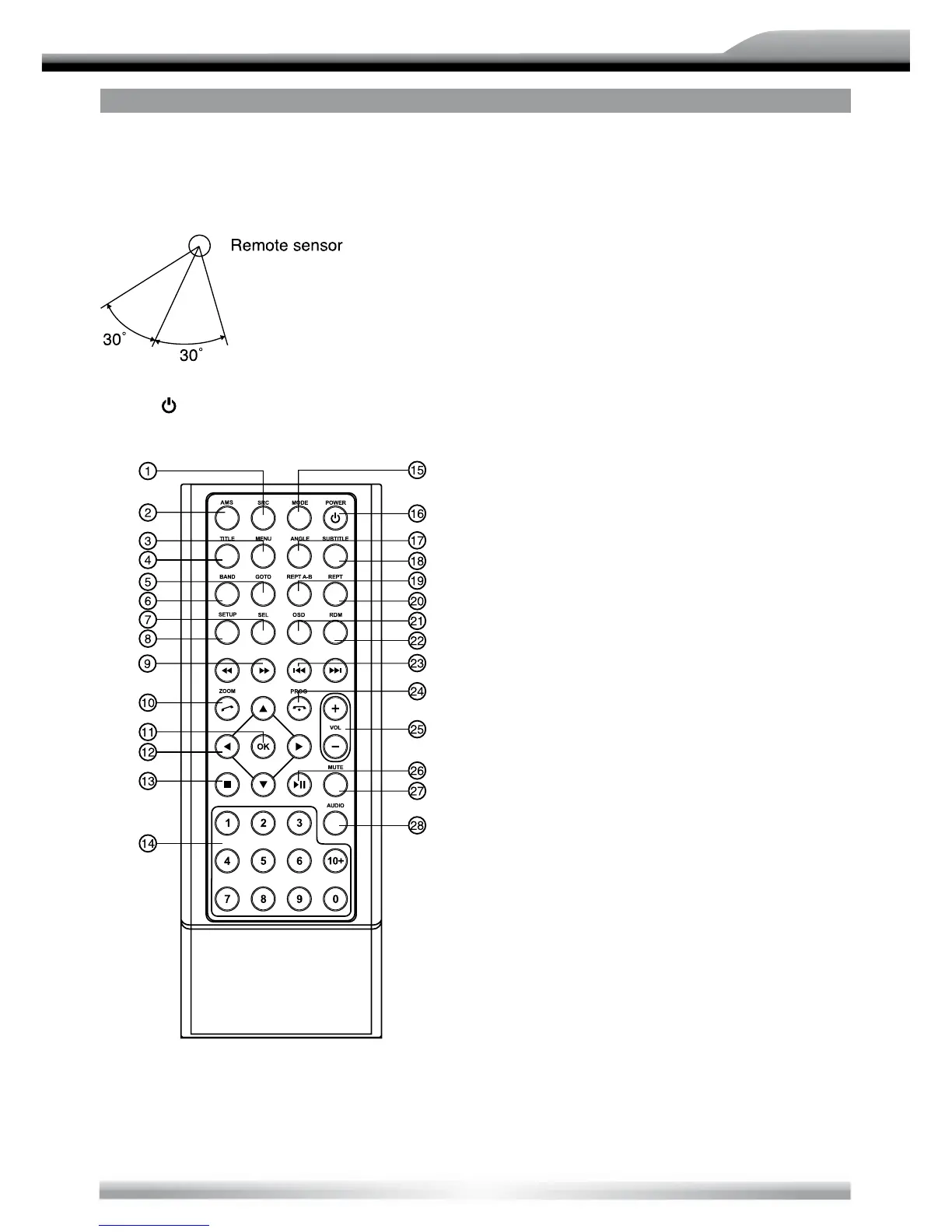
REMOTE CONTROL OPERATING RANGE
The remote control can operate within a
distance of 3~5 m.
Press ( ) to turn on/off the unit.
REMOTE CONTROLS
1. Select the following sources:
Radio
Disc (when a disc is inserted)
USB (when USB drive is connected)
Card (when an SD card is inserted)
AV1 (rear A/V In)
AV2 (front A/V In)
Bluetooth
Navigation (optional)
iPod (optional)
DVB-T (optional)
2. Radio preset scan
Radio auto preset
3. Menu (DVD)
4. Title (DVD)
5. Go to search
6. Radio band
Video System PAL/NTSC/AUTO
7. Sound/display setting
8. System setup
9. Fast reverse/forward playback
10. Zoom (DVD/VCD)
Dial/Receive call
11. Enter
12. Menu Cursor
13. Stop/Return
14. Digit area
15. Enter main menu
16. Power on/off
17. Angle (DVD)
18. DVD subtitle
19. A-B repeat
20. Repeat
21. On-screen display
22. Track random play
23. Radio tune
Track skip/seek
24. Call off/cancel
Program
25. Volume
26. Play/Pause
27. Mute
28. DVD audio
VCD audio L/R/ST



 To Next Page