Home
Zenith
DVD Player
DVT412
Page 11 (External Equipment Connections)
Zenith DVT412 - External Equipment Connections
36 pages
Manual
Save Page as PDF
To Next Page
To Next Page
To Previous Page
To Previous Page
Loading...
PREP
ARA
TION
11
Connections (Continued)
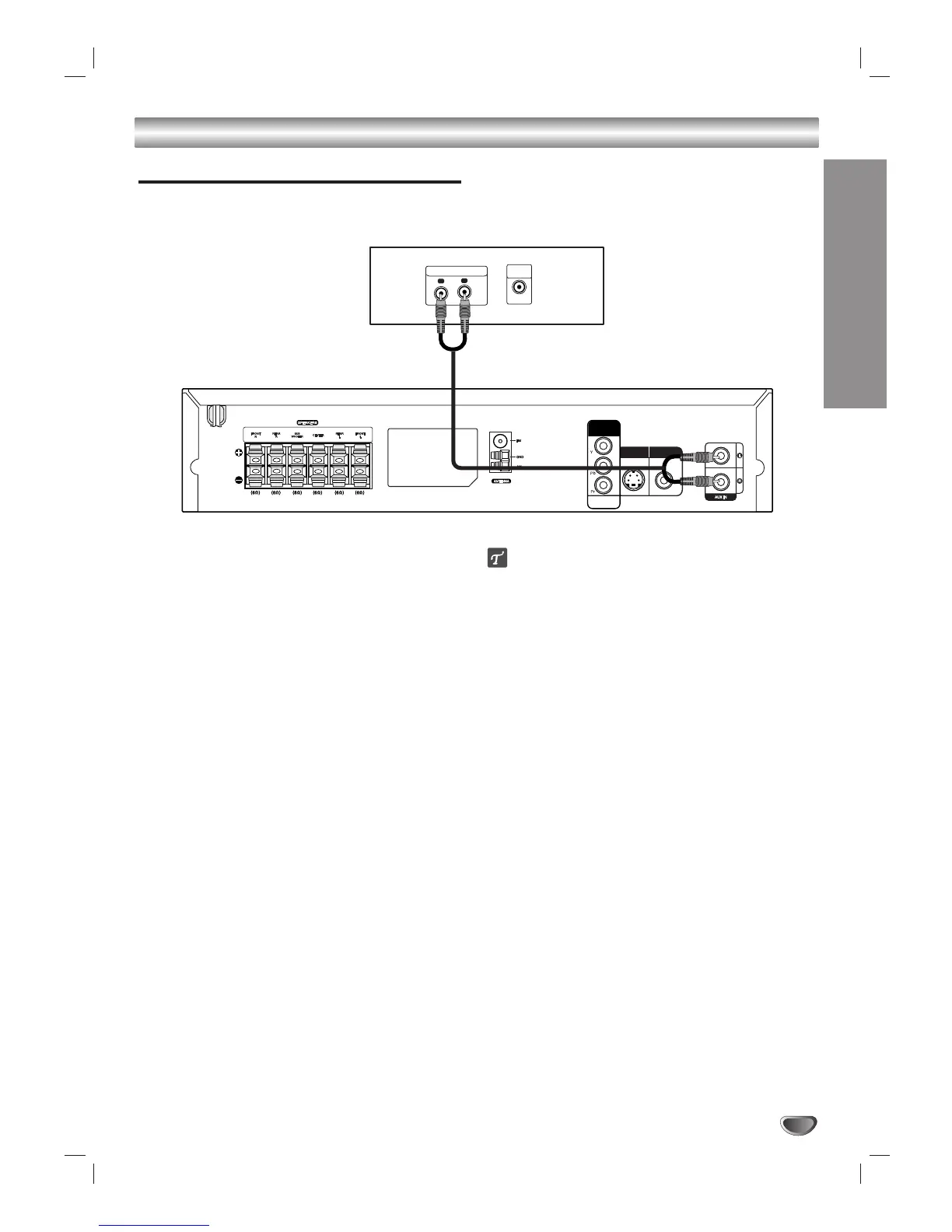
External Equipment Connections
Rear of VCR (or LD player
, etc)
L
R
AUDIO OUTPUT
VIDEO
OUTPUT
S/VIDEO OUT
COMPONENT
VIDEO OUT
PROGRESSIVE
SCAN
MONITOR OUT
Connection
Connect the
AUX IN (L/R) jacks on the DVD/CD
receiver to the
AUDIO OUT
(L/R) jacks on the VCR,
LD player
, etc using the audio cables.
ip
Press
AUX on the remote control to select input to these
jacks.
AUX appears on the Display Window
.
10
12
Table of Contents
Main Page
Safety Precautions
2
Important Safety Instructions
3
Table of Contents
4
Overview
5
Playable Discs
5
Precautions
6
Notes about Discs
6
About Symbols
6
Front Panel Controls and Display Window
7
Indicators
7
Remote Control Buttons
8
Rear Panel Connections
9
Connections
10
TV Connections
10
External Equipment Connections
11
AM-FM Antenna Connections
12
Speaker System Connections
13
Speaker Placement
14
Pre-Operation
15
Mini Glossary for Audio Stream & Surround Mode
15
Sound Mode
15
DVD/CD Player Overview
16
On-Screen Displays
16
Initial Setup
17
Initial Setup and Operation Overview
17
Language
17
Picture
17
Speaker Setup
18
Others
19
Parental Control
19
Pre-Operation
19
DVD Operation
20
DVD Playback
20
General Features
20
TITLE Selection
20
CHAPTER/TRACK Selection
20
Search
20
Pause
20
Still Picture and Frame-By-Frame Playback
21
Slow Motion
21
Repeat A-B
21
Repeat
21
Time Search
21
3D Surround
22
Zoom
22
Marker Search
22
Special DVD Features
22
Title Menu
22
Disc Menu
22
Camera Angles
22
Changing the Audio Language
22
Changing the Audio Channel
22
Subtitles
22
Audio CD and MP3/WMA Disc Operation
23
Playing Audio CD or MP3/WMA Discs
23
Notes on MP3/WMA Recordings
23
Pause
24
Changing Tracks
24
Repeat Track/All/Off
24
Search
24
Repeat A-B
24
3D Surround
24
Changing Audio Channels
24
Audio CD and MP3/WMA Disc Operation
24
JPEG File Operation
25
Viewing JPEG Files
25
Changing Files
25
Still Picture
25
Flipping the Picture
25
Rotating the Picture
25
Notes on JPEG Files
25
Programmed Playback
26
Playback
26
Speaker Setup
27
Additional Information
27
Radio Operation
28
Presetting Radio Stations
28
Listening to the Radio
28
Other Functions
29
Sleep Timer Setup
29
Dimmer
29
Mute
29
Using Headphones
29
Language Code List
30
Country Code List
31
Troubleshooting
32
Troubleshooting
33
Specifications
34
Other manuals for Zenith DVT412
Quick Setup Guide
2 pages
Related product manuals
Zenith DVB412
26 pages
Zenith DVB712
24 pages
Zenith ZDA311 Series
36 pages


 To Next Page