INTRODUCTION
7
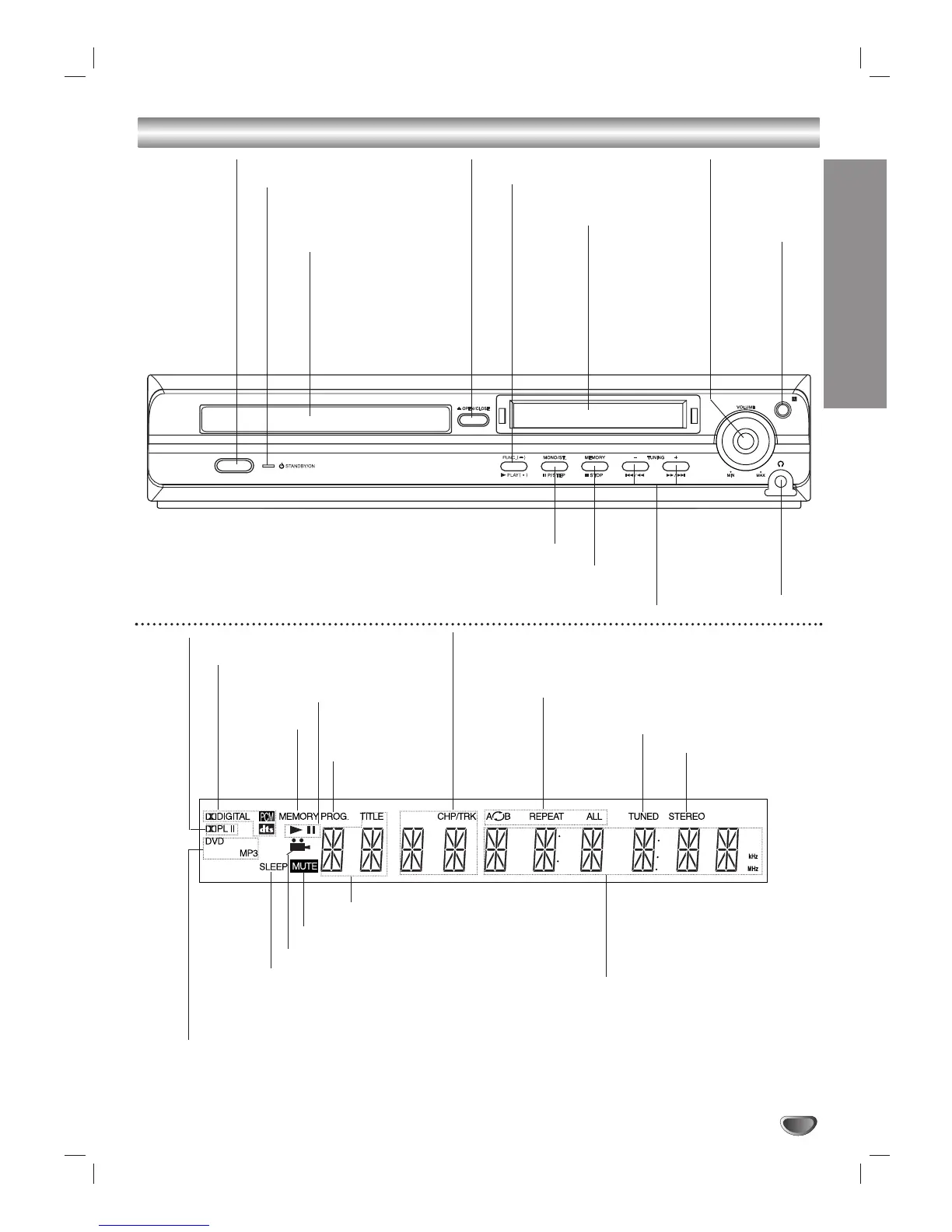
Front Panel Controls/ Display Window Indicators
Indicates current
player function:
Playback, Pause, etc.
ANGLE active
DVD DVD disc loaded
MP3 MP3 disc loaded
Indicates current chapter
or track number
Programmed
playback active
OPEN/CLOSE
TUNING (DOWN/UP)/
SKIP/SCAN
FUNCTION/
PLAY
Remote
sensor
PHONES
connector
VOLUME
controller
STANDBY/ON
DISPLAY
Window
STANDBY indicator
Lights red when the receiver
is in Standby mode (off).
MONO/STEREO/
PAUSE/STEP
MEMORY/STOP
DISC Tray
Indicates current title number
Indicates current
audio stream
Indicates current
surround mode
MUTE indicator
SLEEP indicator
Repeat playback
mode indicators
Total playing time/Elapsed time/
Frequency/Sleep time/Surround
mode/Volume etc. indicators
STEREO indicator
TUNED indicator
MEMORY
indicator


 To Next Page