EasyManua.ls Logo

Zenith H-100 - Clock Speed

Zenith H-100
98 pages
Print Icon
To Next Page IconTo Next Page
To Previous Page IconTo Previous Page
Loading...
INTRODUCTION
To
permi
t
the
H-207
to
operate
in
many
different
types
of
computers,
a
number
of
jumpers
and
a
slide
switch
are
incorporated
into
the
design
of
the
board.
These
devices
permit
configuring
the
controller
board
for
the
computer
environment
in
which
the
H-207
is
installed.
There
are
t h r e e ma
ina
rea
s 0 f
con
c
ern:
c10 ck s
pee
d j
urn
per
i ng ,
selection
of
interrupt
jumpers
and
the
setting
of
the
slide
switch,
DS1.
Refer
to
the
pictorial
on
the
adjacent
page
for
the
location
of
the
jumpers
and
the
slide
switch.
CLOCK
SPEED
The
host
computer
clock
speed
that
the
H-207
will
operate
wi
th
is
determined
by
the
jumpering
at
J1.
As
received,
J1
is
jumpered
by
a
foil
run
on
the
bottom
of
the
board.
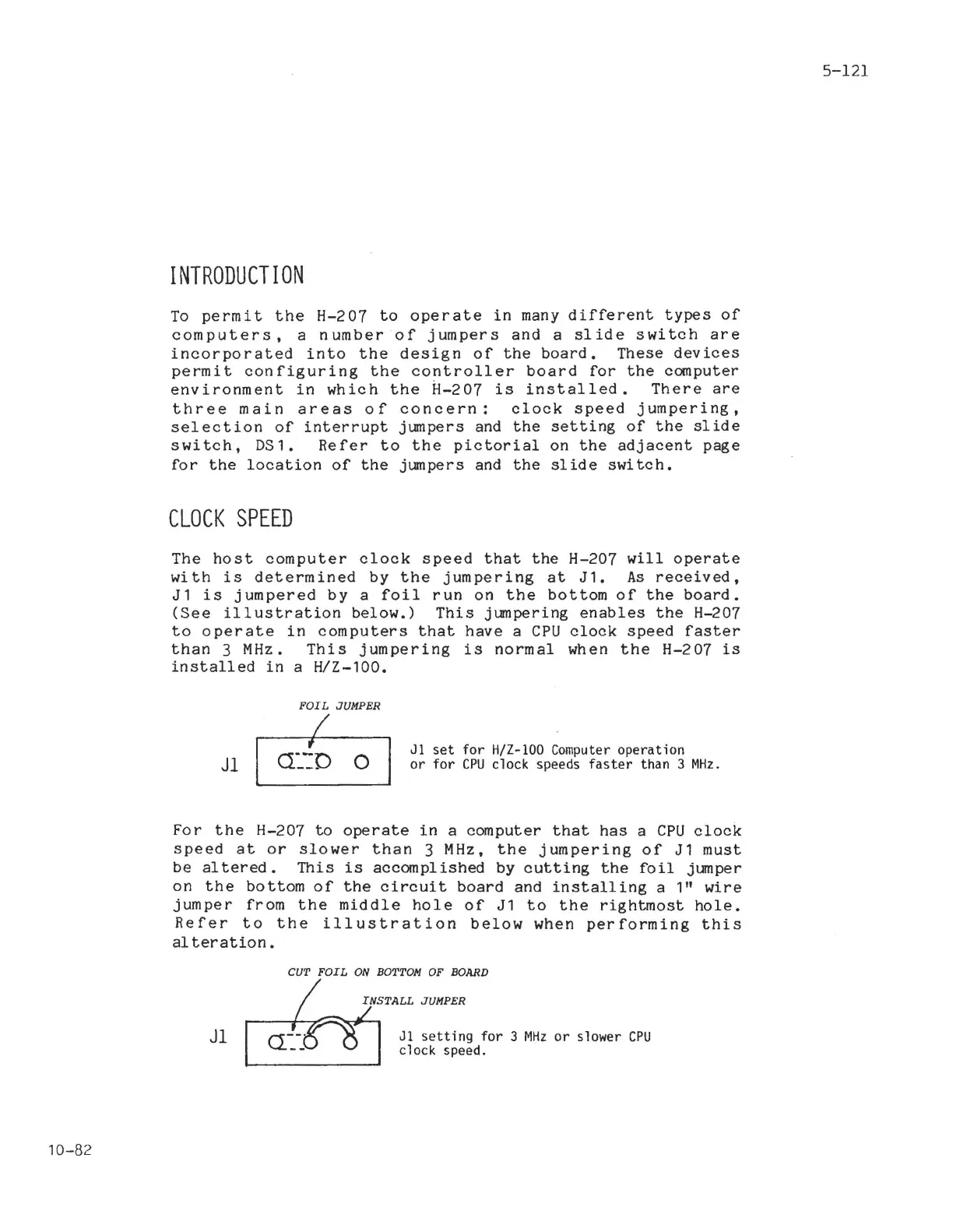
(See
illustration
below.)
This
jumpering
enables
the
H-207
to
operate
in
computers
that
have
a
CPU
clock
speed
faster
than
3
MHz.
This
jumpering
is
normal
when
the
H-207
is
installed
in
a
H/Z-100.
FOIL
JUMPER
I
5-121
Jl
,
O:':D 0
Jl
set
for
H/Z-IOO
Computer
operation
or
for
CPU
clock speeds
faster
than 3
MHz.
For
the
H-207
to
operate
in
a
computer
that
has
a
CPU
clock
speed
at
or
slower
than
3
MHz,
the
jumpering
of
J1
must
be
al
tered.
This
is
accomplished
by
cutting
the
foil
jumper
on
the
bottom
of
the
circuit
board
and
installing
a 1"
wire
jumper
from
the
middle
hole
of
J1
to
the
rightmost
hole.
Refer
to
the
illustration
below
when
performing
this
al
teration.
CUT
FOIL
ON
BOTTOM
OF
BOARD
10-82
Jl
Jl
setting
for
3
MHz
or
slower
CPU
clock speed.

Related product manuals