MFL34797058-en-simple 11/6/07 4:52 PM Page 19
VCR SETUP
When connecting with a RCA cable
1. How to connect
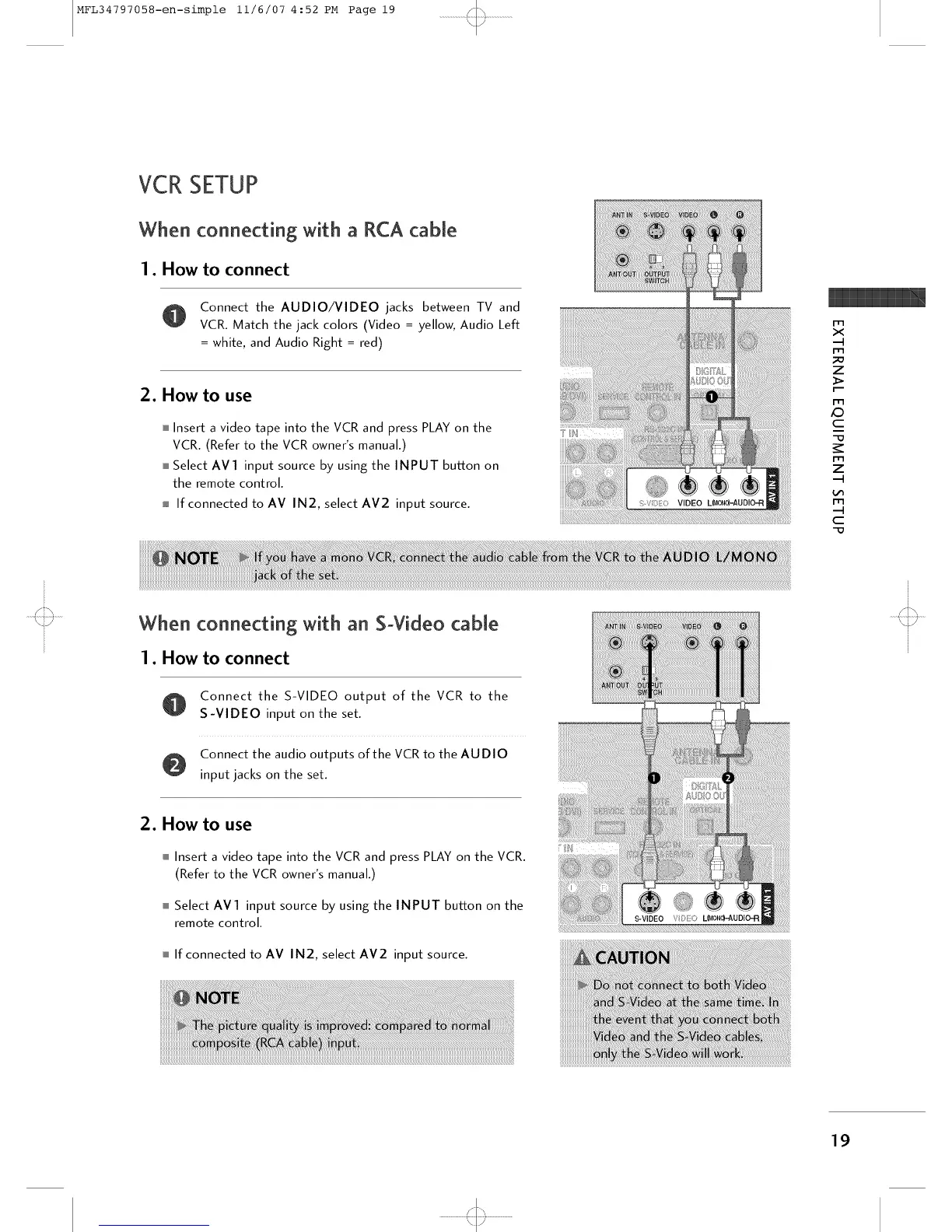
Connect the AUDIO/VIDEO jacks between TV and
VCR. Match the jack colors (Video = yellow, Audio Left
= white, and Audio Right = red)
2. How to use
mInsert a video tape into the VCR and press PLAY on the
VCR. (Refer to the VCR owner's manual.)
mSelect AV1 input source by using the INPUT button on
the remote control.
m If connected to AV IN2, select AV2 input source.
T
m
x
m
_o
7
>
i-m
£9
c
-o
I'r3
7
rT1
c
-o
When connecting with an S+Video cable
1. How to connect
Connect the S-VIDEO output of the VCR to the
S-VIDEO input on the set.
Connect the audio outputs of the VCR to the AUDIO
input jacks on the set.
2. How to use
m Insert a video tape into the VCR and press PLAY on the VCR.
(Refer to the VCR owner's manual.)
m Select AVl input source by using the INPUT button on the
remote control.
m If connected to AV IN2, select AV2 input source.
19
'<:::3



 To Next Page