MFL34797058-en-simple 11/6/07 4:52 PM Page 7
FRONT PANEL[NFORMATMON
_ Here shown may be somewhat different from your TV.
NOTE: If your product has a protection tape attached, remove the tape.
And then wipe the product with a cloth (Ira polishing cloth is included with your product, use it).
Front Panel Controls
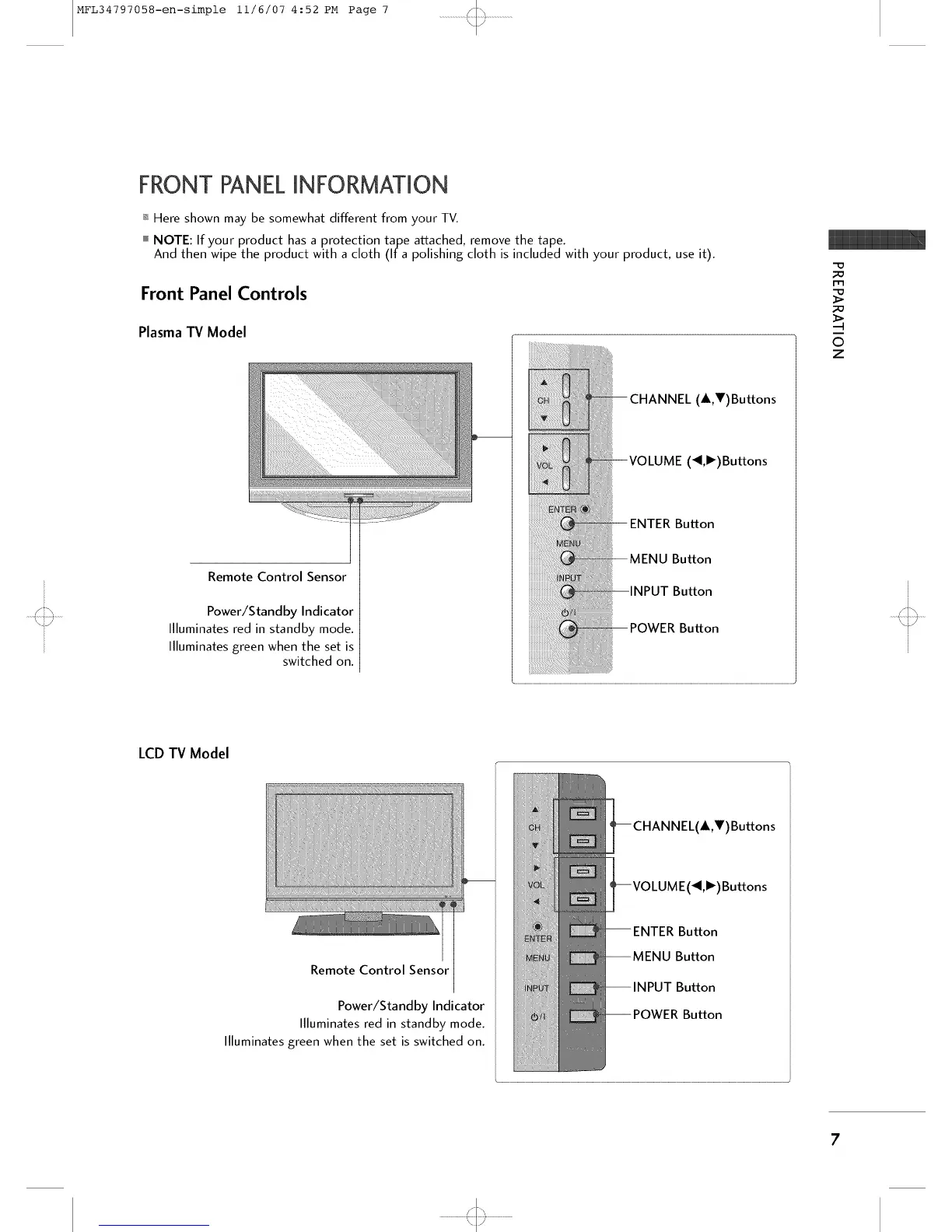
Plasma TV Model
Remote Control Sensor
Power/Standby Indicator
Illuminates red in standby mode.
Illuminates green when the set is
switched on.
CHANNEL (A,V)Buttons
(_,')Buttons
ENTER Button
MENU Bu_on
Bu_on
Bu_on
©
Z
LCDTV Model
Remote Control Sensor
Power/Standby Indicator
Illuminates red in standby mode.
Illuminates green when the set is switched on.
(A,V) Buttons
(_I,I_) Buttons
Button
Button
Button
Button
'<:::3



 To Next Page