MFL34797058-en-simple 11/6/07 4:52 PM Page 15
STAND INSTALLATION
32/42LC7D only
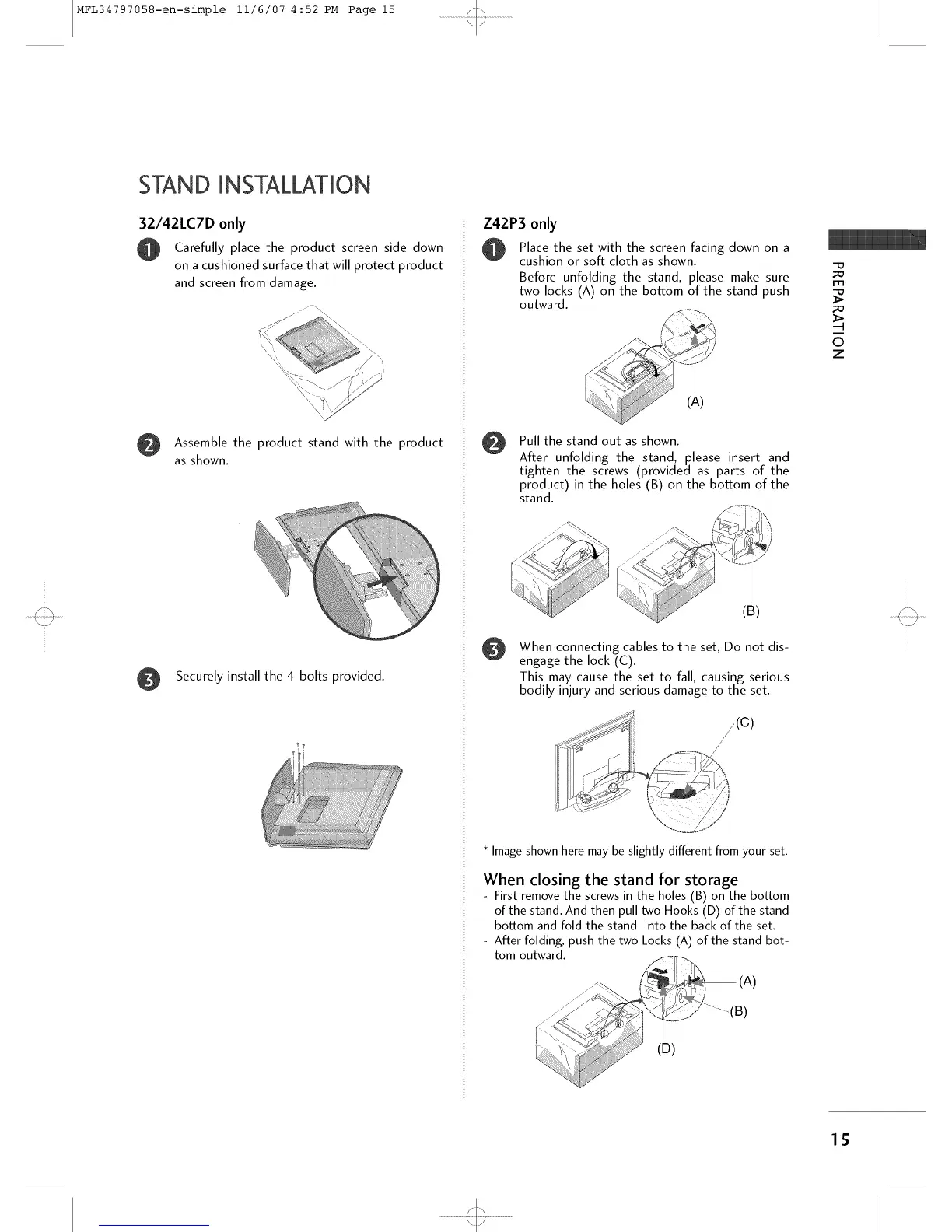
Carefully place the product screen side down
on a cushioned surface that will protect product
and screen from damage.
Assemble the product stand with the product
as shown.
Securely install the 4 bolts provided.
Z42P3 only
Place the set with the screen facing down on a
cushion or soft cloth as shown.
Before unfolding the stand, please make sure
two locks (A) on the bottom of the stand push
outwa rd.
@
/
(A)
Pull the stand out as shown.
After unfolding the stand, please insert and
tighten the screws (provided as parts of the
product) in the holes (B) on the bottom of the
stand.
(B)
When connecting cables to the set, Do not dis-
engage the lock (C).
This may cause the set to fall, causing serious
bodily injury and serious damage to the set.
/(c)
/
Image shown here may be slightly different from your set.
When closing the stand for storage
- First remove the screws in the holes (B) on the bottom
of the stand. And then pull two Hooks (D) of the stand
bottom and fold the stand into the back of the set.
- After folding, push the two Locks (A) of the stand bot-
tom outward.
(A)
(D)
-D
;O
I-I"1
;D
O
z
15
'<::3



 To Next Page