MFL34797058-en-simple 11/6/07 4:52 PM Page 20
EXTERNALEQUIPMENT SETUP
PC SETUP
m
x
m
z
>
m
£9
c
O
m
z
m
c
O
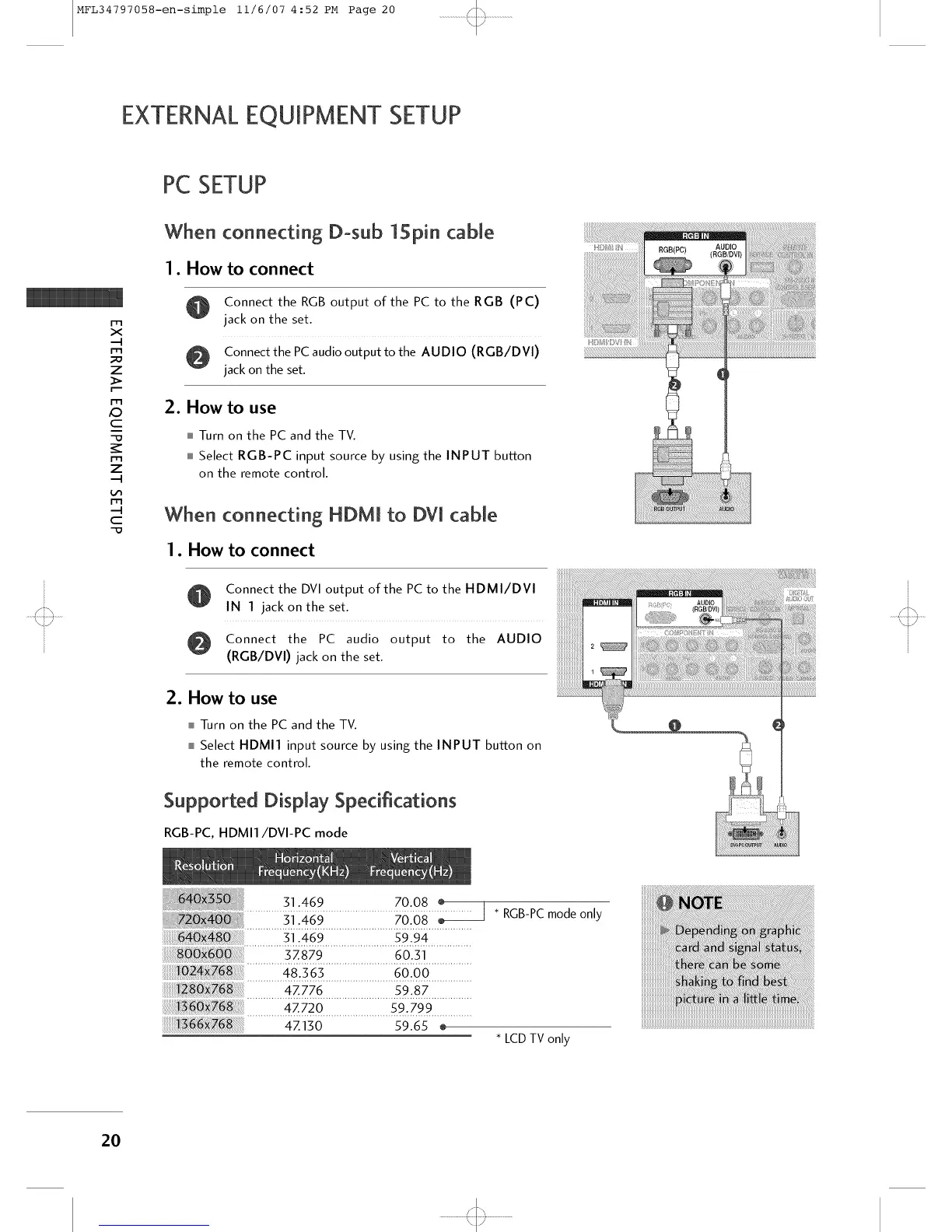
When connecting Dosub 15pin cable
1. How to connect
Connect the RGB output of the PC to the RGB (PC)
jack on the set
Connect the PCaudio output to the AUDIO (RGB/DVI)
jack on the set.
2. How to use
Turn on the PC and the TV.
Select RGB-PC input source by using the INPUT button
on the remote control.
When connecting HDM[ to DV[ cable
1. How to connect
Connect the DVI output of the PC to the HDMI/DVI
IN 1 jack on the set.
Connect the PC audio output to the AUDIO
(RGB/DVI) jack on the set.
2. How to use
Turn on the PC and the TV.
Select HDMI1 input source by using the INPUT button on
the remote control.
Supported Display Specifications
RGBPC HDMI1/DVI PC mode
............... ] 1 _ 469 ........................... 70_081 IO .......... ] * RGBPC mode only
............... ] 1 I _ 469 ........................... 5 9 I I 94 ................
.............48:$6s..........................60:()0................
4Z720 59.799
.............._7iso...........................Bi6 .........
* LCDTV only
2O
'<::3



 To Next Page