MFL34797058-en-simple 11/6/07 4:52 PM Page 17
EXTERNAL EQUIPMENT SETUP
To prevent the equipment damage, never plug in any power cords until you have finished connecting all equipment.
This part of EXTERNAL EQUIPMENT SETUP mainly use picture for LCD TV model,
HD RECEIVERSETUP
This TV can receive Digital Over-the-air/Cable signals without an external digital set-top box. However, if you do
receive digital signals from a digital set-top box or other digital external device, refer to the figure as shown below.
When connecting Component cable
1. How to connect
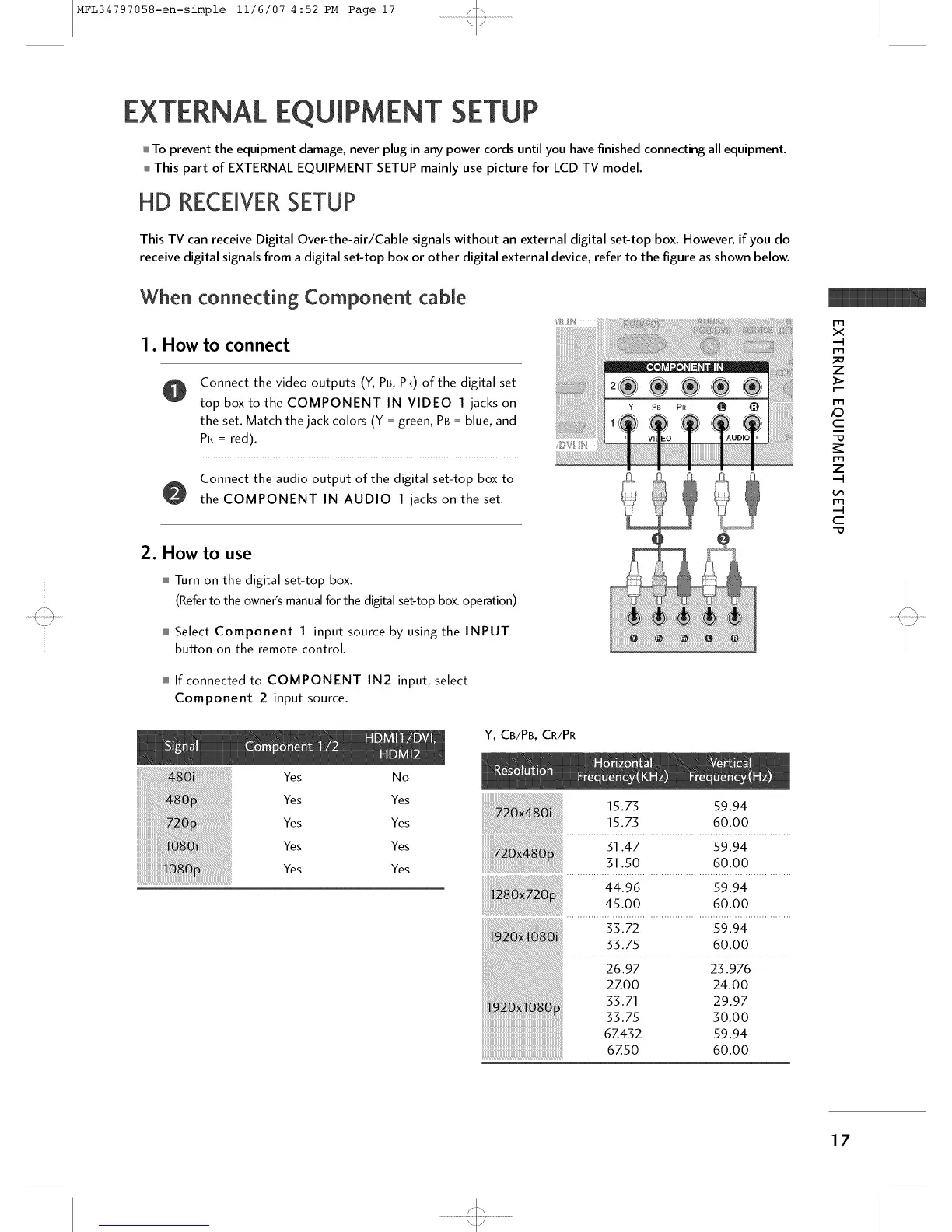
Connect the video outputs (Y, PB, PR) of the digital set
top box to the COMPONENT IN VIDEO 1 jacks on
the set. Match the jack colors (Y = green, PB = blue, and
PR = red).
Connect the audio output of the digital set-top box to
the COMPONENT IN AUDIO 1 jacks on the set.
2. How to use
Turn on the digital set-top box.
(Refer to the owner's manual for the digital set-top box. operation)
Select Component 1 input source by using the INPUT
button on the remote control.
If connected to COMPONENT IN2 input, select
Component 2 input source.
Y, CB/PB, CR/PR
m
x
m
z
>
m
K9
c
-D
_r
m
z
m
c
-D
Yes No
Yes Yes
Yes Yes
Yes Yes
Yes Yes
15.73 59.94
15.73 60.00
31.47 59.94
31.50 60.00
[[[[[
44.96 59.94
45.00 60.00
33.72 59.94
33.75 60.00
26.97 23.976
2ZO0 24.00
33.71 29.97
33.75 30.00
6Z432 59.94
67.50 60.00
17



 To Next Page