10
8 PAIRING THE SENSOR IN THE APP
Please be aware that the pairing of your HEAD Tennis Sensor is carried out entirely
in the app. The Sensor should not be paired via the Bluetooth menu of your
smartphone/tablet. The new user interface of the Sensor is controlled via the app.
Therefore, if you try to connect the new Sensor via the Bluetooth settings of your
device, it will either not be displayed or it will be unable to pair since the app user
interface regulates the pairing to the Sensor itself.
8.1 Connecting the Sensor and app for the first time
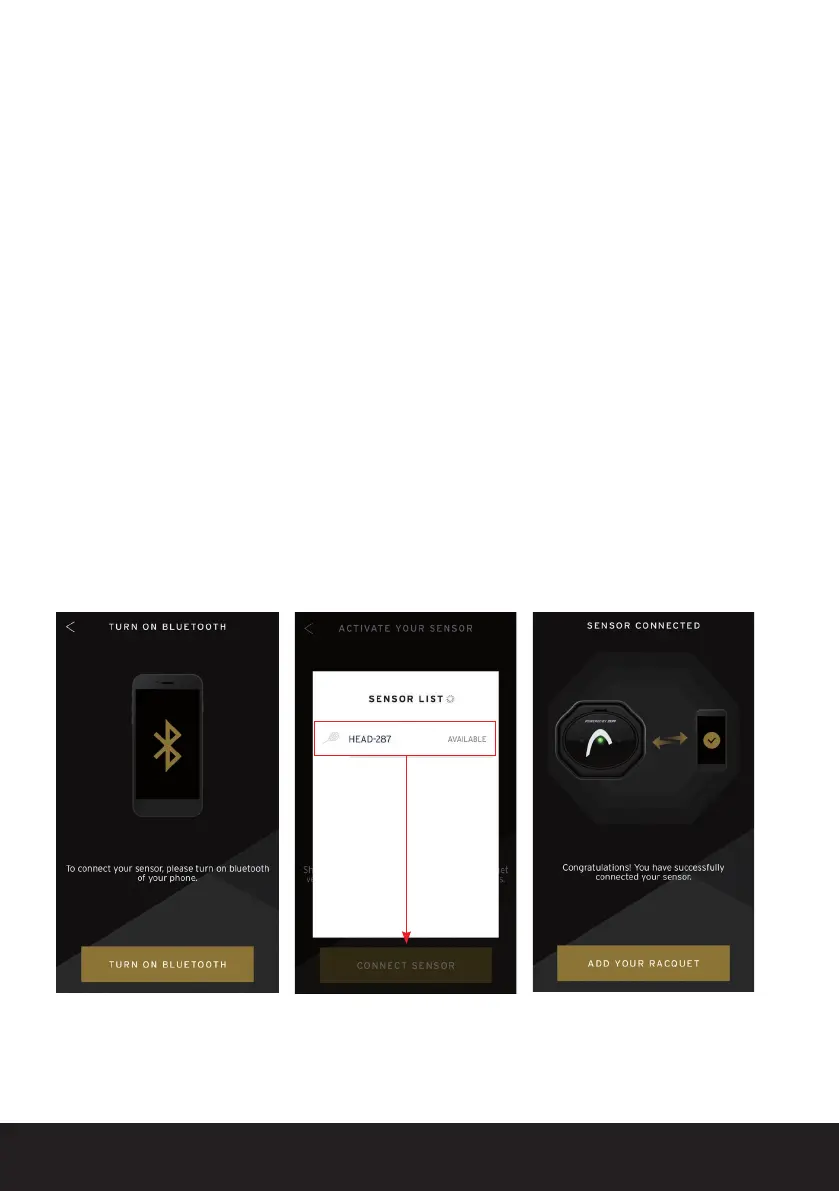
To connect your HEAD Tennis Sensor, ensure that Bluetooth is activated on your
mobile device from the settings menu.
Once Bluetooth has been activated via the settings on your device, go back to the
HEAD Tennis Sensor app. The available Sensor should now be displayed in the
Sensor list.
By clicking on the displayed Sensor, you can pair it to the app.


 To Next Page