3
1 Key Facts about the Sensor 4
1.1 Three factors that make the Sensor unique 4
1.2 Sensor technology 5
1.3 Compatible HEAD racquet models 5
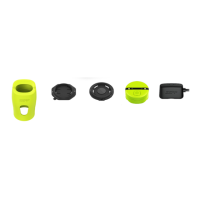
2 The Sensor package – parts included 6
3 Download app 6
4 Login 7
5 Fitting the Sensor to racquets 8
6 Charging the Sensor 9
7 Switching the Sensor on and off 9
8 Pairing the Sensor in the app 10
8.1 ConnectingtheSensorandappforthersttime 10
8.2 Repeating the connection between the Sensor and app 11
9 Add HEAD racquet in the app 12
9.1 Addrstracquetintheapp 12
9.2 Add additional racquets 14
10 Prole 15
10.1 Settingupyourrstprole 15
10.2 Editingaprole 16
11 Modes 17
11.1 Mode: PLAY 17
11.2 Mode: TRAIN 23
11.3 Mode: COMPETE 24
11.4 Mode: PRACTICE SERVE 26
12 Sharing Sensor data and images 27
13 Carryingoutrmwareupdates 28
14 Disconnecting the Sensor and editing the Sensor name 29
15 Resetting your password 30
16 Problem solving: Sensor cannot be paired 31
16.1 Scenario 1: Sensor is not displayed 31
16.2 Scenario 2: Sensor is displayed but does not pair 32
17 Problem solving: Sensor does not detect serve 33
18 Problem solving: Sensor does not detect strokes 34
19 Customer Service Center 34
CONTENTS


 To Next Page