28
13 CARRYING OUT FIRMWARE
UPDATES
Click‘Firmwareupdate’andfollowtheinstructionstoupdateyourSensor’srmware.
In some cases, the update is started automatically.
Dependingonthesmartphone,armwareupdatemaytake1–5minutes.
Please be patient while this process is completed. Once the update is complete
amessageappearsonthescreenconrmingthattheupdatewasperformed
successfully.
WhenappsareupdatedintheAppleStoreorinGooglePlay,armwareupdatemay
also be included. Firmware updates improve how precise the Sensor is and can be
completed in just a few minutes.
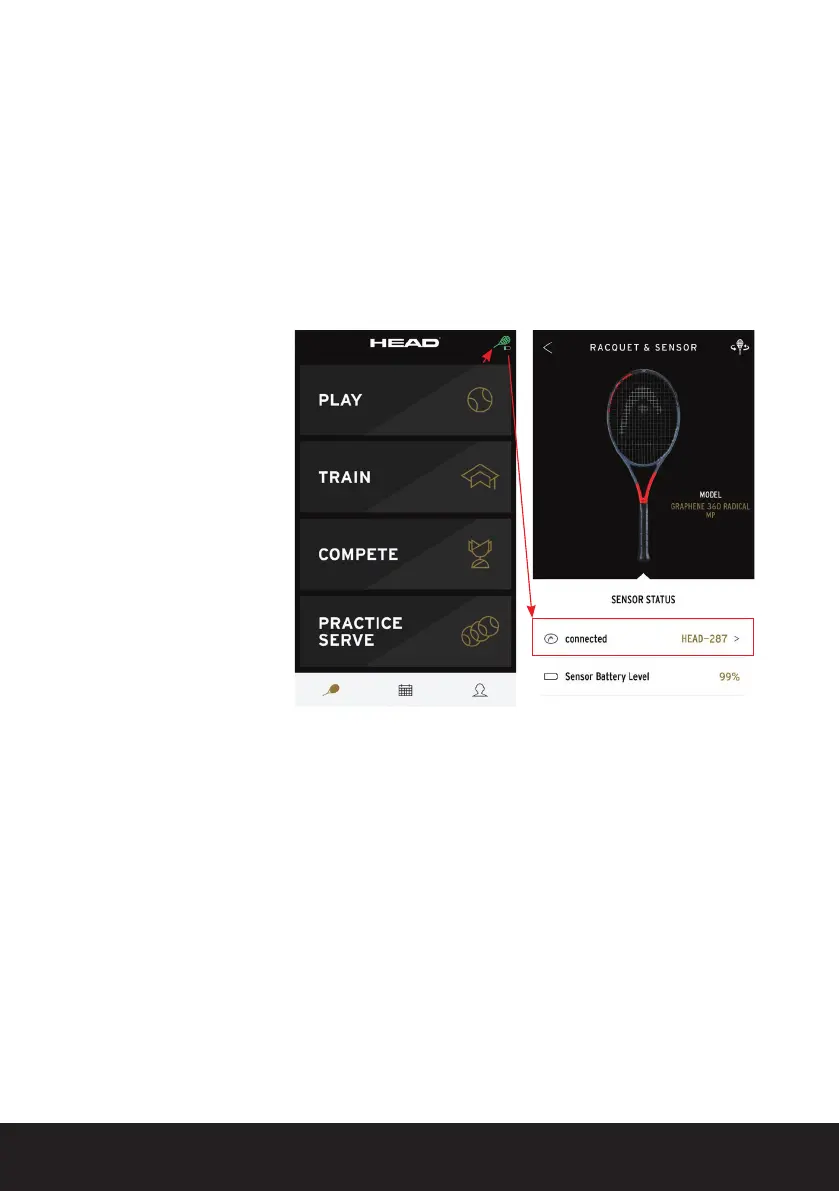
Ifarmwareupdateisavailable,asmallredarrowlightsupnexttothegreenracquet
symbol on the start page.
Tocarryoutthermware
update click on the green
tennis racquet symbol.
Then click on ‘Connected
sensor’ and select the
Sensor from the Sensor
list.


 To Next Page