16
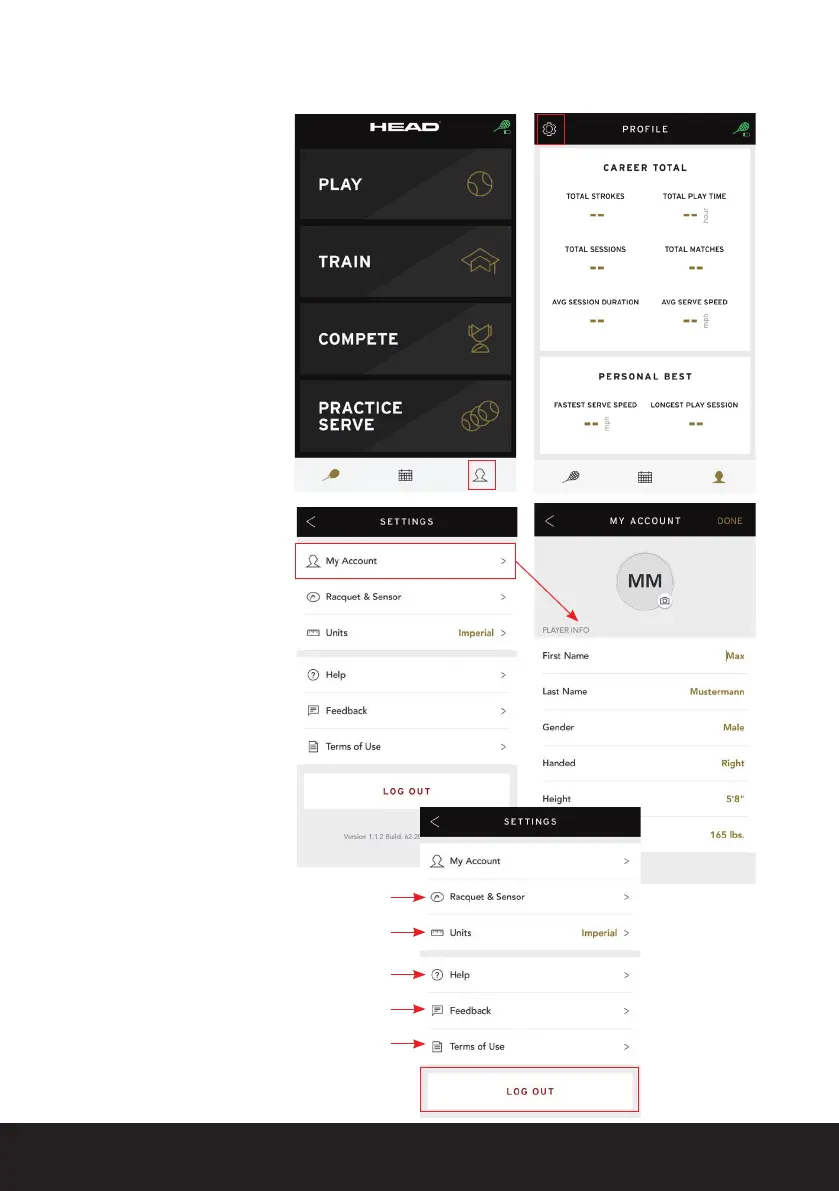
Click on the person symbol
in the bottom right of the
menu list to access your
prole.
Here you can see your
entire HEAD Tennis Sensor
history as well as your
personal best performance.
Additionally, you can edit
yourprolebyclickingon
the gear symbol.
Under ‘My Account’
you can now edit your
personalizedplayerprole
includingyourrstand
last name, gender, playing
hand, height, weight and
prolepicture.
Furthermore, in the
‘SETTINGS’ option of the
app
you can select the
following:
- Edit the ‘RACQUET &
SENSOR’ connection
- Choose between metric
(centimeter, meter, etc.)
or imperial (inches,
yards, etc.) units
- Contact us and FAQs
- Send us feedback
- Read the terms of use
If you would like to log out
of your account,
you can do so by clicking
on ‘LOG OUT’.
10.2 Editing a profile


 To Next Page