11
8.2 Repeating the connection between
the Sensor and app
To connect your HEAD Tennis Sensor, ensure that Bluetooth is activated in the
settings menu of your mobile device (see Point 8.1) and then log in to your HEAD
Tennis Sensor App.
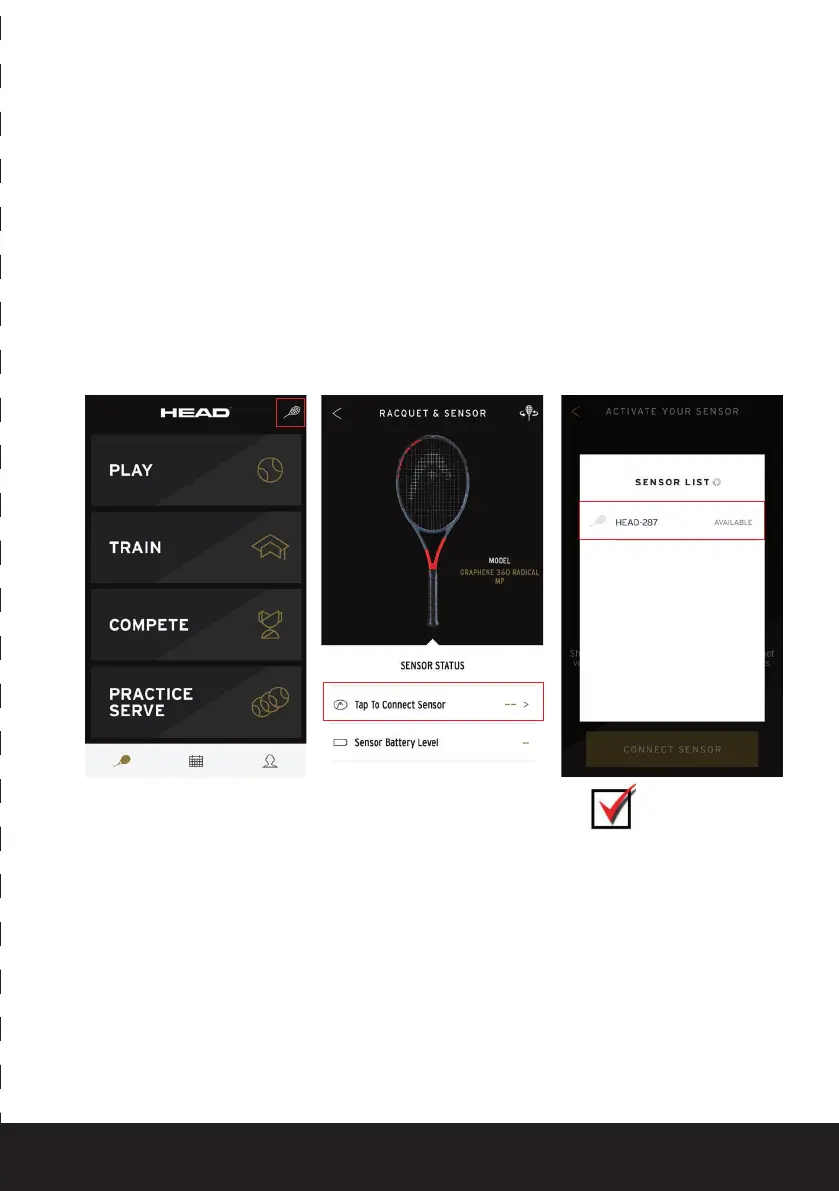
Once you have logged in, follow these steps:
1. Click on the gray racquet
symbol in the top right
of the start screen
2. Then click on the
‘Tap to connect Sensor’
button
Once steps 1–3 have been completed successfully, the Sensor should be paired to the
HEAD Tennis Sensor app.
3. Click on the displayed
Sensor in the list of
available Sensors (in this
case: HEAD-287)
13
3. Klicke in der Liste der verfügbaren Sensoren auf den angezeigten Sensor (hier: HEAD-76C).
Nach erfolgreicher Durchführung der Schritte 1-3 ist der Sensor nun mit der HEAD Tennis Sensor App
verbunden.
9 HEAD Schläger in der App hinzufügen
9.1 Ersten Schläger hinzufügen
Wenn Du in der Head Tennis Sensor App noch keinen Schläger hinzugefügt hast, zeigt Dir die App
folgendes an:
CONNECTED
WITH SENSOR


 To Next Page