Handleiding Internet van Ziggo 16
3.3 Connecting the Wireless Voice Gateway to a
Single Computer
This section of the manual explains how to connect your Wireless Voice
Gateway to the Ethernet port on your computer and install the necessary
software. Please refer to Figure 1-5 to help you connect your Digital Cable
Modem for the best possible connection.
3.3.1 Attaching the Cable TV Wire to the Wireless
Voice Gateway
1. Locate the Cable TV wire. You may find it one of three ways:
a. Connected directly to a TV, a Cable TV converter box, or VCR. The line
will be connected to the jack, which should be labeled either IN, CABLE
IN, CATV, CATV IN, etc.
b. Connected to a wall-mounted cable outlet.
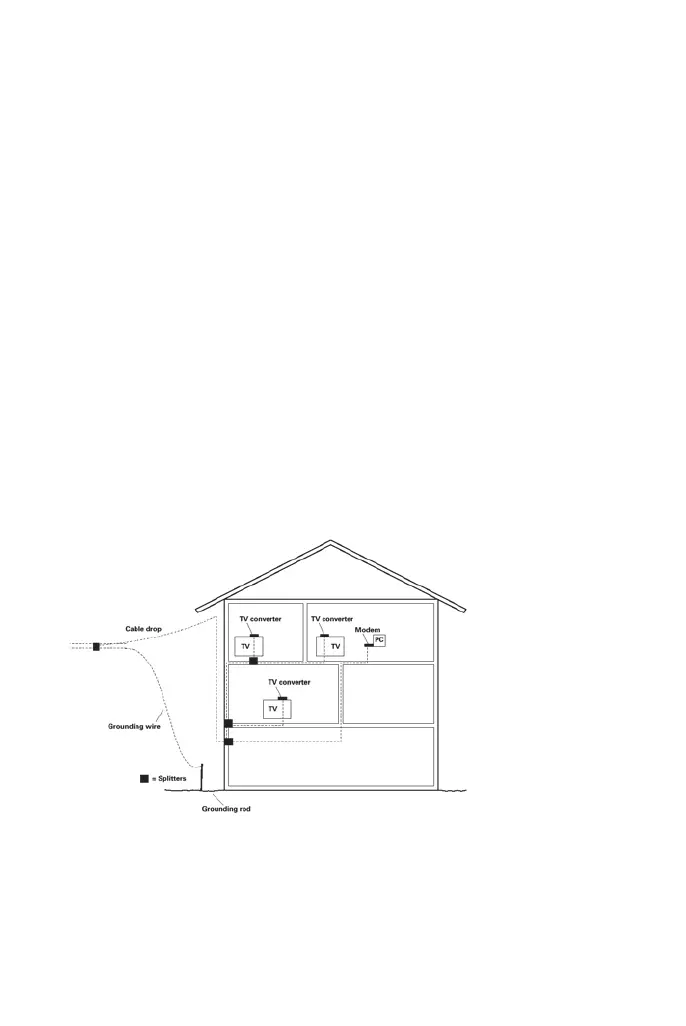
c. Coming out from under a baseboard heater or other location. See Figure
1-6 for the wiring example.
For optimum performance, be sure to connect your Wireless Voice Gateway to
the first point the cable enters your home. The splitter must be rated for at least
1GHz.
figure 5: Basic home wiring


 To Next Page