Handleiding Internet van Ziggo 53
4.5.4 Remote Log
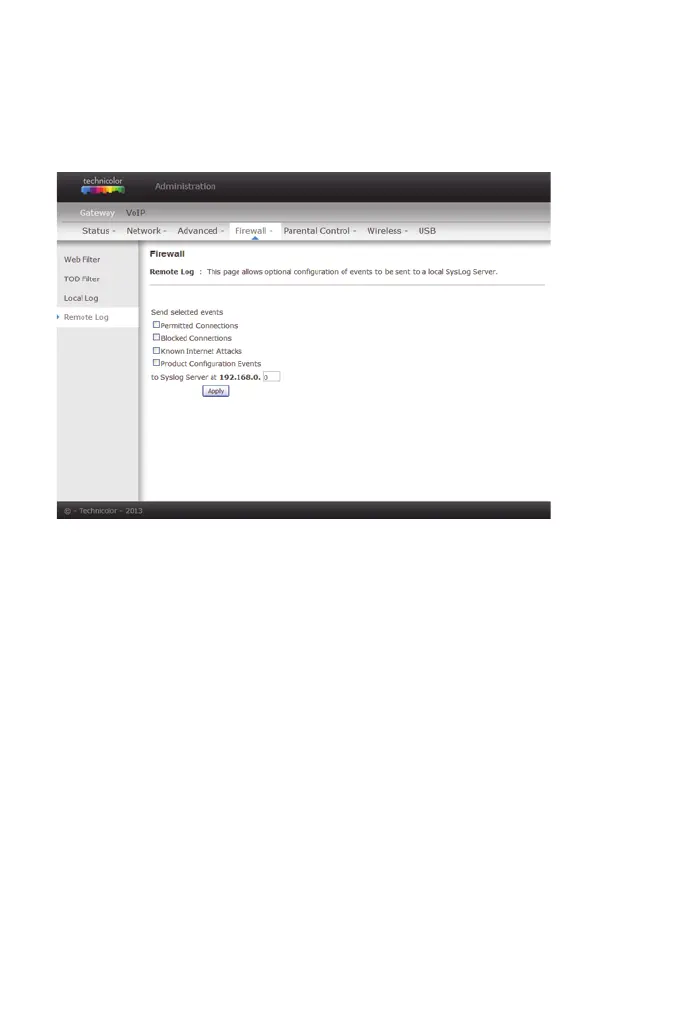
The Remote Log page allows you to specify the IP address where a SysLog
server is located on the LAN Side and select different types of firewall events that
may occur. Then, each time such an event occurs, notification is automatically
sent to this log server.
figure 42: Gateway\Firewall\Remote Log
4.6 Gateway – Parental Control Web Page Group
4.6.1 Basic
This page allows you to enable, disable, and configure a variety of firewall
features associated with web browsing, which uses the HTTP protocol and
transports HTML web pages. On these pages, you designate the gateway packet
types you want to have forwarded or blocked. You can activate settings by
checking them and clicking Apply.
Here are some of your choices on the Parental Control page:
•Activate Keyword Blocking and specify some keywords in the Keyword List
to cause blocking of web pages on the WAN side with the specified keyword
in the content.
•Activate Domain Blocking and specify some Domain Names (e.g.
www.ABC.com) in the Domain List.


 To Next Page