Handleiding Internet van Ziggo 85
5.6 Cable Modem (CM) Mode
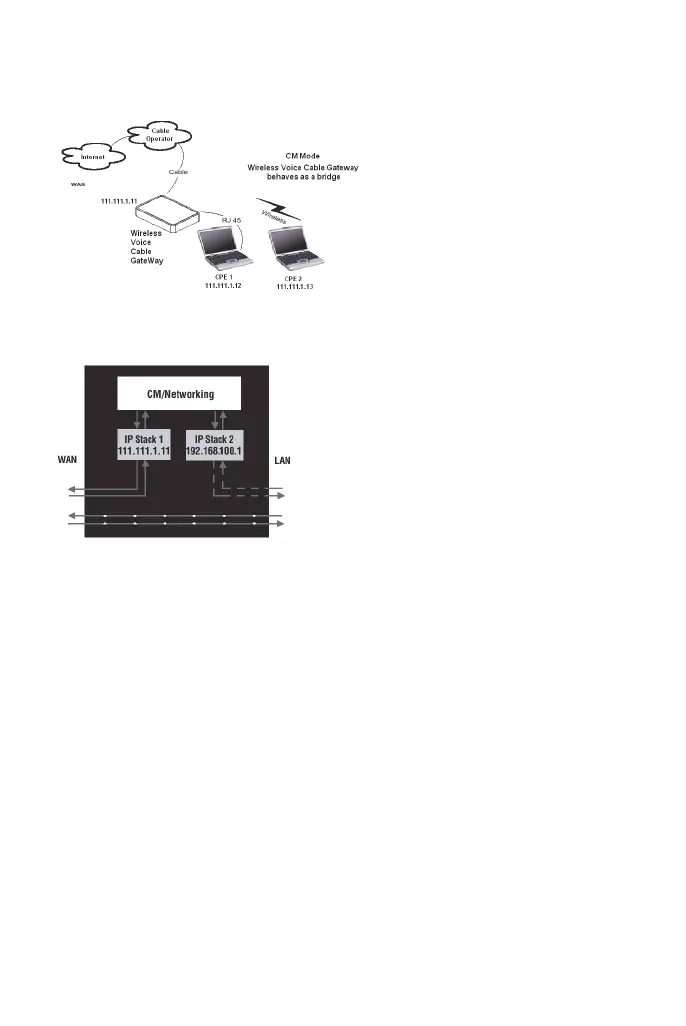
figure 68: Cable Modem Mode
figure 69: Two IP stacks are activated in cable modem mode
CM (Cable Modem) Mode provides basic home networking. In this mode, two
IP stacks are active:
• IP Stack 1 - for use by the cable company to communicate with the cable
modem section only. This stack receives its IP address from the cable
company during CM initialization. It uses the MAC address printed on the
label attached to the Wireless Cable gateway.
• IP Stack 2 - for use by you, the end user, to communicate with the cable
modem and Networking sections, to access the internal web page
diagnostics and configuration. This stack uses a fixed IP address:
192.168.100.1. It uses a MAC address 00:10:95:FF:FF:FE.
With CM Mode, your cable company must provide one IP address for the CM
section, plus one for each PC you connect from their pool of available
addresses. Your cable company may have you or your installer manually enter
these assigned addresses into your PC, or use a DHCP Server to communicate


 To Next Page