Handleiding Internet van Ziggo 34
4.3.4 DDNS - Dynamic DNS service
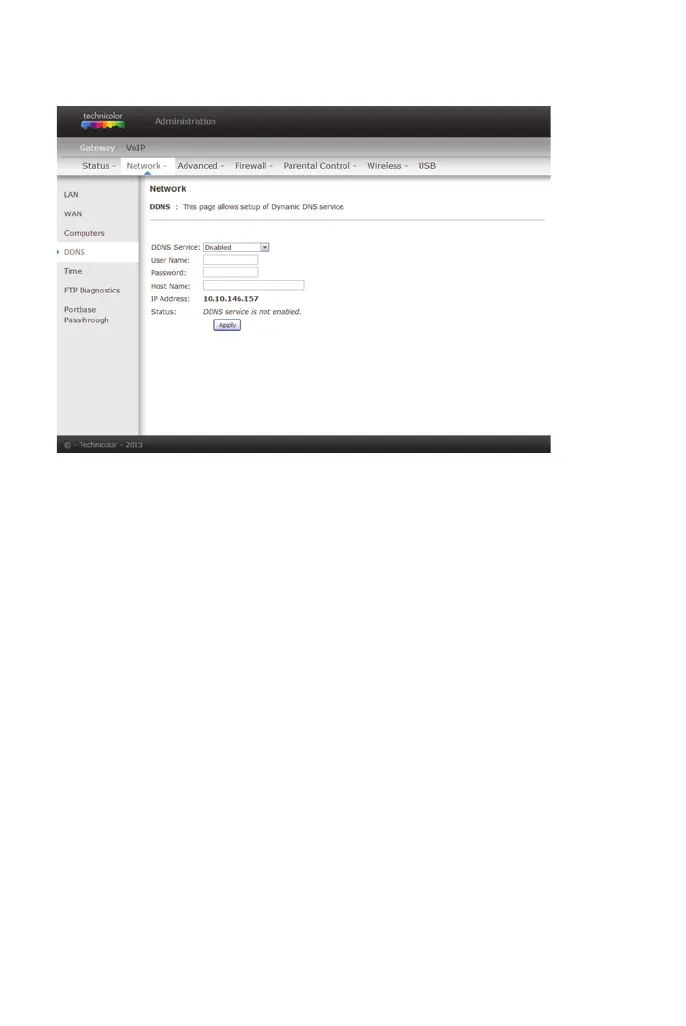
This page allows to setup for Dynamic DNS server.
figure 22: Gateway\Network\DDNS
Click Apply to save the changes.
DDNS Service Choose Enabled (www.DynDNS.org) to enable the basic
setting. Choose Disabled to close the basic setting.
Username The username that you registered with your DDNS provider.
Password The password that you registered with your DDNS provider.
Host Name The domain name or host name that is registered with your
DDNS provider.
Status It shows the DDNS service status whether it is enabled or
disabled.


 To Next Page