Handleiding Internet van Ziggo 71
4.7.6 802.11 Wi-fi Multimedia
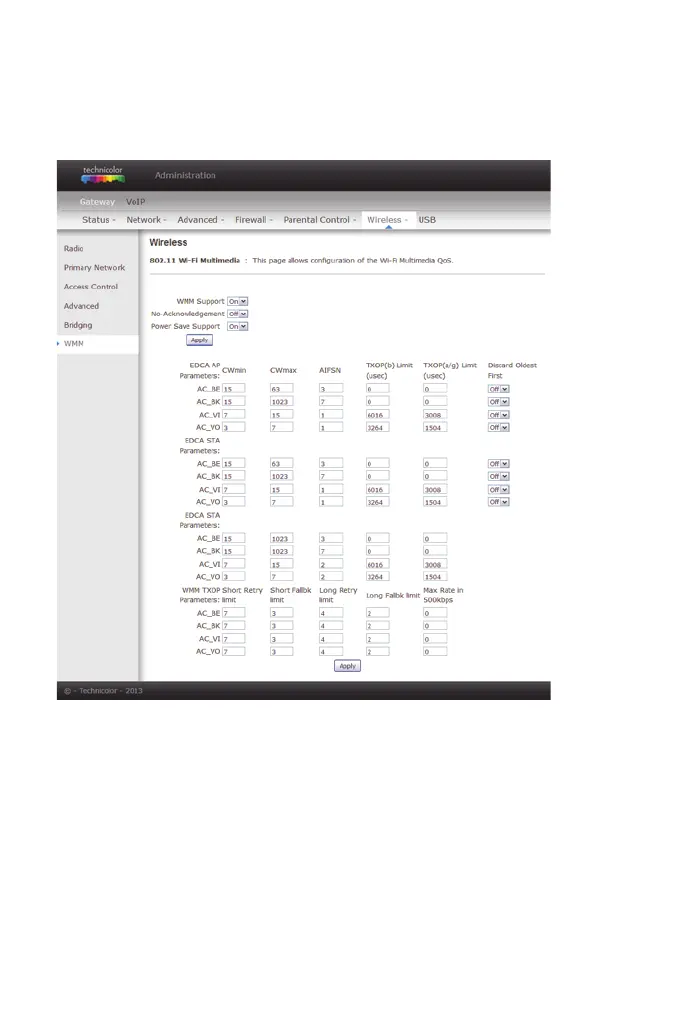
Wi-Fi Multimedia (WMM) is a component of the IEEE 802.11e wireless LAN
standard for quality of service (QoS). The QoS assigns priority to the selected
network traffic and prevents packet collisions and delays thus improving VoIP
calls and watching video over WLANs.
figure 56: Gateway\Wireless\WMM
Enable WWM This field allows you to enable WMM to improve
multimedia transmission.
Enable WWM No-
Acknowledgment
This field allows you to enable WMM No-
Acknowledgement.
Power Save Support This field allows you to enable WMM Power-Save-
Support.


 To Next Page