Zip Hydro Tap Installation and Operating Instructions - 81467 - April 2006 Page 11of 20
Setting the Energy Saver Timer (products with this feature only)
Normal Operation (not available on HT boiling only series)
Set Time
To change time, press either Mode ∧ or Mode ∨ button until Set Time is on the display screen.
Press ∧ Adjust button to increase time or ∨ Adjust button to decrease time. Time increases or
decrease in increments of one minute. Hold the Adjust buttons down for rapid increases or
decreases. The time will be displayed in 24Hr mode.
Set Day
Press either Mode ∧ or Mode ∨ button until Set Day is displayed.
Press ∧ Adjust or ∨ Adjust to select day.
Filter Life ( factory set at 6000 Ltrs )
Press either Mode ∧ or Mode ∨ button until Filter Life is displayed.
Press ∧ Adjust button to increase Filter Life or ∨ Adjust button to decrease Filter Life.
Filter Life increases in 1000 Ltr increments to a maximum of 10000 Ltrs.
Reset Litres Filtered
This function is to reset the Filter Change display after a filter has reached the end of its life (refer
to “Replace Filter Instructions” section of this document).
Press either Mode ∧ or Mode ∨ button until “Litres Filtered” is displayed. Press ∧ Adjust once and
“Reset Counter” will be displayed, press ∧ Adjust button once and “Are You Sure” will be
displayed.
Press ∧ Adjust once and “Litres Filtered” will be reset to 0.
Activating Sleep Mode
This mode allows the HydroTap to go into Energy Saving mode. In this mode the unit will go to
“sleep” after a pre-determined period of inactivity. Press either Mode ∧ or Mode ∨ button until
“Sleep Mode” is displayed. Press ∧ Adjust once to select 2 Hours or twice to select 4 Hours.
When the period of inactivity passes, the display will show “Sleep Mode”.
During the “Sleep Mode” the Red LED on top of the tap lever will flash slowly.
To de-activate the sleep mode, momentarily operate the Hot lever and then allow sufficient time
for the water to reach the set temperature
Activating On / Off Mode
Press the Mode ∧ or Mode ∨ button until “Monday On” is displayed. To set the time for the unit to
turn on press ∧ Adjust button until required time is reached.
To set the time for the unit to turn Off press Mode ∧ button once and “Monday Off” will be
displayed. Now press ∧ Adjust until required time is reached.
If each individual day is to have an “On / Off” time, these steps need to be repeated for each day
and for each On / Off time.
Note:
The Hydrotap may be temporarily activated during the On / Off Mode. By operating the levers, the
unit will go into normal operation and then remain in an “ON” cycle, until the next “OFF” cycle.
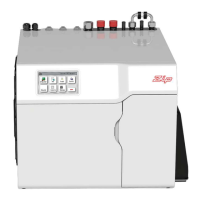
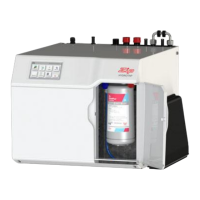
Mode Plus Button
Mode Minus Button
Plus Adjust Button
Minus Adjust Button









 To Next Page
