Page 12 of 20 Zip Hydro Tap Installation and Operating Instructions - 81467 - April 2006
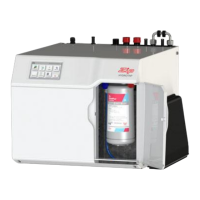
Auxiliary Fan Attachment (excluding HT boiling only models)
Auxiliary fan
connection
Cold water
connection
Electrical
connections
The HydroTap is equipped with an auxiliary fan connection point on the rear
panel close to the cold water inlet / flex and plug area. The fan kit is available
as a spare part. The fan operates in parallel with the Condensor fan helping to
remove heat from the cupboard space. This fan should be purchased and
connected to the HydroTap if the airfow characteristics of the cupboard space
are inadequate for the effective removal of hot air, thereby adversly affecting
the operation of the HydroTap.
The fan can be installed so that it extracts air from, or forces air into the
cupboard space, whichever is the most effective for your installation.
Application of the fan is of paramount importance in situations where the
cupboard space reaches temperatures greater than 35ºC.
The exhaust fan kit must be fitted, when supplied with the appliance.
Note: The 150/175 models are supplied with the auxillary fan kit
Boiling Water Isolation (excluding HT boiling only models)
The HydroTap if equipped with a safety mode that allows protection against
accidental operation by Infirmed or disabled persons.
1. On the LCD scroll through the menu to Hot Isolation.
2. Press adjust ∧ to activate.
3. Now go to the Tap Head assembly and press the Safety Lock (3) three
times rapidly, the LED’s will scroll from left to right (3) three times. This
operation confirms the activation.
4. This isolates the boiling tap only. The LCD shows isolation mode is active.
5. To de-activate, press the Safety Lock (3) three times rapidy, the LED’s will
scroll from right to left (3) three times. This operation confirms
de-activation.
6. The LCD will show Normal Operation.
7. If de-activation mode is required, de-activate by scrolling through the
menu and selecting de-activate when Hot isolation Mode is displayed on
the screen.
Set the Hot & Cold water dispensing times
The ability to change the maximum dispensing time for both the Hot and Cold
water has been introduced. the default settings for the maximum dispensing
times is 15 secs. The ability to change both the Hot and Cold dispensing times
between 5 and 15 secs, in increments of 1 sec, is accessible through the
Menu screen on the LCD.
Scroll through the Menu until the Dispense Hot screed is displayed, then use
the adjust buttons to set the required dispensing time for the Hot water.
Follow the same procedure to access the Dispense Cold or Dispense Amb (on
boiling ambient models) screens.









 To Next Page
