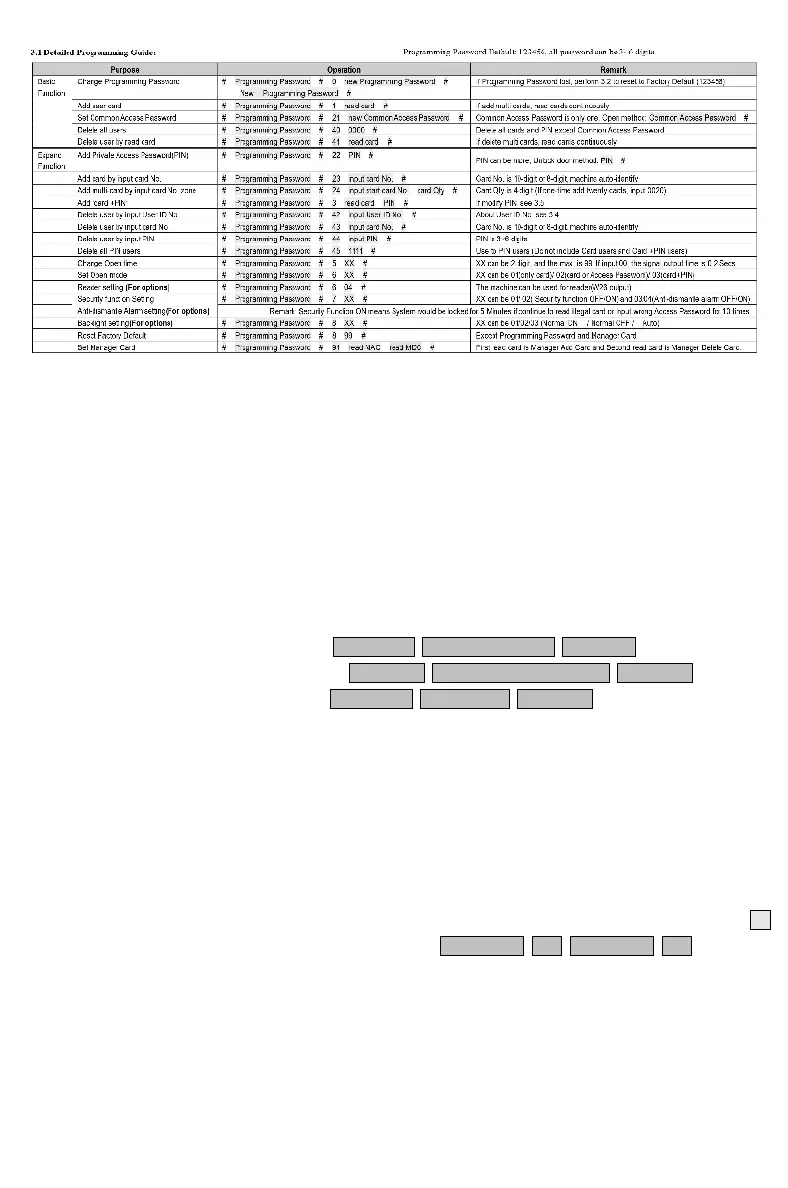
3.2 To reset to Factory Programming Password (123456)
Step1、Turn off power and connect bin 2&3 of RST(S1)。
Step2、Turn on power and buzzer gives 3 long buzz with green light flash fast。
If need to set Manager Card, now read two empty cards first one as Manager Add Card and
Second one as Manager Delete Card with red light flashing and continuous short buzz .
Step3、Turn off power, disconnect bin2&3 and connect bin 1&2 of RST。
Step4、Turn on power again.
3.3 How to use Manager Card - MAC & MDC
To add a card user in standby mode: read MAC read new cards read MAC
To delete a card user in standby mode: read MDC read registered cards read MDC
To delete all users in standby mode: read MDC read MAC read MDC
Remark: User cards can be added or deleted continuously.
3.4 User ID No. explain
User ID is auto-generating 4-digit number started at 0001. The number increases with adding
user one by one and ignores deleting user. Common Access Password has no ID.
3.5 How to change PIN (When open mode: card+ PIN)
After reading card and input corresponding PIN to open the door, within 5 seconds, long press #
until the green lights flash fast. and then input new PIN # new PIN # , new PIN
changed successfully with a long buzz.
3. Programming Guide














 To Next Page