32
8010001002
X Series User’s Manual Chapter 2 Installation & Operation
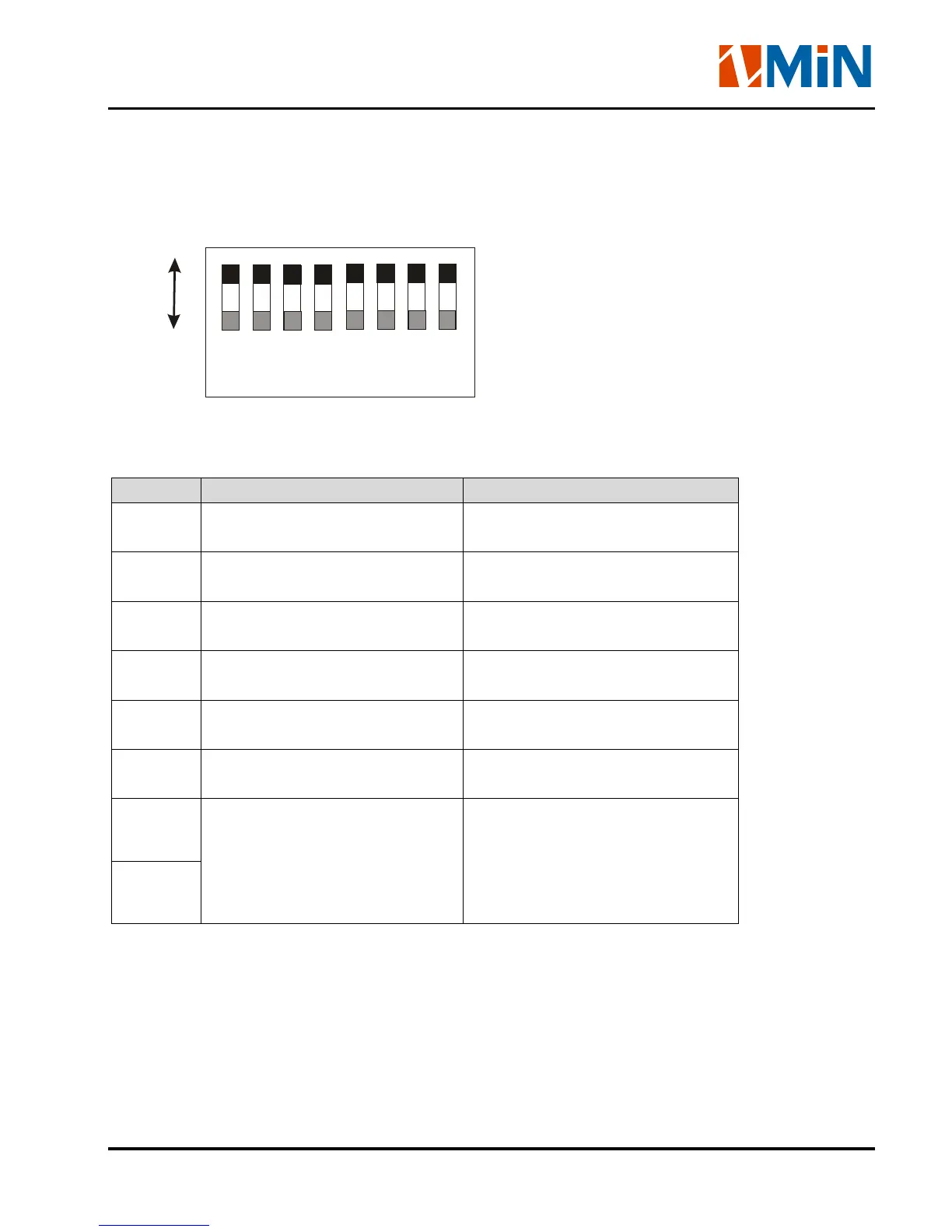
DIP Switches at the rear of the printer
1
2
3
4
5
6
7
8
OFF
ON
Note: Please turn off the printer before setting the DIP switches.
DIP Bit Functions Remarks
1
ON: Direct thermal print mode
OFF: Thermal transfer print mode
Printing method setting
Default: OFF
2
ON: Tear off position
OFF: Edge of next label
Stop position setting
Default: OFF
3
ON: Cutter is installed
OFF: Cutter is not installed
Cutter setting
Default: OFF
4
ON: Peeler is installed
OFF: Peeler is not installed
Peeler settings
Default: OFF
5
ON: Transmissive Media Sensor
OFF: Reflective Media Sensor
Media Sensor type setting
Default:OFF
6
ON: Enable IP setting
OFF: Disable IP setting
IP address setup
Default: OFF
7
7 8
OFF OFF – 9600,n,8,1
ON OFF –19200,n,8,1
OFF ON – 38400,n,8,1
ON ON – 57600,n,8,1
RS232 Serial Port baud rate setting
Default: OFF | OFF
8
Windows Driver and X Label Software
The printer driver supports Windows 7/Vista/2003/XP/2000/NT operating systems. Each X Series
printer comes with powerful barcode label edit software. Both the Windows driver and software are


 To Next Page