Page 14
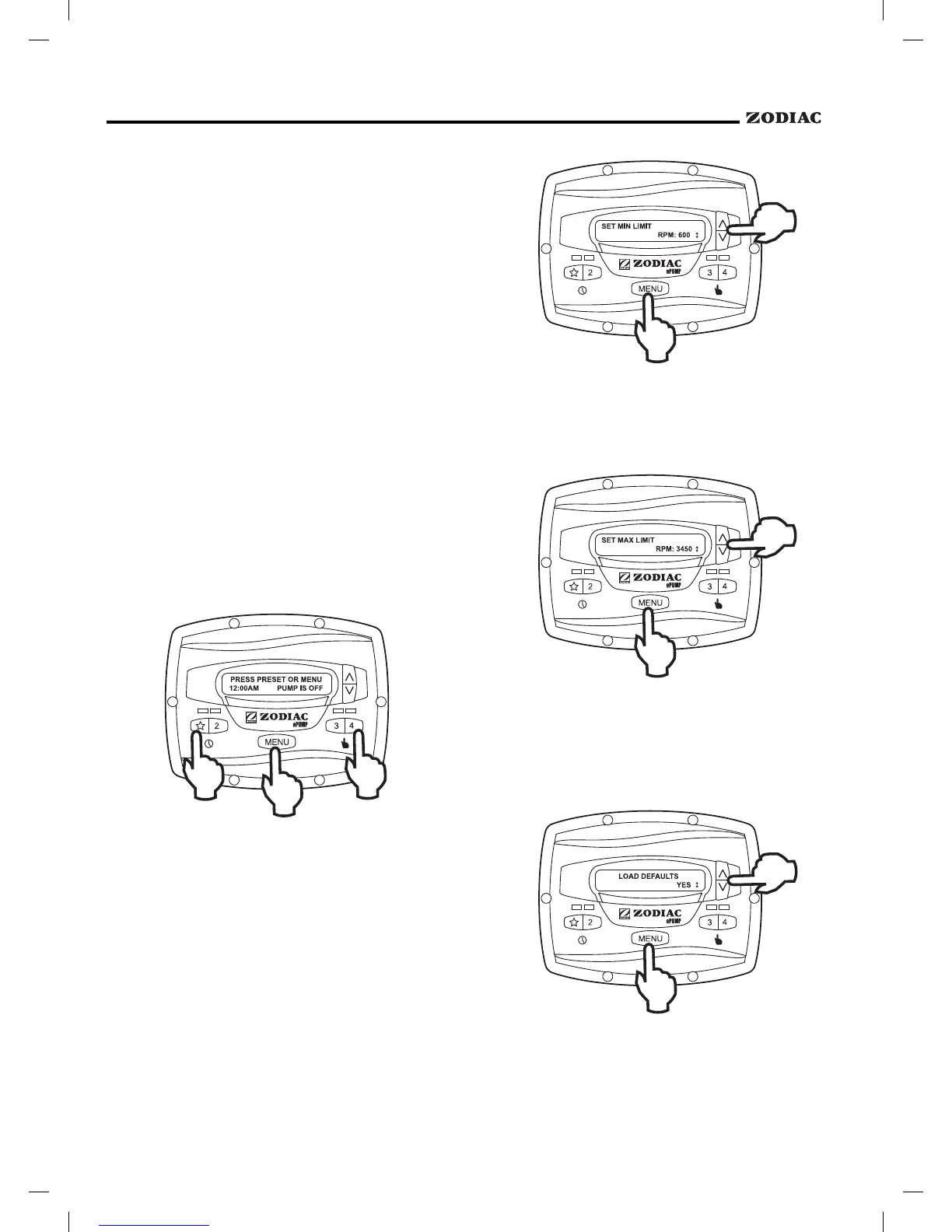
To set the maximum speed, from the service
setup menu, select
using the arrow
keys. Press
. Using the arrow keys, set the
maximum speed to the desired value. Press
to
accept and store.
To restore factory default settings to the
controller, from the service setup menu, select
. Press . Using the arrow keys, select
. Press to restore factory default settings.
The service setup menu allows the installer to
set various operating parameters, view fault history, and
restore factory defaults.
Parameters that may be modified and set in the
service setup menu include:
• Priming speed and duration.
• Minimum and maximum pump speeds.
• "
" eStar speed.
• Pump Freeze Protect operation.
The ePump™ controller must be in the OFF
mode (all LED's lights must be off) before
entering the user setup mode. While in setup
mode the controller will return back to the OFF
mode after one (1) minute since the last key
press.
To enter the service setup menu, press and hold
, then press and hold the "
" and preset "4"
keys. Hold all three (3) keys down for five (5) seconds.
To exit, press any preset button.
These speeds are considered global settings
across the entire controller, and create the range of
allowable speed that may be sent to the ePump™.
To set the minimum speed, from the service
setup menu, select
using the arrow
keys. Press
. Using the arrow keys, set the
minimum speed to the desired value. Press
to
accept and store.


 To Next Page