Page 15
eStar 1750 RPM
Preset 2 - 8 2750 RPM
Priming Speed 2750 RPM
Freeze Protect Duration 30 min
Priming Duration 1 min
This feature shows on the top display line, the
most recent unique fault message and on the bottom
display line, the second-to-last unique fault message.
If there is no entry for a fault, the display will show
“*----------------*” on the corresponding line. To select
last fault, from the service setup menu select
. Press .
NOTE The fault messages are stored in non-volatile
memory, and remain even with no power. To
clear the fault history, press either arrow key.
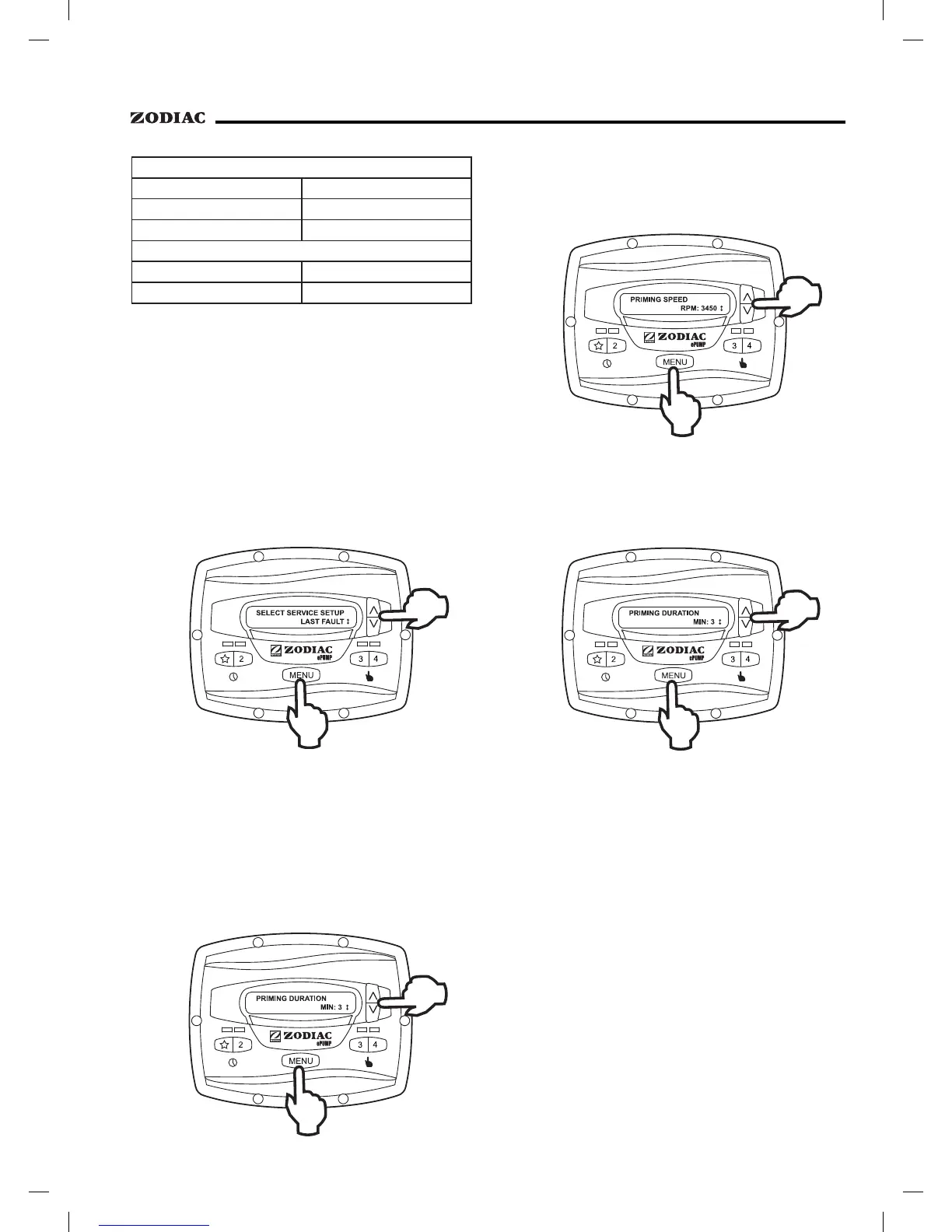
The ePump™ controller will command the
ePump™ to operate at the priming speed for the
priming duration specified (except during timer program
overlaps or follow-on commands where the pump is
not stopped before changing speeds). From the service
setup menu, select
using the arrow keys.
Press
.
To set priming speed, select
using the arrow keys. Press
. Using the arrow
keys, set the priming speed to the desired value. Press
to accept and store.
To set priming duration, select
using the arrow keys. Press . Using
the arrow keys, set the priming speed to the desired
value in minutes from one (1) to five (5) minutes. Press
to accept and store.


 To Next Page