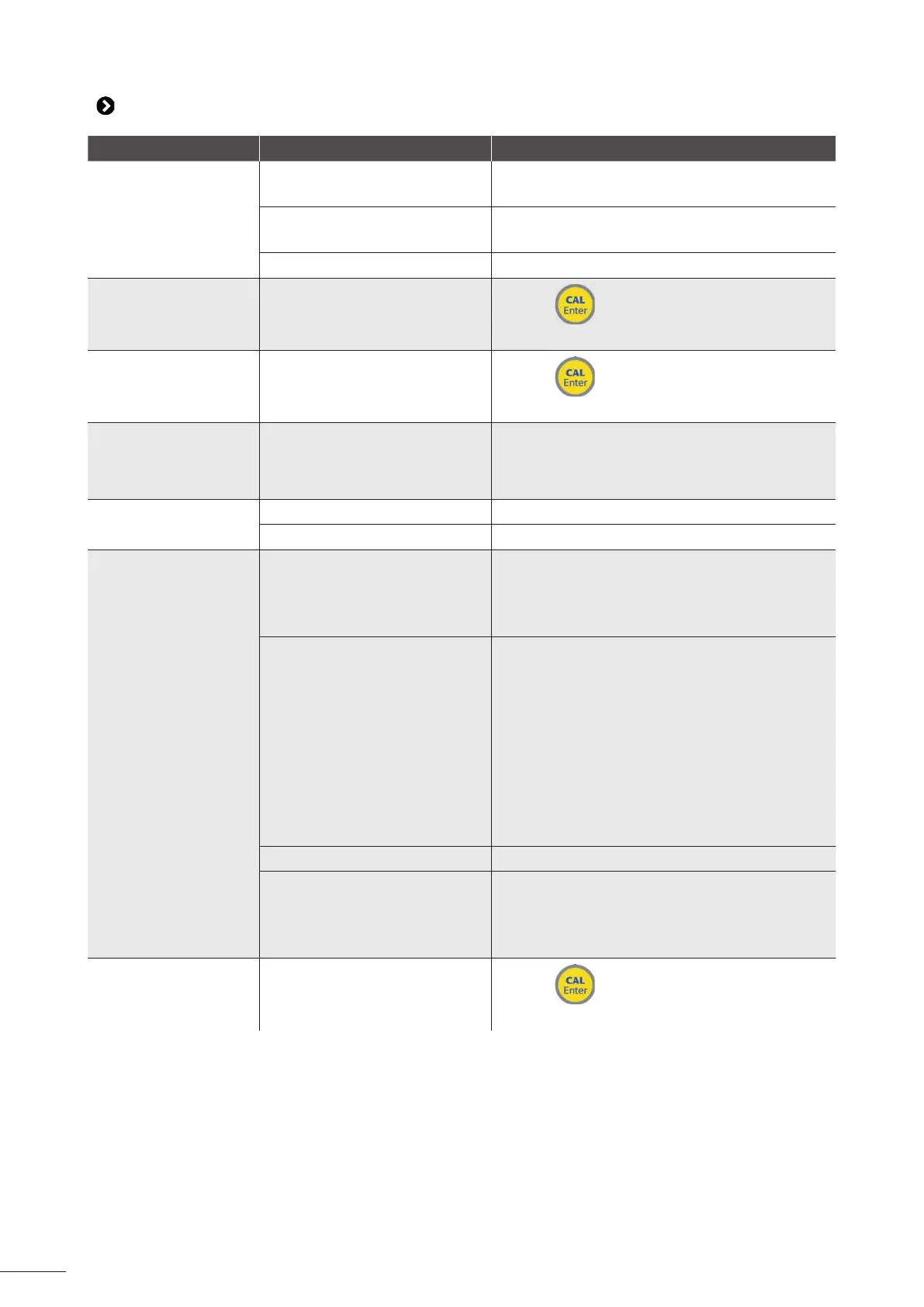
Message Possible causes Solu ons
"Level Low"
• Corrector product container
empty
• Replace the corrector product container
• Floater blocked • Check that the white fl oater on the suc on
cane is in working order
• Level sensor cut o • Change the suc on cane
"OFA Alarm"
First step of the ac vated over
feed safety mechanism ( me >
75%)
• Press
to stop the alarm
• Check the sensor and/or the pH in the pool
"OFA Stop"
Second step of the ac vated
over feed safety mechanism
( me = 100%)
• Press
to stop the alarm
• Check the sensor and/or the pH in the pool
"OFA Test"
pH sensor measurement test if
the "OFA Stop" was ac vated
during the previous ltering
cycle
• Wait for the end of the procedure (1 hour)
then check the sensor and/or the pool pH
level
"Filtering"
• Filtering stopped • Start and/or check the ltering
• Incorrect connec on • Check the electrical connec ons
"4pH Sensor Fail"
or
7pH Sensor Fail"
• Bu er solu on defec ve • Check that the solu on used is pH7 or pH4
• Take a new pH7 and/or pH4 bu er solu on
• Check the pH of the bu er solu on with an
electronic pH meter
• Problem on sensor's porous
coa ng and/or dirt deposits
• Restart calibra on
• Check that the pH sensor bulb is not
damaged and that it did not dry outside the
water
• As a last resort, clean it by dipping the
sensor in a 10% hydrochloric acid solu on for a
few hours
• Check that the sensor's porous coa ng is in
good condi on (wash the sensor with an acidic
solu on)
• The sensor is worn • Replace the pH sensor
• The sensor is electrically
charged
• Rinse the sensor with clean water
• Do not wipe the sensor with a cloth or
paper, shake it gently
• If the problem persists, replace the pH sensor
"Parameter Error"
Parameter error
• Press
to cancel the error
• Replace the printed circuit board
If the problem con nues, contact your retailer.





 To Next Page