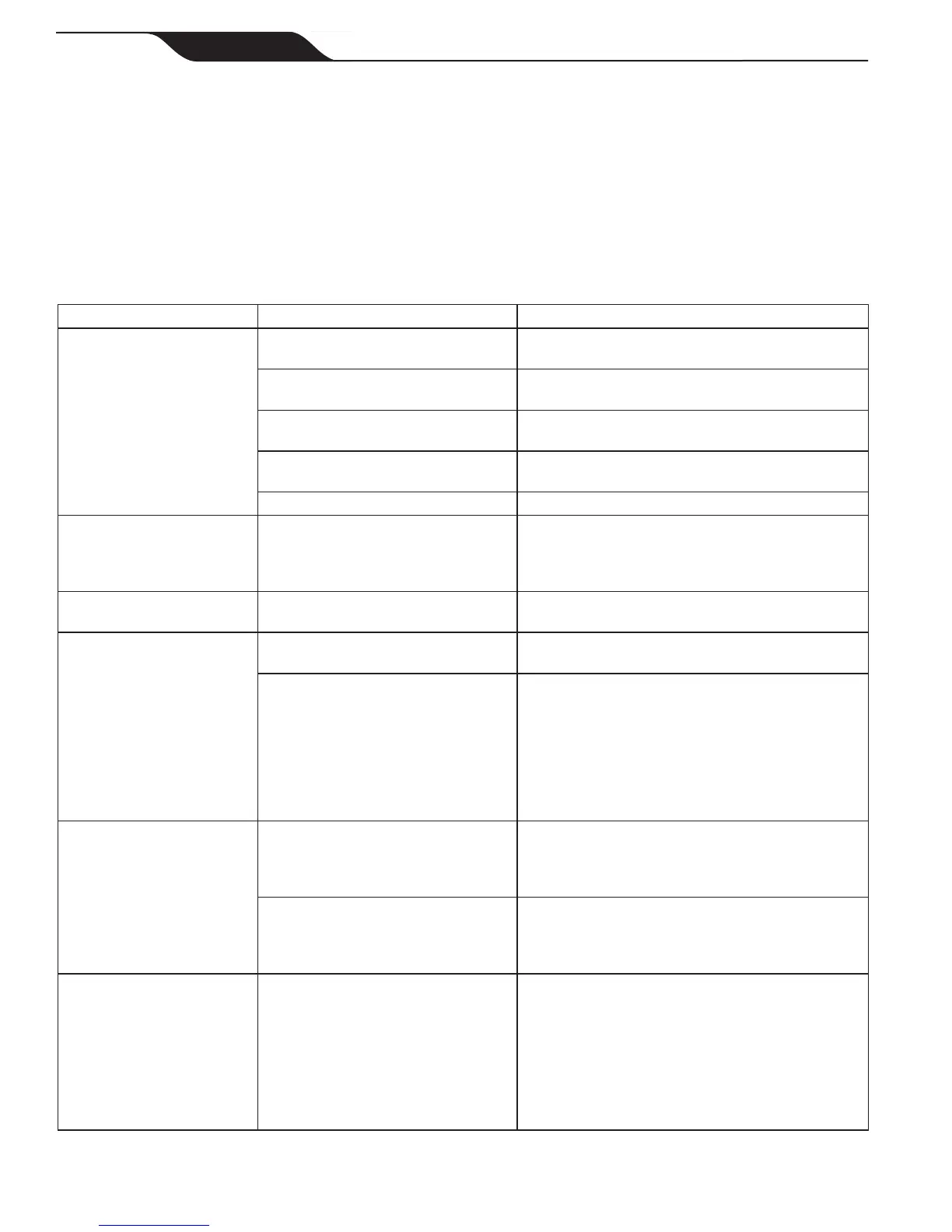
Symptom Cause Solution
Theashingindicator
lights appear just after
start (pressing the Power
or Cycle button to start the
cleaner) (< 20 seconds).
Ensuretheoatingcableisproperly
plugged into the control unit.
Unplugtheoatingcablefromthecontrolunitand
plug it in again.
Ensure the cleaner is well submerged
and free of trapped air.
Submerge the cleaner following the procedure in
Section 4.1, "Submerging the Cleaner".
Cleaner needs to be reset and start
new cycle.
Press the power button OFF and then Cycle I or II
Program buttons to start new cycle.
Propellerdoesnotturn.Thelter
canister needs to be emptied.
Please contact your local service representative.
Wheels do not turn. Please contact your local service representative.
Theashinglightsappears
during the cycle.
Lightashesifthecleanersucks
air for 60 seconds or more. May be
caused at beach entry if cleaner does
not reverse correctly.
Resubmerge the cleaner following the procedure in
Section 4.1, "Submerging the Cleaner".
The cleaner does not stay
rmlyonthepoolbottom.
There is air in the appliance casing. Submerge the cleaner following the procedure in
Section 4.1, "Submerging the Cleaner".
The cleaner does not or no
longer climbs the pool sides.
Theltercanisterisfullordirty. Cleantheltercanisterfollowingtheprocedure
Section 5.1, "Cleaning the Filter Canister".
Sides of pool are slippery or slimy.
Although the water seems clear,
microscopic algae, invisible to the
human eye, are present in the pool.
As a result the pool sides become
slippery and prevent the cleaner from
climbing. Check tires for wear and
replace as necessary.
Do a shock chlorination treatment and slightly
reduce the pH. DO NOT leave the cleaner in the
pool during this treatment.
On startup the cleaner does
not move.
Not supplied with electricity. The outlet, the control unit is connected to, is not
supplying electrical power. Check that the outlet
to which the control unit is connected is receiving
electricity.
Unit is turned ON. Check that you have started one (1) of the two
(2) programs and check that the indicator for the
selected program is lit. If the problem persists,
contact your local service representative.
The Cycle I and II program
indicatorsashalternately.
Your cleaner has encountered
a problem or an issue during its
operation.
Disconnect the control unit and wait 20 seconds
before reconnecting the control unit. Check that the
oatingcableiscorrectlyconnectedtothecontrol
unit. Check that no debris impedes the rotation of
thebrushesand/orthepropeller.Emptythelter
canisterandcleanthelter.Startanewcleaning
program. If the problem continues contact your
local service representative.
Section 7. Troubleshooting
The following table lists some of the more common symptoms, causes and solutions encountered when using the
cleaner. The unit employs ashing lights during Cycle I and II to indicate different issues on the control unit and on
the cleaner. These indicators are not necessarily major issues. To turn off the ashing light, press the power button,
then start a new cycle. If the ashing lights persist after completing troubleshooting, please contact your retailer. DO
NOT open the control unit.
Page 18
ENGLISH
Zodiac
®
Vortex™ 3, Vortex 4 Robotic Pool Cleaner
|
Owner's Manual




 To Next Page