2
2 Operational Instruction
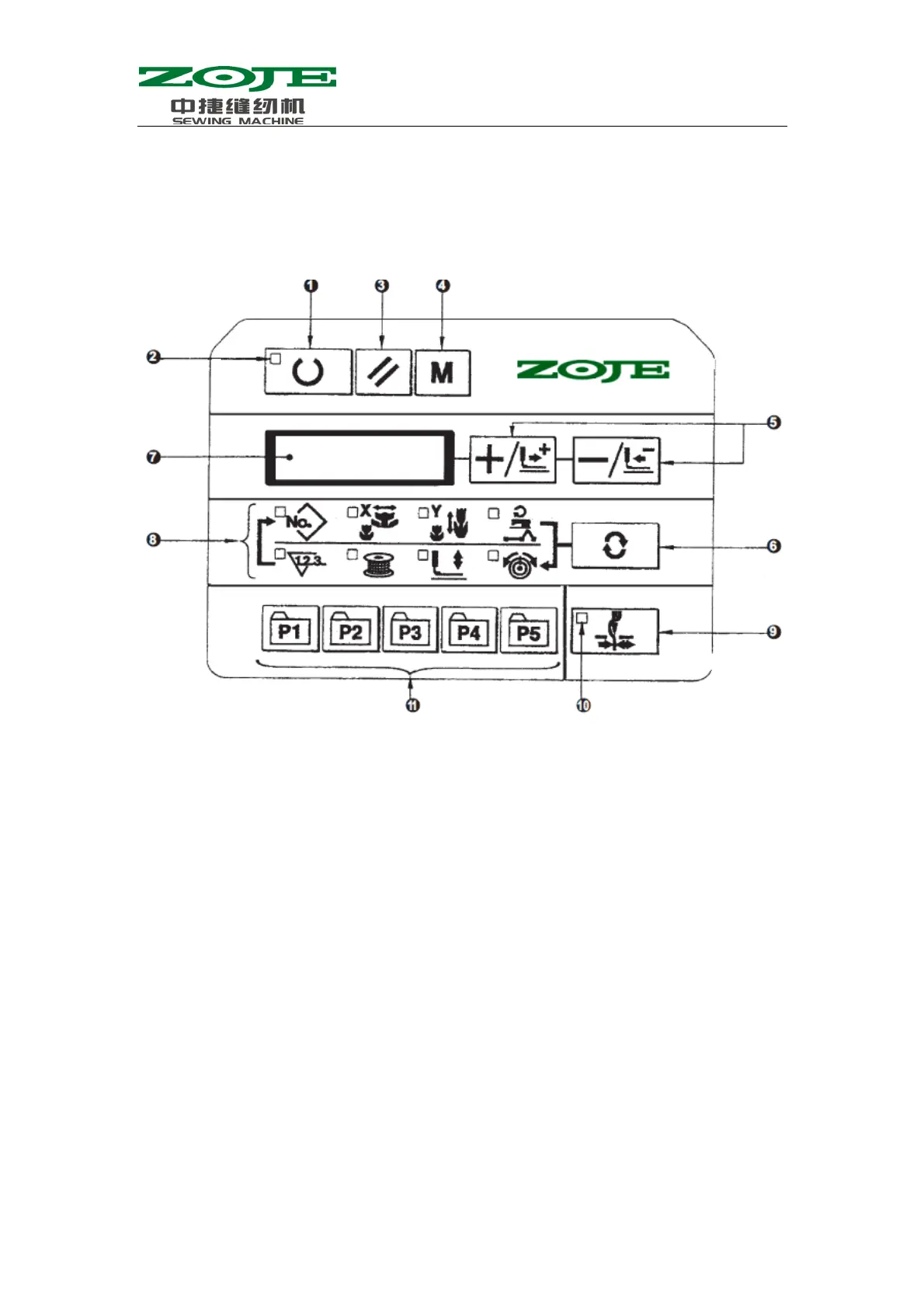
2.1 Name & Description of Buttons on Control Panel
⑴ Ready Key
Key for shifting between the setting/programming status of control panel and the sewing status of
sewing machine;
⑵ Sewing LED
It is set as: “ON” at sewing status, “OFF” at programming status. User can use the Ready Key for
shifting between these two statuses;
⑶ Reset Key
Release the error and restore the set value to the default value;
⑷ Mode Key
When the Sewing LED is off, this key can activate the functions for setting parameters or storing
the patterns; when the Sewing LED is on, this key can activate the siding function for threading
actions, which will be automatically turned off in 20 seconds.
⑸ +/Feed Forward Key & -/Feed Backward Key
These two keys are applicable for changing pattern number, rate of scale and feeding cloth
forward/backward.
⑹ Selection Key
Select the set item. The Item Selection LED and the set value of the selected item will be



 To Next Page