3
displayed.
⑺ Data Display LED
This LED indicates the set value of the selected items such as the pattern number, scale rate and so
on.
⑻ Item Selection LED
The LED of the selected item will be on.
⑼ Thread-catching ON/OFF Key
The Validity/Invalidity of thread-catching function can be selected. When it is set as Validity, the
Thread-catching Display LED will be on.
⑽ Thread-catching Display LED
When the LED is on, the machine will catch the thread.
⑾ Pattern Storage Key
Store the pattern. The stored pattern can be put into sewing as long as user presses this key. The
changes in scale rate, sewing position and so on can also be stored.
2.2 Basic Operation
2.2.1 Settings of Item Data
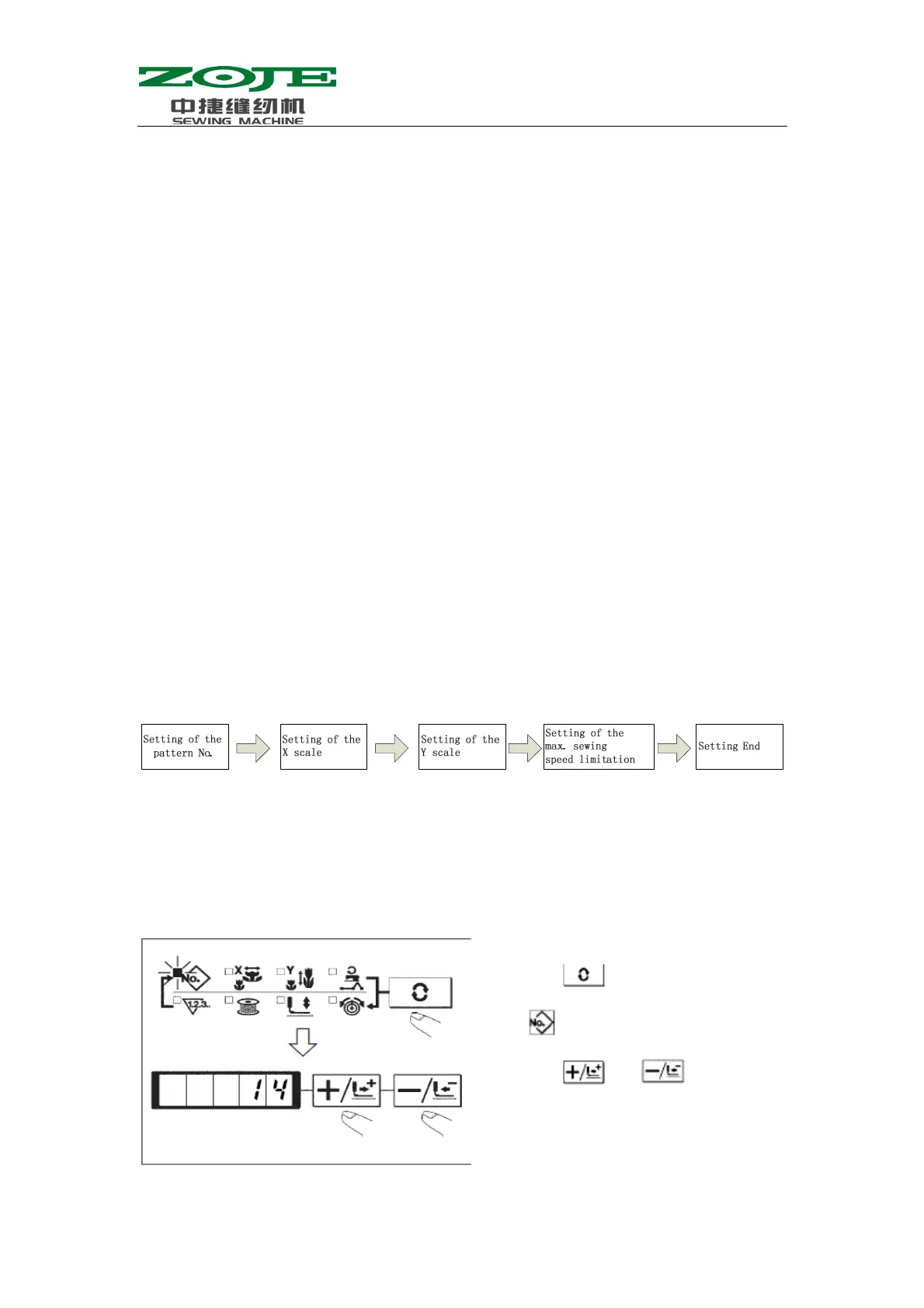
Please set the items in the following sequence:
1.Turn ON the power switch.
The pattern number of the item selection is lit up, and the pattern number will be displayed at
data display part.
2.Setting of the pattern No.
(1)Press
, and then the LED of
will be on.
(2)Press
and to display
14 in the Data Display LED
( We take No.14 pattern as an



 To Next Page