1
7YLZZ
2
:LSLJ[057<;HUKWYLZZ
3
:LSLJ[3,=,3(<;6HUKWYLZZ
4
:LSLJ[65
069
6WLYH[PVUZ9LJVYKPUNM\UJ[PVUZ!9,*3,=,3(<;6
9LJVYKPUNM\UJ[PVUZ!9,*3,=,3(<;6
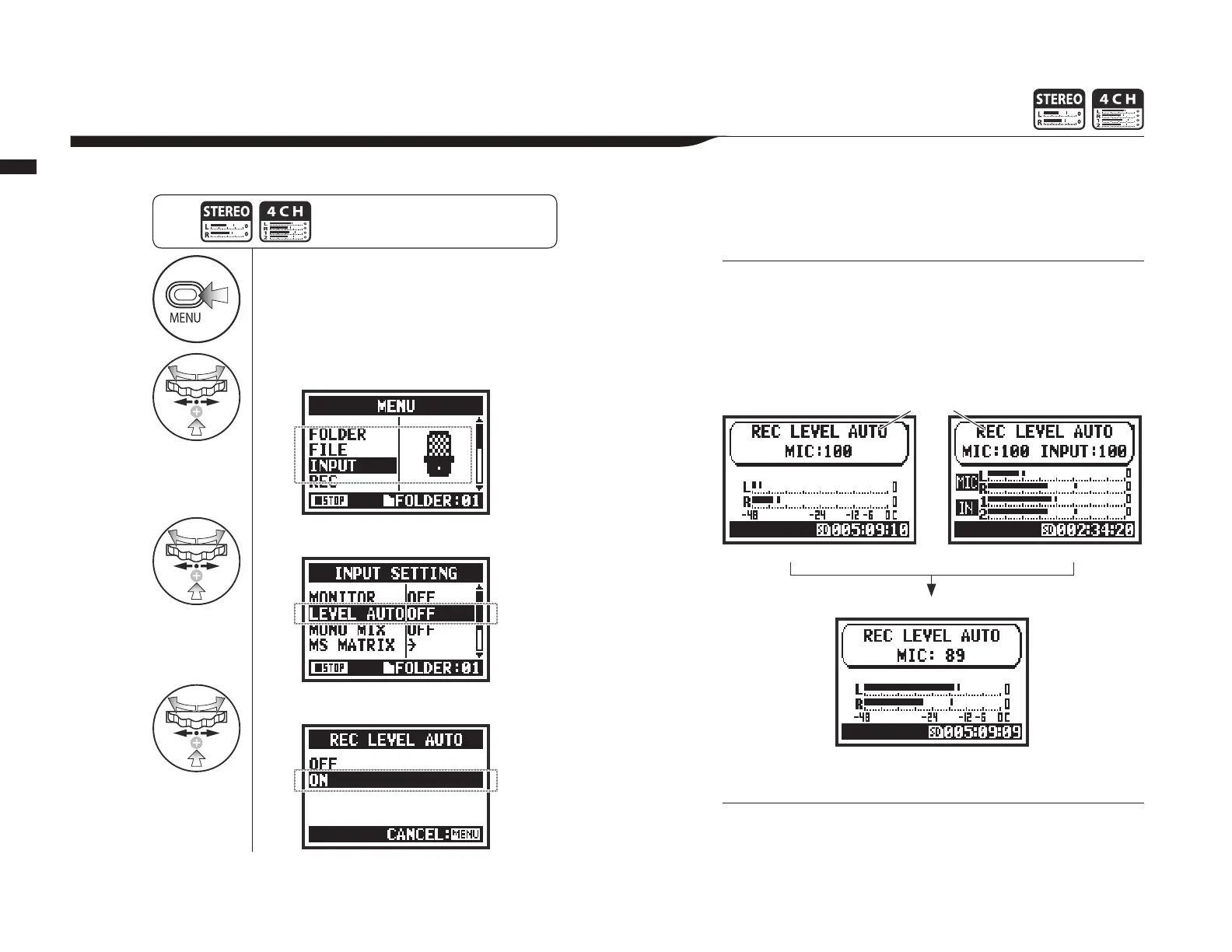
This function automatically sets the level for recording.
7YLZZ [OL 4,5< I\[[VU MVY TVYL
[OHUZLJVUKZHUKZ[HY[VWLYH[PVU
MYVT[OL[VWZJYLLU
When REC LEVEL AUTO is used, the unit automatically
sets recording levels using signals present during recording
standby. If the volume surpasses 6 dB during recording, the
input level is automatically adjusted with the new level shown
on the screen for two seconds.
•
You cannot use this function together with AUTO REC.
•
You cannot make this setting during recording and playback.
+PZWSH`PU
YLJVYKPUNZ[HUKI`
Current input level
Stereo mode 4CH mode
+PZWSH`^OLUK)PZL_JLLKLK^OPSLYLJVYKPUN



 To Next Page