Need help?
Do you have a question about the Zte EPON SFU Series and is the answer not in the manual?
Essential safety guidelines for installing the equipment to prevent damage or hazards.
Important safety measures and best practices for operating the device to ensure user safety and device longevity.
Overview of the key capabilities and functionalities of the ZTE EPON SFU series products.
Specifies the operational temperature and humidity conditions for the device.
Details and identifies the physical ports and buttons on the device for connectivity.
Explains the meaning of various LED indicators for device status monitoring.
Step-by-step instructions for connecting the ONU device to the network and power.
Illustrates a typical network diagram for 1GE + CATV ONU deployment.
Guides on physically connecting a PC to the ONU and configuring network settings for access.
Instructions on how to access the ONU's local web interface via a web browser.
Procedure to check the registration status of the ONU with the OLT.
Details on how to view the optical input and output power levels of the ONU.
Configuration steps for setting up the ONU Registration LOID and password for authentication.
Configuration of Internet access using routing mode, including PPPoE, DHCP, and static IP.
Instructions for configuring Internet access in bridge mode for the ONU.
How to check the status and IP address of the WAN connection.
Steps to remove or delete an existing Internet WAN connection configuration.
Configuration of the ONU's LAN IP address and DHCP server settings.
Configuration of parameters for CATV services, including enabling/disabling and setting values.
How to view the status and optical parameters related to CATV services.
Configuration for enabling and managing remote access (TELNET, WEB) to the ONU.
Procedure to restore the ONU to its factory default settings.
Steps to upgrade the ONU firmware using a software file.
Instructions on how to restart or reboot the ONU device.
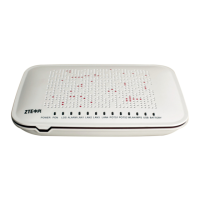
This document describes the ZTE EPON SFU (Single Family Unit) series of terminal equipment, specifically the 1GE/1GE+CATV models, designed for broadband access and Fiber-to-the-Home (FTTH) applications. These devices integrate CATV optical receivers and offer broadband and CATV dual network integration, leveraging mature and stable Gigabit EPON technology, Gigabit Ethernet switching, WDM technology, and HFC light reception technology. The SFU products are known for their high reliability, ease of management, and quality of service (QoS). They comply with IEEE802.3ah and China Telecom EPON equipment technical requirements (V2.1 / V3.0).
The ZTE EPON SFU series supports both routing and bridging functionalities. In routing mode, the ONU acts as a home gateway, obtaining an IP address via DHCP, static IP, or PPPoE. User devices connected to the ONU receive IP addresses from the ONU's internal DHCP address pool or are manually configured with static IP addresses. In bridging mode, the ONU functions as a relay device, and it does not obtain an IP address from the upper layer. Instead, the user device connected to the ONU's LAN port obtains an IP address from the OLT's upper layer server through DHCP, PPPoE, or static IP.
The primary function of these ONUs is to provide Internet, CATV, and IPTV service access. They support bidirectional FEC (Forward Error Correction) with RS (255, 239) FEC decoding. By default, the devices support SFU (pure bridged data) access. For broadband services, they support PPPoE, DHCP, and static IP access. Network address translation (NAT), static routing, and port forwarding are also supported, enhancing network flexibility and security.
Data encryption, VLAN transparent mode, VLAN tagging, and VLAN trunking capabilities are included, allowing for flexible network segmentation and secure data transmission. The devices also feature traffic limit functions for both upstream and downstream data, enabling bandwidth management.
Network monitoring and fault detection capabilities are integrated, such as port loop detection, port link status detection, and power dying gasp alarms. These features help in quickly identifying and resolving network issues. The ONUs support AES-128 decryption and key generation/switching, ensuring secure communication. Dynamic Bandwidth Allocation (DBA) technology and a dual priority management model are implemented to guarantee minimum bandwidth requirements for users, optimizing network performance.
For CATV services, the ONUs include a CATV optical receiver. They support remote shutdown of CATV services, providing operators with control over service delivery. The working wavelength range for optical signals is 1100 - 1650nm, with an optical reflection loss greater than 45dB. The input optical power range is -18dBm to 0dBm.
The ONU devices are designed for easy setup and configuration. Physical connection involves inserting the SC fiber connector into the PON port, connecting an RJ-45 Ethernet cable to a LAN port for home devices (PC, IPTV set-top box), connecting a coaxial cable to the RF connector for CATV, and plugging in the AC/DC adapter.
Local management is facilitated through a web-based interface. Users can access the ONU's local web interface by setting their computer's IP address within the same subnet as the ONU (e.g., 192.168.101.X) and navigating to http://192.168.101.1 in a web browser. The default login credentials are adminisp for both username and password.
The web interface allows for comprehensive configuration. Users can view the ONU's registration status and optical power information (input and output power). LOID (Logical ONT ID) configuration is available for specific authentication modes, though it's less common for EPON ONUs which typically use MAC address authentication.
Internet basic configuration is a key feature. In routing mode, users can create WAN connections with PPPoE, DHCP, or static IP. Parameters such as connection name, VLAN ID, 802.1p priority, service list (Internet), MTU, link type, IP version, and NAT enablement can be configured. The "Enable NAT" function is crucial for internal and external network communication address translation. For DHCP and static IP modes, specific IP type settings are available.
The LAN side configuration allows users to set the ONU's local management IP address, subnet mask, and enable/disable the DHCP server function. DHCP server settings include defining the IP address interval for terminals, enabling/disabling ISP DNS allocation, and configuring DNS server addresses and default gateway.
Multicast/IPTV service settings are primarily managed through the OLT (Optical Line Terminal), including multicast VLAN and snooping configurations.
CATV management is also accessible via the web interface. Users can configure CATV parameters such as Vcc (voltage), temperature thresholds, RF output power, and optical input power thresholds. The CATV service can be turned on or off, and various alarm states can be monitored. The CATV information view provides real-time status of the CATV switch and optical parameters.
Remote access settings for Telnet and WEB can be configured under the Security section, allowing for management from external networks.
The ONU devices offer several maintenance functionalities to ensure smooth operation and easy troubleshooting.
Fault alarm functions are provided to aid in fault diagnosis, allowing for quick identification of issues. The devices can be managed by OLTs from different manufacturers, operating as SNMP-agents, which simplifies installation and maintenance in multi-vendor environments.
The web interface includes options for device management. Users can restore the ONU to its factory default settings, which can be useful for troubleshooting or reconfiguring the device. Software upgrades can be performed through the web interface by uploading a new firmware image. The ONU will automatically restart after an upgrade, which typically takes about 3 minutes.
The device can also be rebooted directly from the web interface, providing a convenient way to restart the ONU without physically accessing it. These maintenance features contribute to the overall reliability and ease of management of the ZTE EPON SFU products.
 General
| Category | Network Hardware |
|---|---|
| Type | EPON SFU |
| Transmission Distance | 20km |
| Device Type | SFU |
| PON Interface | 1x EPON |
| Ethernet Ports | 4 |
| Voice Interface | 2x FXS |
| Wi-Fi | 802.11 b/g/n (Optional) |
| Power Supply | 12V DC |
| Operating Temperature | 0°C to 40°C |
| Storage Temperature | -40°C to 70°C |
| Humidity | 5% to 95% (non-condensing) |
| Wavelength | 1310nm (Upstream) / 1490nm (Downstream) |


 To Next Page