8
No. Button/Control Description
telephone is muted, the backlight of the Mute
button is turned on.
16 Down volume button
Press this button to lower the volume of the
ring while your telephone is ringing, lower the
voice level of the callers while talking through
the handset, or lower the volume of the
speaker while in speakerphone mode.
17 Handset Pick up the handset to talk to the callers.
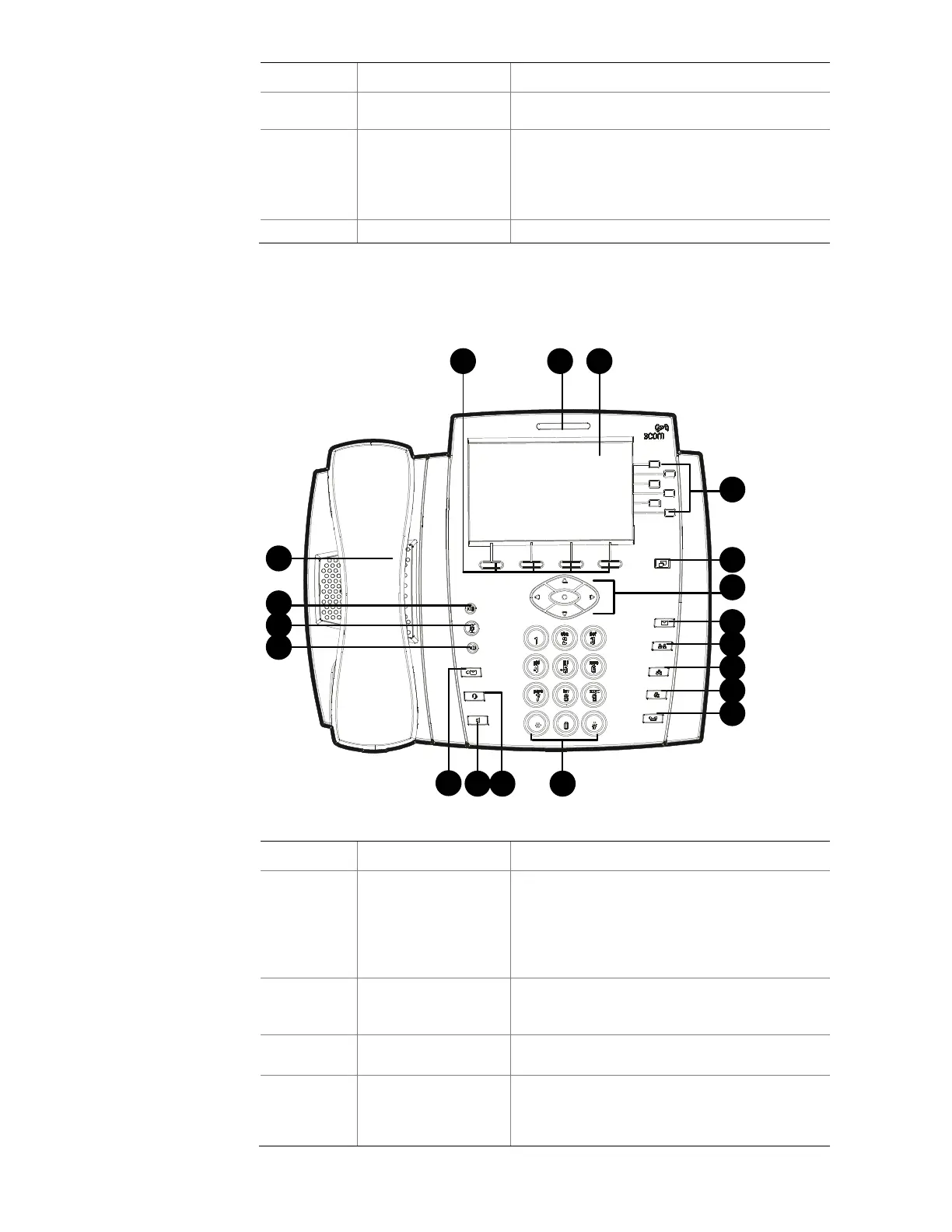
Figure 2 shows the buttons and controls on the 3502 telephone.
Figure 2 3502 telephone
1 2 3
7
8
9
10
11
6
1214 13
18
17
16
19
5
4
15
Table 4 Functions of the 3502 telephone buttons and controls
No. Button/Control Description
1 Soft buttons
There are four soft buttons below the Display
Panel. The bottom of the Display Panel shows
the functions of the four soft buttons, which
vary with the state of the telephone. You can
choose different functions by pressing different
soft buttons.
2
Message Waiting
Indicator(MWI)
The MWI LED lights up when there are unread
messages in the voice mailbox, and blinks
when an incoming call is present.
3 Display Panel
The Display Panel displays the telephone state
and call information.
4 Access buttons
The 3502 telephone has six Access buttons.
The button at the bottom is a page-switching
button, called the Shift button. The functions of
the other five buttons are displayed on the



 To Next Page