6
2
2 2
2
VCX IP PHONES
This chapter describes the buttons, controls, and features on the 3Com® VCX™ IP
phones.
This chapter includes the following topics:
Telephone Buttons and Controls
Access Buttons
Feature Options
Display Panel
Telephone Buttons and Controls
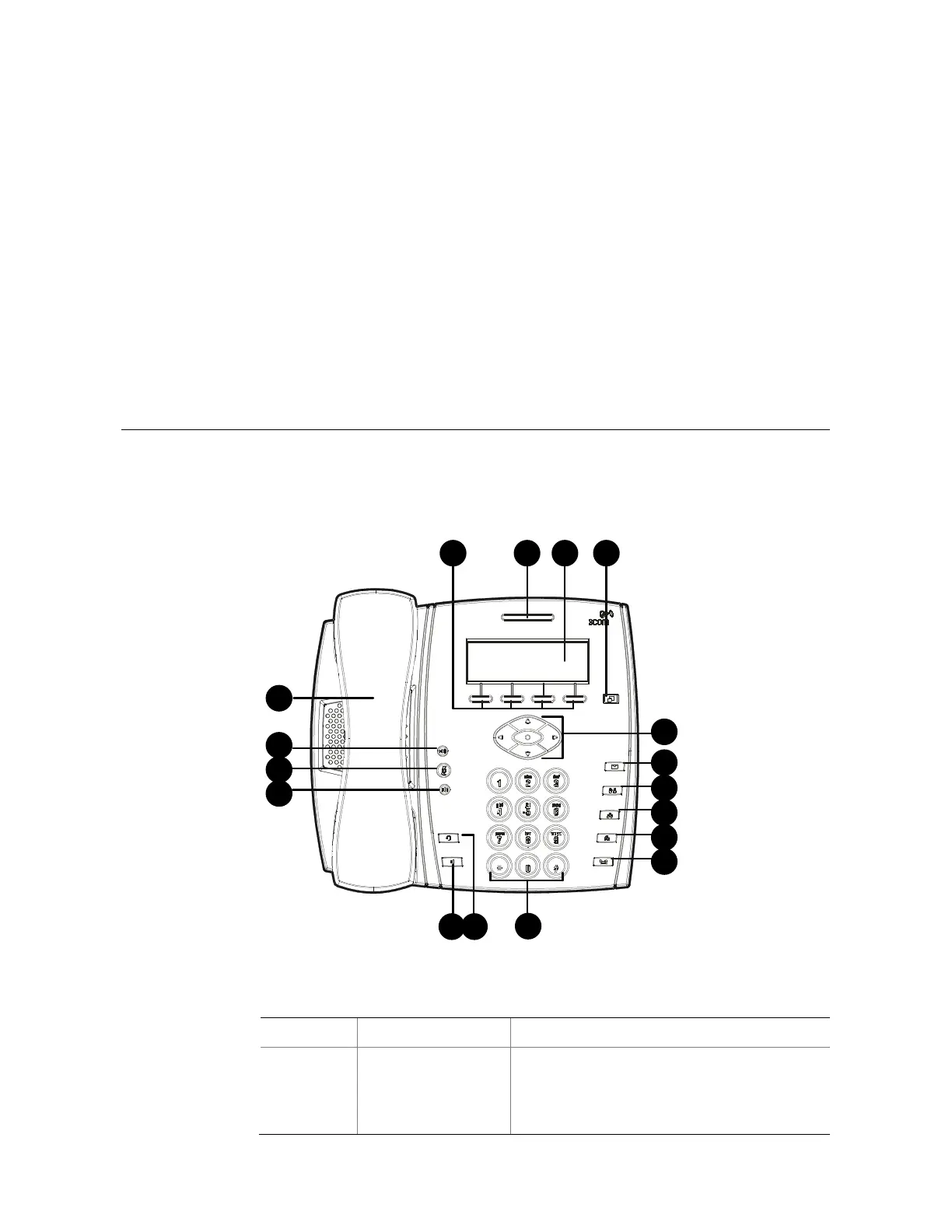
Figure 1 shows the buttons and controls on the 3500/3500B/3501 telephone.
Figure 1 3500/3500B/3501 telephone
1 2 3 4
6
7
8
9
10
5
11
13 12
16
15
14
17
Table 3 Functions of the 3500/3500B/3501 telephone buttons and controls
No. Button/Control Description
1 Soft buttons
There are four soft buttons below the Display
Panel. The bottom of the Display Panel shows
the functions of the four soft buttons, which
vary with the state of the telephone. You can
choose different functions by pressing different



 To Next Page